very_long_variable_name = {"field": 1, "is_debug": True}  # noqa: F811
if (
    very_long_variable_name is not None
    and very_long_variable_name["field"] > 0
    or very_long_variable_name["is_debug"]
):
    z = "hello " + "world"  # noqa: F405, F811, F821
else:
    f = rf"hello {world}"  # noqa: F405, F811, F821
if True:
    y = "hello world"  # FIXME: https://github.com/python/black/issues/26  # noqa: F405, F811, F821


class Foo(object):  # noqa: F405, F811, F821
    def f(self):  # noqa: F811
        return 37 * -2

    def g(self, x, y=42):  # noqa: F811
        return y


regular_formatting = [0, 1, 2, 3, 4, 5]  # noqa: F811


def CAPITALIZE(mystring):  # noqa: F405, F811, F821
return mystring.upper()스타일 가이드, 스크립트, 가져오기
토마스 보젠, 2020년 9월
이 연습은 4장을 보완합니다.
연습
1.
다음 코드의 모든 구문 및 문체 문제를 나열하려면 ’flake8’을 사용하세요. 코드를 .py 파일에 복사하고 명령줄에서 flake8을 실행하거나(4장 참조) JupyterLab flake8 확장 프로그램을 사용해 볼 수 있습니다.
# Your answer here.2.
다음 코드를 자동 서식 지정하려면 black을 사용하세요. 코드를 ‘.py’ 파일에 복사하고 명령줄에서 ’black’을 실행하거나(4장 참조), JupyterLab black 확장을 사용해 볼 수 있습니다.
very_long_variable_name = {"field": 1, "is_debug": True}  # noqa: F811
if (
    very_long_variable_name is not None
    and very_long_variable_name["field"] > 0
    or very_long_variable_name["is_debug"]
):
    z = "hello " + "world"  # noqa: F405, F811, F821
else:
    f = rf"hello {world}"  # noqa: F405, F811, F821
if True:
    y = "hello world"  # FIXME: https://github.com/python/black/issues/26  # noqa: F405, F811, F821


class Foo(object):  # noqa: F405, F811, F821
    def f(self):  # noqa: F811
        return 37 * -2

    def g(self, x, y=42):  # noqa: F811
        return y


regular_formatting = [0, 1, 2, 3, 4, 5]  # noqa: F811


def CAPITALIZE(mystring):  # noqa: F405, F811, F821
    return mystring.upper()
# Your answer here.3.
마지막 연습 문제 세트에서 ‘Circle’ 클래스를 만들었습니다.
class circle:
    """반지름이 r인 원입니다."""

    def __init__(self, radius):
        self.radius = radius

    def area(self):
        """원의 넓이를 계산해 보세요."""
        return math.pi * self.radius ** 2

    def diameter(self):
        """원의 둘레를 계산하세요."""
        2.0 * math.pi * self.radius를 반환합니다.

    def __str__(self):
        f"반경이 {self.radius}인 원"을 반환합니다.
이 코드를 파일에 저장한 후 여기로 가져와서 다음 질문에 답하세요.
- 반지름이 10인 원의 면적은 얼마입니까?
- 반지름이 10인 원의 둘레는 얼마입니까?
# Your answer here.4.
나는 최근 Python을 사용하여 내가 주최하는 파티에 참석할 가능성을 시뮬레이션하기로 결정했습니다. 아이디어는 초대하는 모든 손님에 대해 실제로 파티에 참석할 확률을 할당하는 것입니다. 예를 들면:
| 손님 이름 | 참석확률 |
|---|---|
| 톰 | 1 |
| 바라다 | 0.75 |
| 티파니 | 0.5 |
| 조엘 | 0.75 |
| 알렉시 | 0.5 |
| 조엘 | 1 |
| 마이크 | 0.5 |
| 헤일리 | 0.75 |
이 연습에서는 각 손님의 참석을 Bernoulli 무작위 변수로 모델링하는 함수를 만들어 보겠습니다. numpy 라이브러리 함수 random.binomial(n=1, ...)(여기 문서)을 사용하여 Bernoulli 시험을 실행할 수 있습니다. 이 함수를 가져와서 위 리스트에서 단일 시뮬레이션을 실행해야 합니다(여기에서는 무작위 시드를 수정하지 않으므로 결과가 달라질 수 있습니다).
나는 당신이 시작할 수 있는 가능성의 리스트을 제공했습니다. 시뮬레이션을 실행한 후 코드에서 총 참석자 수를 출력해야 합니다.
이 질문은 최근에 올렸던 임의의 웹사이트 게시물을 바탕으로 작성되었습니다.
probabilities = [1, 0.75, 0.5, 0.75, 0.5, 1, 0.5, 0.75]  # noqa: F811

# Your answer here.
5.
따라서 연습 4를 완료한 후에는 확률 리스트이 주어지면 단일 시뮬레이션을 실행할 수 있습니다. 이제 확률 리스트에 대해 n 시뮬레이션을 실행하고 각 시뮬레이션의 총 참석자 수 리스트을 반환하는 simulate_party(probabilities, n)라는 함수를 작성해 보시기 바랍니다.
그런 다음 100번의 시뮬레이션을 실행한 후 평균 손님 참석률을 계산합니다(가장 가까운 정수로 반올림 - 힌트: math.ceil()).
def simulate_party(probabilities, n):  # noqa: F405, F811, F821
    "Simulate attendance at a party from a list of attendance probabilities."
    pass  # Remove this line and add your answer here.
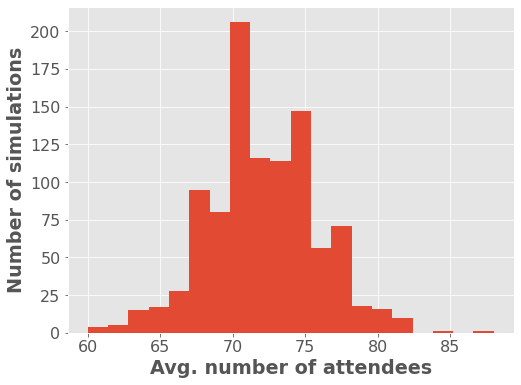
작동하는 함수이 있으면 아래 코드의 주석 처리를 제거하여 훨씬 더 긴 손님 리스트에 함수 결과를 표시하십시오!
import numpy as np
import matplotlib.pyplot as plt

# Use this code to plot your function on a bigger guest list!

plt.style.use(
    "ggplot"
)  # These lines are to do with plot formatting. We'll talk about them in a later chapter.
plt.rcParams.update(
    {"font.size": 16, "axes.labelweight": "bold", "figure.figsize": (8, 6)}
)

number_of_guests = 100  # noqa: F811
probabilities = np.random.choice(  # noqa: F405, F811, F821
    [0.2, 0.4, 0.6, 0.8, 1], size=number_of_guests, p=[0.1, 0.2, 0.2, 0.3, 0.2]
)

# attendance = simulate_party(probabilities, n=1000)  # noqa: F405, F811, F821
# plt.hist(attendance, bins=20)
# plt.xlabel("Avg. number of attendees")
# plt.ylabel("Number of simulations");
솔루션
1.
다음 코드의 모든 구문 및 문체 문제를 나열하려면 ’flake8’을 사용하세요. 코드를 .py 파일에 복사하고 명령줄에서 flake8을 실행하거나(4장 참조) JupyterLab flake8 확장 프로그램을 사용해 볼 수 있습니다.
very_long_variable_name = {"field": 1, "is_debug": True}  # noqa: F811
if (
    very_long_variable_name is not None
    and very_long_variable_name["field"] > 0
    or very_long_variable_name["is_debug"]
):
    z = "hello " + "world"  # noqa: F405, F811, F821
else:
    f = rf"hello {world}"  # noqa: F405, F811, F821
if True:
    y = "hello world"  # FIXME: https://github.com/python/black/issues/26  # noqa: F405, F811, F821


class Foo(object):  # noqa: F405, F811, F821
    def f(self):  # noqa: F811
        return 37 * -2

    def g(self, x, y=42):  # noqa: F811
        return y


regular_formatting = [0, 1, 2, 3, 4, 5]  # noqa: F811


def CAPITALIZE(mystring):  # noqa: F405, F811, F821
return mystring.upper()!flake8 bad_style.pybad_style.py:2:25: E128 continuation line under-indented for visual indent
bad_style.py:3:80: E501 line too long (119 > 79 characters)
bad_style.py:4:2: E111 indentation is not a multiple of four
bad_style.py:6:2: E111 indentation is not a multiple of four
bad_style.py:6:16: F821 undefined name 'world'
bad_style.py:7:10: E701 multiple statements on one line (colon)
bad_style.py:7:31: E261 at least two spaces before inline comment
bad_style.py:7:31: E262 inline comment should start with '# '
bad_style.py:8:1: E302 expected 2 blank lines, found 0
bad_style.py:8:13: E201 whitespace after '('
bad_style.py:8:25: E202 whitespace before ')'
bad_style.py:9:3: E111 indentation is not a multiple of four
bad_style.py:9:8: E211 whitespace before '('
bad_style.py:9:19: E202 whitespace before ')'
bad_style.py:10:11: E271 multiple spaces after keyword
bad_style.py:11:3: E301 expected 1 blank line, found 0
bad_style.py:11:3: E111 indentation is not a multiple of four
bad_style.py:11:16: E231 missing whitespace after ','
bad_style.py:12:7: E111 indentation is not a multiple of four
bad_style.py:13:1: E305 expected 2 blank lines after class or function definition, found 0
bad_style.py:17:1: E302 expected 2 blank lines, found 0
bad_style.py:18:28: W292 no newline at end of file2.
다음 코드를 자동 서식 지정하려면 black을 사용하세요. 코드를 ‘.py’ 파일에 복사하고 명령줄에서 ’black’을 실행하거나(4장 참조), JupyterLab black 확장을 사용해 볼 수 있습니다.
very_long_variable_name = {"field": 1, "is_debug": True}  # noqa: F811
if (
    very_long_variable_name is not None
    and very_long_variable_name["field"] > 0
    or very_long_variable_name["is_debug"]
):
    z = "hello " + "world"  # noqa: F405, F811, F821
else:
    f = rf"hello {world}"  # noqa: F405, F811, F821
if True:
    y = "hello world"  # FIXME: https://github.com/python/black/issues/26  # noqa: F405, F811, F821


class Foo(object):  # noqa: F405, F811, F821
    def f(self):  # noqa: F811
        return 37 * -2

    def g(self, x, y=42):  # noqa: F811
        return y


regular_formatting = [0, 1, 2, 3, 4, 5]  # noqa: F811


def CAPITALIZE(mystring):  # noqa: F405, F811, F821
    return mystring.upper()
# I used the Jupyter Lab code formatter extension for this.
very_long_variable_name = {"field": 1, "is_debug": True} # noqa: F811
if (
very_long_variable_name is not None
and very_long_variable_name["field"] > 0
or very_long_variable_name["is_debug"]
):
z = "hello " + "world" # noqa: F405, F811, F821
else:
f = rf"hello {world}" # noqa: F405, F811, F821
if True:
y = "hello world" # FIXME: https://github.com/python/black/issues/26 # noqa: F405, F811, F821
class Foo(object): # noqa: F405, F811, F821
def f(self): # noqa: F811
return 37 * -2
def g(self, x, y=42): # noqa: F811
return y
regular_formatting = [0, 1, 2, 3, 4, 5] # noqa: F811
def CAPITALIZE(mystring): # noqa: F405, F811, F821
return mystring.upper()3.
마지막 연습 문제 세트에서 ‘Circle’ 클래스를 만들었습니다.
이 코드를 파일에 저장한 후 여기로 가져와서 다음 질문에 답하세요.
- 반지름이 10인 원의 면적은 얼마입니까?
- 반지름이 10인 원의 둘레는 얼마입니까?
from circle import Circle  # noqa: F405, F811, F821

c = Circle(10)  # noqa: F405, F811, F821
print(f"The circle has area = {c.area():.2f}")  # noqa: F811, F821
print(f"The circle has circumference = {c.circumference():.2f}")
The circle has area = 314.16
The circle has circumference = 62.834.
나는 최근 Python을 사용하여 내가 주최하는 파티에 참석할 가능성을 시뮬레이션하기로 결정했습니다. 아이디어는 초대하는 모든 손님에 대해 실제로 파티에 참석할 확률을 할당하는 것입니다. 예를 들면:
| 손님 이름 | 참석확률 |
|---|---|
| 톰 | 1 |
| 바라다 | 0.75 |
| 티파니 | 0.5 |
| 조엘 | 0.75 |
| 알렉시 | 0.5 |
| 조엘 | 1 |
| 마이크 | 0.5 |
| 헤일리 | 0.75 |
이 연습에서는 각 손님의 참석을 Bernoulli 무작위 변수로 모델링하는 함수를 만들어 보겠습니다. numpy 라이브러리 함수 random.binomial(n=1, ...)(여기 문서)을 사용하여 Bernoulli 시험을 실행할 수 있습니다. 이 함수를 가져와서 위 리스트에서 단일 시뮬레이션을 실행해야 합니다(여기에서는 무작위 시드를 수정하지 않으므로 결과가 달라질 수 있습니다).
나는 당신이 시작할 수 있는 가능성의 리스트을 제공했습니다. 시뮬레이션을 실행한 후 코드에서 총 참석자 수를 출력해야 합니다.
이 질문은 최근에 올렸던 임의의 웹사이트 게시물을 바탕으로 작성되었습니다.
import numpy as np

probabilities = [1, 0.75, 0.5, 0.75, 0.5, 1, 0.5, 0.75]  # noqa: F811


attendance_simulation = [np.random.binomial(n=1, p=p) for p in probabilities]  # noqa: F405, F811, F821
print(f"{sum(attendance_simulation)} guests attended the party in this simulation!")
6 guests attended the party in this simulation!5.
따라서 연습 4를 완료한 후에는 확률 리스트이 주어지면 단일 시뮬레이션을 실행할 수 있습니다. 이제 ‘n’ 시뮬레이션을 실행하고 각 시뮬레이션의 총 참석자 수 리스트을 반환하는 함수를 작성해 보겠습니다. 100번의 시뮬레이션을 실행한 후 평균 손님 참석률을 계산합니다(가장 가까운 정수로 반올림 - 힌트: math.ceil()).
import math


def simulate_party(probabilities, n):  # noqa: F405, F811, F821
    "Simulate attendance at a party from a list of attendance probabilities."

    attendance = []  # noqa: F811
    for i in range(n):
        attendance.append(sum([np.random.binomial(n=1, p=p) for p in probabilities]))  # noqa: F405, F811, F821
    return attendance


simulations = simulate_party(probabilities, 100)  # noqa: F405, F811, F821

print(
    f"Avg. number of guests across all simulations: {math.ceil(sum(simulations) / len(simulations))}"
)
Avg. number of guests across all simulations: 6import numpy as np
import matplotlib.pyplot as plt
# Use this code to plot your function on a bigger guest list!
plt.style.use(
"ggplot"
) # These lines are to do with plot formatting. We'll talk about them in a later chapter.
plt.rcParams.update(
{"font.size": 16, "axes.labelweight": "bold", "figure.figsize": (8, 6)}
)
number_of_guests = 100 # noqa: F811
probabilities = np.random.choice( # noqa: F405, F811, F821
[0.2, 0.4, 0.6, 0.8, 1], size=number_of_guests, p=[0.1, 0.2, 0.2, 0.3, 0.2]
)
attendance = simulate_party(probabilities, n=1000) # noqa: F405, F811, F821
plt.hist(attendance, bins=20)
plt.xlabel("Avg. number of attendees")
plt.ylabel("Number of simulations");