매개변수, 반환 값, 동작 및 사용법을 설명하는 함수에 대한 독스트링(Docstrings)(Docstrings)을 작성합니다.
1. for 루프
For 루프를 사용하면 특정 횟수만큼 코드를 실행할 수 있습니다.
for n in [2, 7, -1, 5]:print(f"The number is {n} and its square is {n**2}")print("I'm outside the loop!")
The number is 2 and its square is 4
The number is 7 and its square is 49
The number is -1 and its square is 1
The number is 5 and its square is 25
I'm outside the loop!
주목해야 할 주요 사항:
for 키워드는 루프를 시작합니다. 콜론:은 루프의 첫 번째 줄을 끝냅니다.
들여쓰기된 코드 블록은 리스트의 각 값에 대해 실행됩니다(따라서 “for” 루프라는 이름이 붙음).
변수 n이 리스트의 모든 값을 가져온 후에 루프가 종료됩니다.
list, tuple, range, set, string 등 모든 종류의 “반복 가능”을 반복할 수 있습니다.
iterable은 실제로 반복될 수 있는 일련의 값을 가진 모든 객체입니다. 이 경우 리스트의 값을 반복합니다.
word ="Python"# noqa: F811for letter in word:print("Gimme a "+ letter +"!")print(f"What's that spell?!! {word}!")
Gimme a P!
Gimme a y!
Gimme a t!
Gimme a h!
Gimme a o!
Gimme a n!
What's that spell?!! Python!
매우 일반적인 패턴은 range()와 함께 for를 사용하는 것입니다. range()는 특정 값(최종 값을 포함하지 않음)까지의 정수 시퀀스를 제공하며 일반적으로 루핑에 사용됩니다.
range(10)
range(0, 10)
list(range(10))
[0, 1, 2, 3, 4, 5, 6, 7, 8, 9]
for i inrange(10):print(i)
0
1
2
3
4
5
6
7
8
9
’range’를 사용하여 시작 값과 건너뛰기 값을 지정할 수도 있습니다.
for i inrange(1, 101, 10):print(i)
1
11
21
31
41
51
61
71
81
91
여러 차원의 데이터를 반복하기 위해 다른 루프 안에 루프를 작성할 수 있습니다.
for x in [1, 2, 3]:for y in ["a", "b", "c"]:print((x, y))
Python에는 이러한 종류의 작업을 수행하는 영리한 방법이 많이 있습니다. 객체를 반복할 때 저는 실무에서 zip()과 enumerate()를 자주 활용합니다. zip()은 튜플의 반복 가능한 zip 객체를 반환합니다.
for i inzip(list_1, list_2):print(i)
(0, 'a')
(1, 'b')
(2, 'c')
for 루프에서 이러한 튜플을 직접 “압축해제”할 수도 있습니다.
for i, j inzip(list_1, list_2):print(i, j)
0 a
1 b
2 c
enumerate()는 루프 내에서 사용할 수 있는 반복 가능 항목에 카운터를 추가합니다.
for i inenumerate(list_2):print(i)
(0, 'a')
(1, 'b')
(2, 'c')
for n, i inenumerate(list_2):print(f"index {n}, value {i}")
index 0, value a
index 1, value b
index 2, value c
.items()를 사용하여 딕셔너리의 키-값 쌍을 반복할 수 있습니다. 일반적인 구문은 for key, value in Dictionary.items()입니다.
courses = {521: "awesome", # noqa: F811551: "riveting",511: "naptime!",}for course_num, description in courses.items():print(f"DSCI {course_num}, is {description}")
DSCI 521, is awesome
DSCI 551, is riveting
DSCI 511, is naptime!
더 복잡한 언패킹을 수행하기 위해 enumerate()를 사용할 수도 있습니다:
for n, (course_num, description) inenumerate(courses.items()):print(f"Item {n}: DSCI {course_num}, is {description}")
Item 0: DSCI 521, is awesome
Item 1: DSCI 551, is riveting
Item 2: DSCI 511, is naptime!
2. while 루프
또한 while 루프를 사용하여 코드 블록을 여러 번 실행할 수도 있습니다. 하지만 조심하세요! 조건식이 항상 ’True’이면 무한 루프가 발생하는 것입니다!
n =10# noqa: F811while n >0:print(n) n -=1print("Blast off!")
10
9
8
7
6
5
4
3
2
1
Blast off!
위의 while 문을 영어인 것처럼 읽어보겠습니다. 이는 “n이 0보다 큰 동안 n의 값을 표시한 다음 n을 1씩 감소시킵니다. 0에 도달하면 Blast off라는 단어를 표시합니다.”라는 의미입니다.
일부 루프의 경우 언제 중지할지 또는 중지할지 알기가 어렵습니다! 콜라츠 추측을 살펴보세요. 추측에 따르면 우리가 어떤 양의 정수 ’n’으로 시작하더라도 시퀀스는 결국 항상 1에 도달할 것입니다. 우리는 얼마나 많은 반복이 필요할지 알 수 없습니다.
n =11# noqa: F811while n !=1:print(int(n))if n %2==0: # n is even n = n /2# noqa: F811else: # n is odd n = n *3+1# noqa: F811print(int(n))
11
34
17
52
26
13
40
20
10
5
16
8
4
2
1
따라서 어떤 경우에는 ‘break’ 키워드를 사용하여 일부 기준에 따라 ‘while’ 루프를 강제로 중지할 수 있습니다.
n =123# noqa: F811i =0# noqa: F811while n !=1:print(int(n))if n %2==0: # n is even n = n /2# noqa: F811else: # n is odd n = n *3+1# noqa: F811 i +=1if i ==10:print("Ugh, too many iterations!")break
123
370
185
556
278
139
418
209
628
314
Ugh, too many iterations!
‘continue’ 키워드는 ’break’와 유사하지만 루프를 중지하지 않습니다. 대신, 위에서부터 루프를 다시 시작합니다.
n =10# noqa: F811while n >0:if n %2!=0: # n is odd n = n -1# noqa: F811continuebreak# this line is never executed because continue restarts the loop from the topprint(n) n = n -1# noqa: F811print("Blast off!")
10
8
6
4
2
Blast off!
3. 컴프리헨션(Comprehensions)
컴프리헨션을 사용하면 편리하고 간결한 코드 줄로 리스트/튜플/집합/딕셔너리을 작성할 수 있습니다. 저는 이것들을 꽤 많이 사용하고 있어요! 다음은 반복 가능한 항목을 반복하고 리스트을 만드는 데 사용할 수 있는 표준 for 루프입니다.
subliminal = ["Tom","ingests","many","eggs","to","outrun","large","eagles","after","running","near","!",] # noqa: F811first_letters = [] # noqa: F811for word in subliminal: first_letters.append(word[0])print(first_letters)
[i for i inrange(11) if i %2==0] # condition the iterator, select only even numbers
[0, 2, 4, 6, 8, 10]
[-i if i %2else i for i inrange(11)] # condition the value, -ve odd and +ve even numbers
[0, -1, 2, -3, 4, -5, 6, -7, 8, -9, 10]
세트 컴프리헨션(Set Comprehension)도 가능합니다.
words = ["hello", "goodbye", "the", "antidisestablishmentarianism"] # noqa: F811y = {word[-1] for word in words} # set comprehension # noqa: F811y # only has 3 elements because a set contains only unique items and there would have been two e's
{'e', 'm', 'o'}
딕셔너리 이해:
word_lengths = { word: len(word) for word in words} # dictionary comprehension # noqa: F811word_lengths
문제가 발생하더라도 코드가 충돌하는 것을 원하지 않습니다. 정상적으로 실패하기를 원합니다. Python에서는 try/Exception을 사용하여 이를 수행할 수 있습니다. 다음은 기본 예입니다.
this_variable_does_not_existprint("Another line") # code fails before getting to this line
---------------------------------------------------------------------------NameError Traceback (most recent call last)
<ipython-input-30-dd878f68d557> in <module>----> 1this_variable_does_not_exist
2 print("Another line")# code fails before getting to this lineNameError: name 'this_variable_does_not_exist' is not defined
try: this_variable_does_not_existexceptException:pass# do nothingprint("You did something bad! But I won't raise an error.") # print somethingprint("Another line")
You did something bad! But I won't raise an error.
Another line
Python은 try 블록의 코드를 실행하려고 try합니다. 오류가 발생하면 ‘except’ 블록(다른 언어에서는 ‘try’/’catch’라고도 함)에서 이를 “잡습니다”. 다양한 오류 유형 또는 예외가 있습니다. 위에서 NameError를 보았습니다.
5/0# ZeroDivisionError
---------------------------------------------------------------------------ZeroDivisionError Traceback (most recent call last)
<ipython-input-32-9866726f0353> in <module>----> 15/0# ZeroDivisionErrorZeroDivisionError: division by zero
---------------------------------------------------------------------------IndexError Traceback (most recent call last)
<ipython-input-33-8f0c4b3b2ce1> in <module> 1 my_list =[1,2,3]----> 2my_list[5]# IndexErrorIndexError: list index out of range
---------------------------------------------------------------------------TypeError Traceback (most recent call last)
<ipython-input-34-90cd0bd9ddec> in <module> 1 my_tuple =(1,2,3)----> 2my_tuple[0]=0# TypeErrorTypeError: 'tuple' object does not support item assignment
좋습니다. 분명히 여러 가지 오류가 발생할 수 있습니다. try/Exception을 사용하면 예외 자체를 잡을 수도 있습니다:
try: this_variable_does_not_existexceptExceptionas ex:print("You did something bad!")print(ex)print(type(ex))
You did something bad!
name 'this_variable_does_not_exist' is not defined
<class 'NameError'>
위에서는 예외를 포착하고 이를 인쇄할 수 있도록 ex 변수에 할당했습니다. 이는 프로그램을 중단시키지 않고도 오류 메시지가 무엇인지 확인할 수 있기 때문에 유용합니다. 특정 예외 유형을 포착할 수도 있습니다. 이는 일반적으로 오류를 포착하는 데 권장되는 방법입니다. 코드가 실패한 위치와 이유를 정확히 알 수 있도록 오류를 구체적으로 포착해야 합니다.
try: this_variable_does_not_exist # name error# (1, 2, 3)[0] = 1 # type error# 5/0 # ZeroDivisionErrorexceptTypeError:print("You made a type error!")exceptNameError:print("You made a name error!")exceptException:print("You made some other sort of error")
You made a name error!
오류가 위의 유형 중 어느 것도 아닌 경우 마지막 except는 트리거되므로 이러한 종류는 if/elif/else 느낌을 갖습니다. 선택적 else 및 finally 키워드(저는 거의 사용하지 않음)도 있지만 여기에 대한 자세한 내용을 읽을 수 있습니다.
try: this_variable_does_not_existexceptException:print("The variable does not exist!")finally:print("I'm printing anyway!")
The variable does not exist!
I'm printing anyway!
’raise’를 사용하여 의도적으로 예외를 발생시키는 코드를 작성할 수도 있습니다.
def add_one(x): # we'll get to functions in the next section # noqa: F811return x +1
add_one("blah")
---------------------------------------------------------------------------TypeError Traceback (most recent call last)
<ipython-input-39-96e0142692a3> in <module>----> 1add_one("blah")<ipython-input-38-eabf290fc405> in add_one(x) 1def add_one(x):# we'll get to functions in the next section----> 2return x +1TypeError: can only concatenate str (not "int") to str
def add_one(x): # noqa: F811ifnotisinstance(x, float) andnotisinstance(x, int):raiseTypeError(f"Sorry, x must be numeric, you entered a {type(x)}.")return x +1
add_one("blah")
---------------------------------------------------------------------------TypeError Traceback (most recent call last)
<ipython-input-41-96e0142692a3> in <module>----> 1add_one("blah")<ipython-input-40-3a3a8b564774> in add_one(x) 1def add_one(x): 2ifnot isinstance(x, float)andnot isinstance(x, int):----> 3raise TypeError(f"Sorry, x must be numeric, you entered a {type(x)}.") 4 5return x +1TypeError: Sorry, x must be numeric, you entered a <class 'str'>.
이는 함수가 복잡하고 이상한 오류 메시지와 함께 복잡한 방식으로 실패할 때 유용합니다. 함수의 _user_에게 오류의 원인을 훨씬 더 명확하게 만들 수 있습니다. 이렇게 하는 경우 함수 문서에 이러한 예외를 이상적으로 설명해야 합니다. 그러면 사용자가 함수를 호출할 때 무엇을 기대할 수 있는지 알 수 있습니다.
마지막으로 자체 예외 유형을 정의할 수도 있습니다. 우리는 Exception 클래스를 상속함으로써 이를 수행합니다. 다음 장에서 클래스와 상속에 대해 더 자세히 살펴보겠습니다!
class CustomAdditionError(Exception): # noqa: F811pass
def add_one(x): # noqa: F811ifnotisinstance(x, float) andnotisinstance(x, int):raise CustomAdditionError("Sorry, x must be numeric")return x +1
add_one("blah")
---------------------------------------------------------------------------CustomAdditionError Traceback (most recent call last)
<ipython-input-3-96e0142692a3> in <module>----> 1add_one("blah")<ipython-input-2-25db54189b4f> in add_one(x) 1def add_one(x): 2ifnot isinstance(x, float)andnot isinstance(x, int):----> 3raise CustomAdditionError("Sorry, x must be numeric") 4 5return x +1CustomAdditionError: Sorry, x must be numeric
5. 함수
함수는 ’인수’라고도 알려진 입력 매개변수를 허용할 수 있는 재사용 가능한 코드 조각입니다. 예를 들어, 하나의 입력 매개변수 n을 취하고 정사각형 n**2를 반환하는 square라는 함수를 정의해 보겠습니다.
---------------------------------------------------------------------------NameError Traceback (most recent call last)
<ipython-input-10-edbf08a562d5> in <module>----> 1string
NameError: name 'string' is not defined
위의 코드는 여러 가지 이유로 역겹고, 끔찍하고, 이상한 코드입니다. 1. 3개의 요소가 있는 리스트에서만 작동합니다. 2. names라는 이름의 리스트에서만 작동합니다. 3. 함수을 변경하려면 유사한 코드 줄 3개를 변경해야 합니다(반복하지 마세요!!). 4. 겉모습만으로는 무슨 일을 하는지 이해하기 어렵습니다.
이것을 다른 방식으로 try해 봅시다:
names_backwards =list() # noqa: F811for name in names: names_backwards.append(name + name[::-1])names_backwards
['miladdalim', 'tommot', 'tiffanyynaffit']
위의 내용이 약간 나아졌으며 문제 (1)과 (3)을 해결했습니다. 하지만 우리의 삶을 더 쉽게 만들어주는 함수를 만들어 봅시다:
def make_palindromes(names): # noqa: F811 names_backwards =list() # noqa: F811for name in names: names_backwards.append(name + name[::-1])return names_backwardsmake_palindromes(names)
['miladdalim', 'tommot', 'tiffanyynaffit']
좋아요, 이게 더 낫네요. 이제 문제 (2)도 해결했습니다. ’이름’뿐만 아니라 어떤 리스트으로도 함수를 호출할 수 있기 때문입니다. 예를 들어, 여러 개의 _lists_가 있다면 어떻게 될까요?
DRY 원칙을 적용하는 방법과 선택 방법은 사용자와 프로그래밍 컨텍스트에 달려 있습니다. 이러한 결정은 종종 모호합니다. make_palindromes()를 한 번만 수행한다면 함수여야 합니까? 두 배? 루프가 함수 내부에 있어야 할까요, 아니면 외부에 있어야 할까요? 두 개의 함수가 있어야 하며, 하나는 다른 하나를 반복해야 합니까?
내 개인적인 의견으로는 make_palindromes()는 이해하기 어려울 만큼 너무 많은 일을 합니다. 나는 이것을 선호한다:
def make_palindrome(name): # noqa: F811return name + name[::-1]make_palindrome("milad")
'miladdalim'
여기에서 “리스트의 모든 요소에 make_palindrome을 적용”하려면 리스트 이해를 사용할 수 있습니다.
[make_palindrome(name) for name in names]
['miladdalim', 'tommot', 'tiffanyynaffit']
이 작업을 정확하게 수행하는 내장 map() 함수도 있으며 시퀀스의 모든 요소에 함수를 적용합니다.
list(map(make_palindrome, names))
['miladdalim', 'tommot', 'tiffanyynaffit']
9. 발전기
이 장의 앞부분에서 리스트 이해를 상기해 보세요.
[n for n inrange(10)]
[0, 1, 2, 3, 4, 5, 6, 7, 8, 9]
Comprehension은 전체 표현식을 한 번에 평가한 다음 전체 데이터 곱을 반환합니다. 때때로 우리는 한 번에 데이터의 한 부분만 작업하고 싶을 때가 있습니다. 예를 들어 모든 데이터를 메모리에 넣을 수 없는 경우입니다. 이를 위해 제너레이터(Generators)를 사용할 수 있습니다.
(n for n inrange(10))
<generator object <genexpr> at 0x110220650>
방금 ’제너레이터(Generators) 개체’를 만들었습니다. 제너레이터(Generators) 개체는 값을 생성하기 위한 “레시피”와 같습니다. 그들은 요청을 받을 때까지 실제로 어떤 계산도 수행하지 않습니다. 세 가지 주요 방법으로 제너레이터(Generators)에서 값을 얻을 수 있습니다. - next() 사용 - list() 사용 - 루핑
gen = (n for n inrange(10)) # noqa: F811
next(gen)
0
next(gen)
1
제너레이터(Generators)가 소진되면 더 이상 값을 반환하지 않습니다.
gen = (n for n inrange(10)) # noqa: F811for i inrange(11):print(next(gen))
0
1
2
3
4
5
6
7
8
9
---------------------------------------------------------------------------StopIteration Traceback (most recent call last)
<ipython-input-67-14d35f56c593> in <module> 1 gen =(n for n in range(10)) 2for i in range(11):----> 3print(next(gen))StopIteration:
Error 500 (Server Error)!!1500.That’s an error.There was an error. Please try again later.That’s all we know.
gen = (n for n inrange(10)) # noqa: F811list(gen)
[0, 1, 2, 3, 4, 5, 6, 7, 8, 9]
마지막으로 제너레이터(Generators) 객체도 반복할 수 있습니다.
gen = (n for n inrange(10)) # noqa: F811for i in gen:print(i)
0
1
2
3
4
5
6
7
8
9
위에서 우리는 이해 구문을 사용하고 괄호를 사용하여 제너레이터(Generators) 객체를 생성하는 방법을 살펴보았습니다. 함수와 (return 키워드 대신) yield 키워드를 사용하여 제너레이터(Generators)를 만들 수도 있습니다.
def gen(): # noqa: F811for n inrange(10):yield (n, n**2)
g = gen() # noqa: F811print(next(g))print(next(g))print(next(g))
(0, 0)
(1, 1)
(2, 4)
다음은 제너레이터(Generators)가 유용할 수 있는 사례에 대한 실제 동기입니다. 캐나다의 주택에 대한 정보가 포함된 딕셔너리 리스트을 만들고 싶다고 가정해 보겠습니다.
import random # we'll learn about imports in a later chapter # noqa: F405, F811, F821import timeimport memory_profilercity = ["Vancouver", "Toronto", "Ottawa", "Montreal"] # noqa: F811
좋은 함수 작성에 대해 이야기할 때 우리가 실제로 해결하지 못한 문제 중 하나는 “4. 보기만으로는 무엇을 하는지 이해하기 어렵습니다.”였습니다. 이는 “docstring”이라고 불리는 함수 문서화 아이디어를 불러일으킵니다. docstring은 def 줄 바로 뒤에 오고 삼중따옴표"""로 묶입니다.
def make_palindrome(string): # noqa: F811"""Turns the string into a palindrome by concatenating itself with a reversed version of itself."""return string + string[::-1]
Python에서는 help() 함수를 사용하여 다른 함수의 문서를 볼 수 있습니다. IPython/Jupyter에서는 ?를 사용하여 환경에 있는 모든 함수의 문서 문자열을 볼 수 있습니다.
make_palindrome?
Signature: make_palindrome(string)Docstring: Turns the string into a palindrome by concatenating itself with a reversed version of itself.
File: ~/GitHub/online-courses/python-programming-for-data-science/chapters/<ipython-input-78-3399edf39112>
Type: function
그러나 그보다 훨씬 쉬운 점은 커서가 함수 괄호 안에 있는 경우 shift + tab 단축키를 사용하여 마음대로 독스트링(Docstrings)(Docstrings)을 열 수 있다는 것입니다.
# make_palindrome('uncomment this line and try pressing shift+tab here.')
독스트링(Docstrings)(Docstrings) 구조
Python의 일반적인 독스트링(Docstrings)(Docstrings) 규칙은 PEP 257 - 독스트링(Docstrings)(Docstrings) 규칙에 설명되어 있습니다. Python에는 다양한 독스트링(Docstrings)(Docstrings) 스타일 규칙이 사용됩니다. 사용하는 정확한 스타일은 문서를 렌더링하거나 IDE에서 문서를 구문 분석하는 데 도움이 될 수 있습니다. 일반적인 스타일은 다음과 같습니다.
def function_name(param1, param2, param3): # noqa: F811"""First line is a short description of the function. A paragraph describing in a bit more detail what the function does and what algorithms it uses and common use cases. Parameters ---------- param1 : datatype A description of param1. param2 : datatype A description of param2. param3 : datatype A longer description because maybe this requires more explanation and we can use several lines. Returns ------- datatype A description of the output, datatypes and behaviours. Describe special cases and anything the user needs to know to use the function. Examples -------- >>> function_name(3,8,-5) 2.0 """
def make_palindrome(string): # noqa: F811"""Turns the string into a palindrome by concatenating itself with a reversed version of itself. Parameters ---------- string : str The string to turn into a palindrome. Returns ------- str string concatenated with a reversed version of string Examples -------- >>> make_palindrome('tom') 'tommot' """return string + string[::-1]
make_palindrome?
Signature: make_palindrome(string)Docstring:
Turns the string into a palindrome by concatenating
itself with a reversed version of itself.
Parameters
----------
string : str
The string to turn into a palindrome.
Returns
-------
str
string concatenated with a reversed version of string
Examples
--------
>>> make_palindrome('tom')
'tommot'
File: ~/GitHub/online-courses/python-programming-for-data-science/chapters/<ipython-input-1-a382cd1ad1e6>
Type: function
선택적 인수가 있는 Docstring
함수 인수를 지정할 때 선택적 인수의 기본값을 지정합니다.
# scipy styledef repeat_string(s, n=2): # noqa: F811""" Repeat the string s, n times. Parameters ---------- s : str the string n : int, optional the number of times, by default = 2 Returns ------- str the repeated string Examples -------- >>> repeat_string("Blah", 3) "BlahBlahBlah" """return s * n
이 벡터를 ‘(2, 3)’ 모양의 다음 행렬과 비교합니다.
유형 힌트는 말 그대로 함수 인수의 데이터 타입을 암시합니다. argument : dtype 구문을 사용하여 함수에서 인수 유형을 표시하고 def func() -> dtype을 사용하여 반환 값의 유형을 나타낼 수 있습니다. 예를 살펴보겠습니다:
# NumPy styledef repeat_string( s: str, n: int=2) ->str: # <---- note the type hinting here # noqa: F811""" Repeat the string s, n times. Parameters ---------- s : str the string n : int, optional (default = 2) the number of times Returns ------- str the repeated string Examples -------- >>> repeat_string("Blah", 3) "BlahBlahBlah" """return s * n
repeat_string?
Signature: repeat_string(s: str, n: int =2)-> str
Docstring:
Repeat the string s, n times.
Parameters
----------
s : str
the string
n : int, optional (default = 2)
the number of times
Returns
-------
str
the repeated string
Examples
--------
>>> repeat_string("Blah", 3)
"BlahBlahBlah"
File: ~/GitHub/online-courses/python-programming-for-data-science/chapters/<ipython-input-83-964bad9c977b>
Type: function
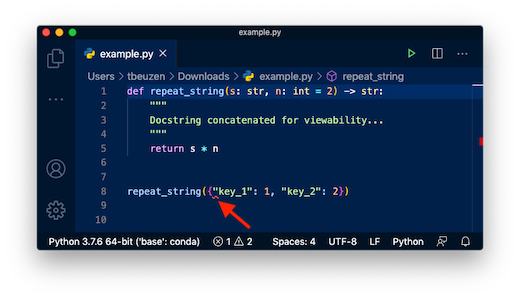
유형 힌트는 사용자와 IDE가 dtype을 식별하고 버그를 식별하는 데 도움이 됩니다. 이는 또 다른 수준의 문서일 뿐입니다. 사용자에게 해당 날짜 유형을 사용하도록 강요하지 않습니다. 예를 들어, 원하는 경우 dict를 repeat_string에 전달할 수 있습니다.
repeat_string({"key_1": 1, "key_2": 2})
---------------------------------------------------------------------------TypeError Traceback (most recent call last)
<ipython-input-85-48f8613bcebb> in <module>----> 1repeat_string({'key_1':1,'key_2':2})<ipython-input-83-964bad9c977b> in repeat_string(s, n) 21"BlahBlahBlah" 22 """
---> 23return s * n
TypeError: unsupported operand type(s) for *: 'dict' and 'int'
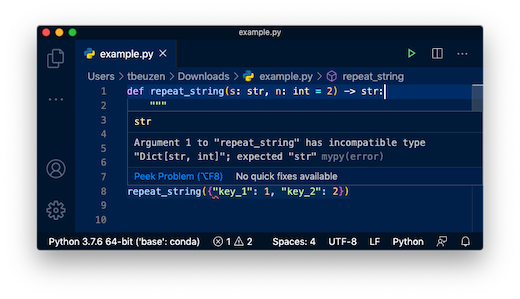
대부분의 IDE는 유형 힌트를 읽고 함수에서 다른 dtype을 사용하는 경우 경고할 만큼 영리합니다(예: 이 VScode 스크린샷).