03 - PyTorch 컴퓨터 비전

Open In Colab

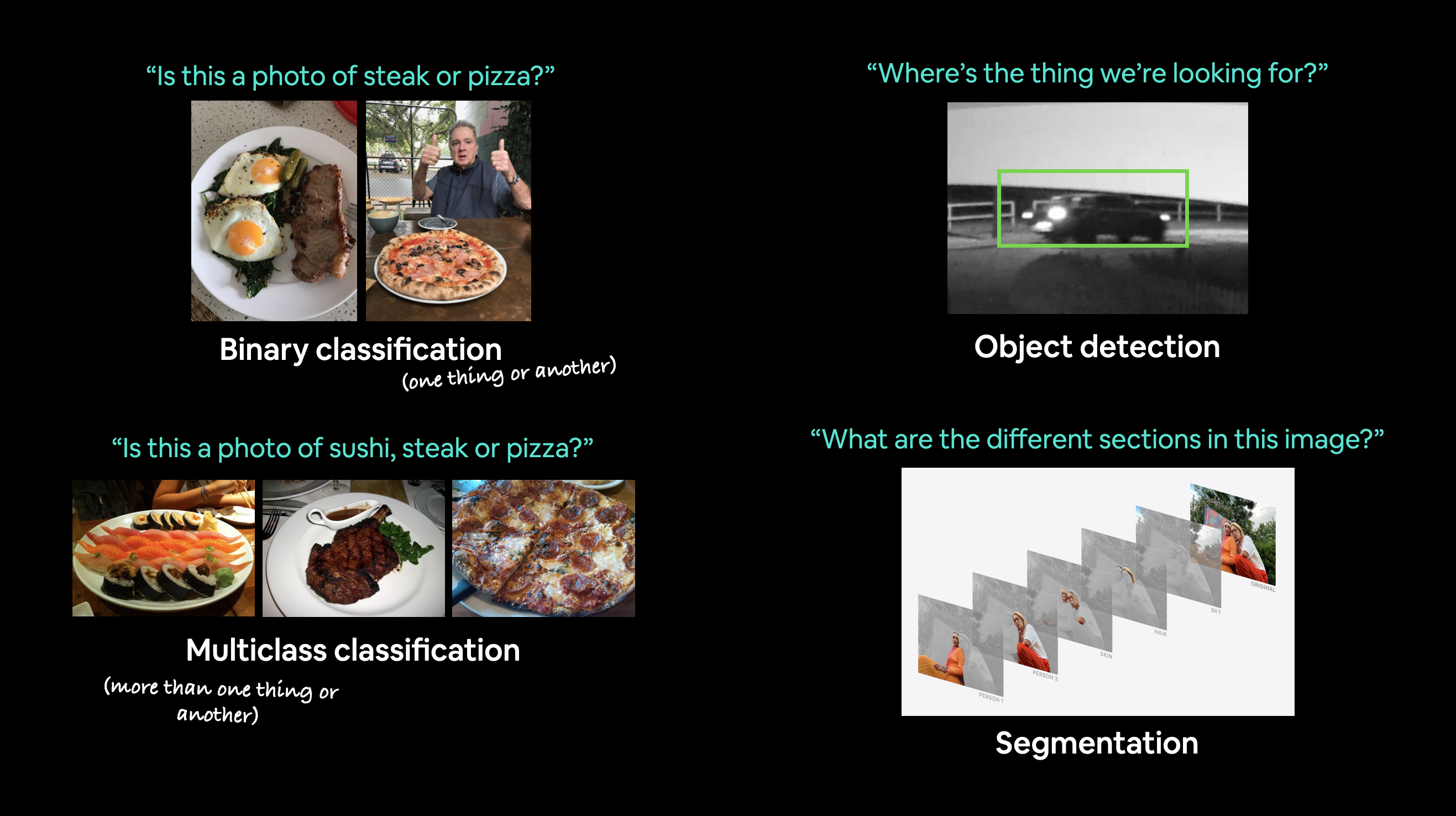
컴퓨터 비전은 컴퓨터가 볼 수 있도록 가르치는 예술입니다.

예를 들어, 사진이 고양이인지 강아지인지 분류하는 모델을 구축하는 것(이진 분류)이 포함될 수 있습니다.

또는 사진이 고양이, 강아지, 닭 중 무엇인지 분류하는 것(다중 클래스 분류)도 포함됩니다.

비디오 프레임에서 자동차가 어디에 나타나는지 식별하는 것(객체 탐지)이나,

이미지에서 서로 다른 물체가 어디에서 분리되는지 알아내는 것(전경 분할(Panoptic Segmentation))도 컴퓨터 비전의 영역입니다.

컴퓨터 비전 문제 예시 이진 분류, 다중 클래스 분류, 객체 탐지 및 분할에 대한 컴퓨터 비전 문제 예시입니다.

컴퓨터 비전은 어디에 사용되나요?

스마트폰을 사용한다면 이미 컴퓨터 비전을 사용하고 있는 것입니다.

카메라 및 사진 앱은 컴퓨터 비전을 사용하여 이미지를 개선하고 정렬합니다.

현대 자동차는 다른 자동차를 피하고 차선을 유지하기 위해 컴퓨터 비전을 사용합니다.

제조업체는 컴퓨터 비전을 사용하여 다양한 제품의 결함을 식별합니다.

보안 카메라는 컴퓨터 비전을 사용하여 잠재적인 침입자를 감지합니다.

본질적으로 시각적으로 설명할 수 있는 모든 것은 잠재적인 컴퓨터 비전 문제가 될 수 있습니다.

이번 장에서 다룰 내용

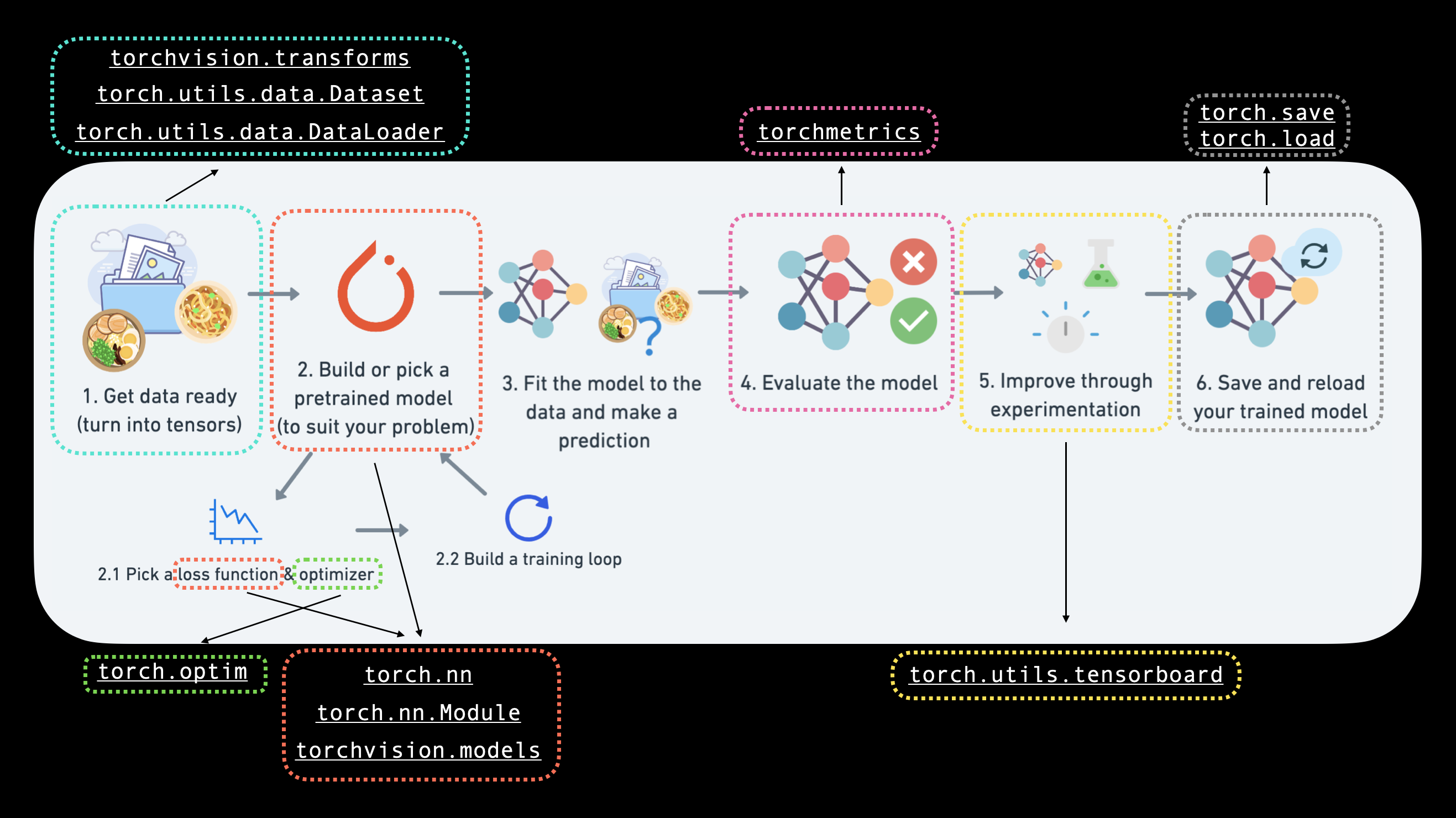
지난 몇 개 섹션에서 배웠던 PyTorch 워크플로우를 컴퓨터 비전에 적용해 보겠습니다.

컴퓨터 비전에 중점을 둔 PyTorch 워크플로우

구체적으로 다음 내용을 다룹니다:

주제 내용
0. PyTorch의 컴퓨터 비전 라이브러리 PyTorch에는 내장된 유용한 컴퓨터 비전 라이브러리가 많이 있습니다. 하나씩 살펴보겠습니다.
1. 데이터 로드 컴퓨터 비전 연습을 위해 FashionMNIST의 다양한 의류 이미지로 시작해 보겠습니다.
2. 데이터 준비 이미지를 가져와서 PyTorch DataLoader로 로드하여 훈련 루프에서 사용할 수 있도록 준비합니다.
3. 모델 0: 베이스라인 모델 구축 데이터에서 패턴을 학습하기 위한 다중 클래스 분류 모델을 만들고, 손실 함수, 옵티마이저를 선택하고 훈련 루프를 구축합니다.
4. 모델 0의 예측 및 평가 베이스라인 모델로 예측을 수행하고 평가해 봅니다.
5. 향후 모델을 위한 장치 중립적 코드 설정 장치 중립적(device-agnostic) 코드를 작성하는 것이 가장 좋으므로, 이를 설정해 봅니다.
6. 모델 1: 비선형성 추가 실험은 머신러닝의 큰 부분입니다. 비선형 레이어를 추가하여 베이스라인 모델을 개선해 봅니다.
7. 모델 2: 합성곱 신경망 (CNN) 컴퓨터 비전에 특화된 강력한 합성곱 신경망 아키텍처를 소개합니다.
8. 모델 비교 세 가지 서로 다른 모델을 구축했으므로, 이들을 비교해 봅니다.
9. 최적의 모델 평가 무작위 이미지에 대해 예측을 수행하고 최적의 모델을 평가해 봅니다.
10. 혼동 행렬 만들기 혼동 행렬은 분류 모델을 평가하는 좋은 방법입니다. 어떻게 만드는지 살펴보겠습니다.
11. 가장 성능이 좋은 모델 저장 및 불러오기 나중에 모델을 사용하고 싶을 수 있으므로 저장하고 올바르게 불러와지는지 확인합니다.

도움을 받을 수 있는 곳

이 과정의 모든 자료는 GitHub에 있습니다.

문제가 발생하면 해당 페이지의 Discussions 페이지에서 질문할 수 있습니다.

또한 PyTorch와 관련된 모든 것에 대해 매우 도움이 되는 장소인 PyTorch 문서PyTorch 개발자 포럼도 있습니다.

0. PyTorch의 컴퓨터 비전 라이브러리

코드를 작성하기 전에 알아야 할 몇 가지 PyTorch 컴퓨터 비전 라이브러리에 대해 이야기해 보겠습니다.

PyTorch 모듈 역할
torchvision 컴퓨터 비전 문제에 자주 사용되는 데이터셋, 모델 아키텍처 및 이미지 변환이 포함되어 있습니다.
torchvision.datasets 이미지 분류, 객체 탐지, 이미지 캡셔닝, 비디오 분류 등 다양한 문제에 대한 많은 예시 컴퓨터 비전 데이터셋이 있습니다. 또한 커스텀 데이터셋을 만들기 위한 일련의 기본 클래스도 포함되어 있습니다.
torchvision.models PyTorch로 구현된 성능이 뛰어나고 일반적으로 사용되는 컴퓨터 비전 모델 아키텍처가 포함되어 있어 자신의 문제에 사용할 수 있습니다.
torchvision.transforms 모델에 사용하기 전에 이미지를 변환(숫자로 변환/처리/증강)해야 하는 경우가 많으며, 일반적인 이미지 변환 기능이 여기에 있습니다.
torch.utils.data.Dataset PyTorch를 위한 기본 데이터셋 클래스입니다.
torch.utils.data.DataLoader 데이터셋(torch.utils.data.Dataset으로 생성)에 대해 파이썬 이터러블(iterable)을 생성합니다.

참고: torch.utils.data.Datasettorch.utils.data.DataLoader 클래스는 PyTorch에서 컴퓨터 비전 전용이 아니며, 다양한 유형의 데이터를 처리할 수 있습니다.

이제 가장 중요한 PyTorch 컴퓨터 비전 라이브러리 몇 가지를 살펴보았으니 관련 종속성을 임포트해 보겠습니다.

# PyTorch 임포트
import torch
from torch import nn

# torchvision 임포트
import torchvision
from torchvision import datasets
from torchvision.transforms import ToTensor

# 시각화를 위한 matplotlib 임포트
import matplotlib.pyplot as plt

# 버전 확인
# 참고: PyTorch 버전은 1.10.0 이상, torchvision 버전은 0.11 이상이어야 합니다.
print(f"PyTorch version: {torch.__version__}\ntorchvision version: {torchvision.__version__}")
PyTorch version: 1.11.0
torchvision version: 0.12.0

1. 데이터셋 가져오기

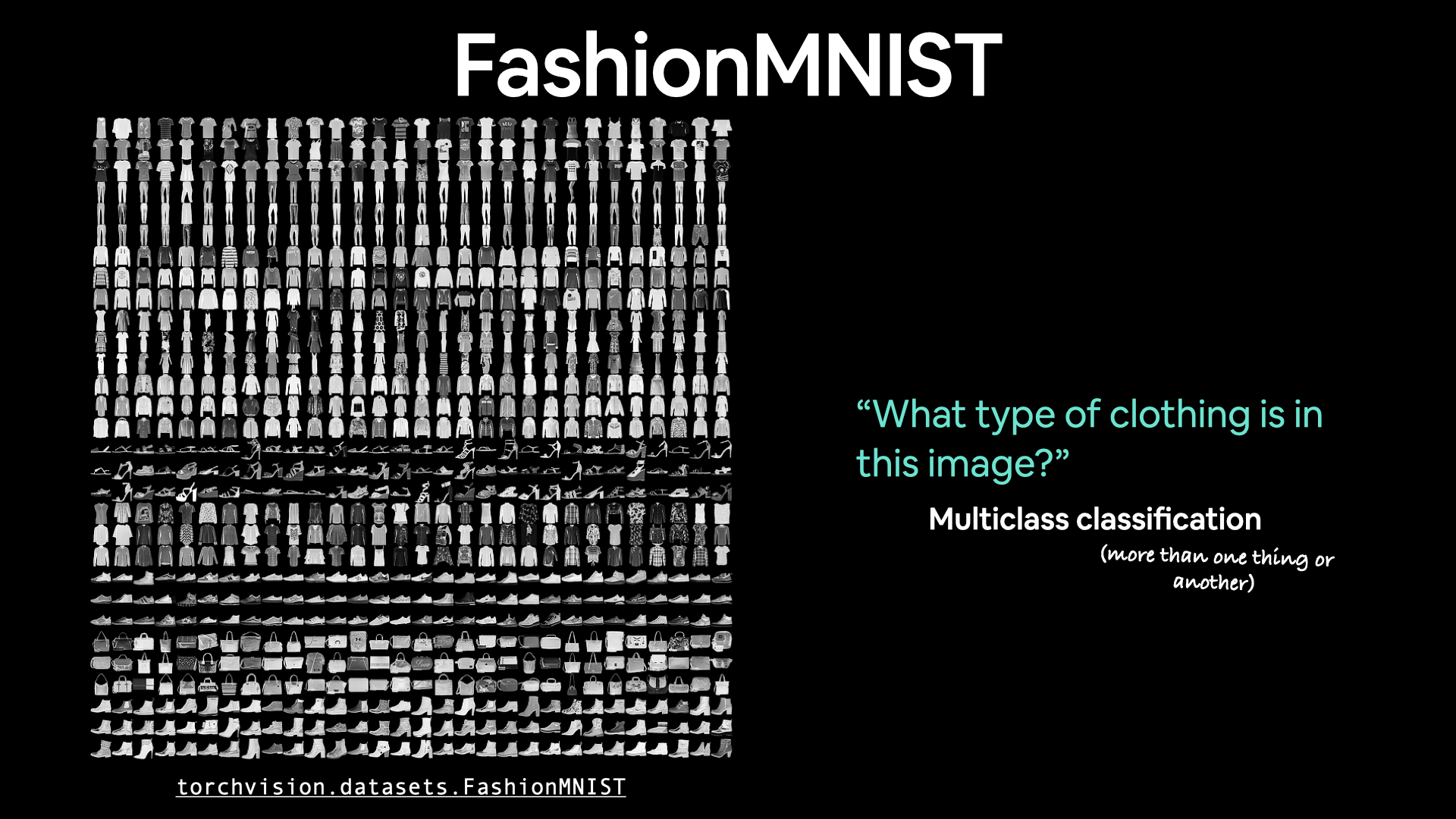
컴퓨터 비전 문제를 시작하기 위해 컴퓨터 비전 데이터셋을 가져와 보겠습니다.

먼저 FashionMNIST로 시작합니다.

MNIST는 Modified National Institute of Standards and Technology의 약자입니다.

오리지널 MNIST 데이터셋에는 수천 개의 손글씨 숫자(0~9) 예시가 포함되어 있으며 우편 서비스를 위한 숫자 식별 컴퓨터 비전 모델을 구축하는 데 사용되었습니다.

Zalando Research에서 만든 FashionMNIST는 비슷한 설정입니다.

다만 10가지 서로 다른 종류의 의류를 나타내는 회색조 이미지가 포함되어 있습니다.

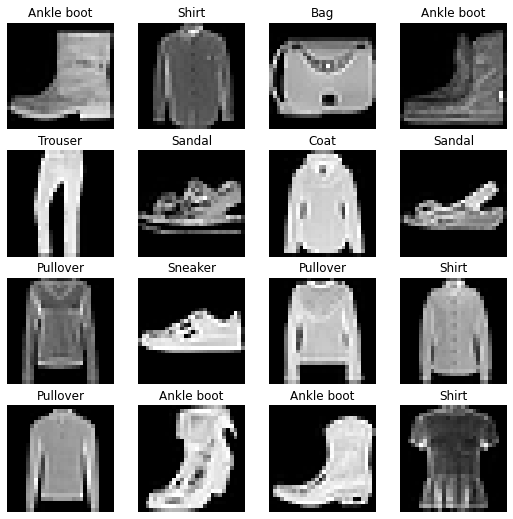
FashionMNIST 예시 이미지 torchvision.datasets에는 컴퓨터 비전 코드 작성을 연습할 수 있는 많은 예시 데이터셋이 포함되어 있습니다. FashionMNIST는 그중 하나입니다. 10개의 서로 다른 이미지 클래스(서로 다른 유형의 의류)가 있으므로 다중 클래스 분류 문제입니다.

나중에 이 이미지들에서 서로 다른 스타일의 의류를 식별하는 컴퓨터 비전 신경망을 구축할 것입니다.

PyTorch에는 torchvision.datasets에 저장된 많은 공통 컴퓨터 비전 데이터셋이 있습니다.

torchvision.datasets.FashionMNIST()에 있는 FashionMNIST를 포함해서요.

이를 다운로드하기 위해 다음 매개변수를 제공합니다: * root: str - 데이터를 어느 폴더에 다운로드할 것인가요? * train: Bool - 훈련 세트 또는 테스트 세트 중 무엇을 원하나요? * download: Bool - 데이터를 다운로드해야 하나요? * transform: torchvision.transforms - 데이터에 어떤 변환을 적용하고 싶나요? * target_transform - 원하는 경우 타겟(레이블)도 변환할 수 있습니다.

torchvision의 다른 많은 데이터셋에도 이러한 매개변수 옵션이 있습니다.

# 훈련 데이터 설정
train_data = datasets.FashionMNIST(
    root="data", # 데이터를 어디에 다운로드할까요?
    train=True, # 훈련 데이터를 가져옵니다.
    download=True, # 디스크에 데이터가 없으면 다운로드합니다.
    transform=ToTensor(), # 이미지는 PIL 형식으로 제공되므로 Torch 텐서로 변환하려고 합니다.
    target_transform=None # 레이블도 변환할 수 있습니다.
)

# 테스트 데이터 설정
test_data = datasets.FashionMNIST(
    root="data",
    train=False, # 테스트 데이터를 가져옵니다.
    download=True,
    transform=ToTensor()
)

훈련 데이터의 첫 번째 샘플을 확인해 보겠습니다.

# 첫 번째 훈련 샘플 확인
image, label = train_data[0]
image, label
(tensor([[[0.0000, 0.0000, 0.0000, 0.0000, 0.0000, 0.0000, 0.0000, 0.0000,
           0.0000, 0.0000, 0.0000, 0.0000, 0.0000, 0.0000, 0.0000, 0.0000,
           0.0000, 0.0000, 0.0000, 0.0000, 0.0000, 0.0000, 0.0000, 0.0000,
           0.0000, 0.0000, 0.0000, 0.0000],
          [0.0000, 0.0000, 0.0000, 0.0000, 0.0000, 0.0000, 0.0000, 0.0000,
           0.0000, 0.0000, 0.0000, 0.0000, 0.0000, 0.0000, 0.0000, 0.0000,
           0.0000, 0.0000, 0.0000, 0.0000, 0.0000, 0.0000, 0.0000, 0.0000,
           0.0000, 0.0000, 0.0000, 0.0000],
          [0.0000, 0.0000, 0.0000, 0.0000, 0.0000, 0.0000, 0.0000, 0.0000,
           0.0000, 0.0000, 0.0000, 0.0000, 0.0000, 0.0000, 0.0000, 0.0000,
           0.0000, 0.0000, 0.0000, 0.0000, 0.0000, 0.0000, 0.0000, 0.0000,
           0.0000, 0.0000, 0.0000, 0.0000],
          [0.0000, 0.0000, 0.0000, 0.0000, 0.0000, 0.0000, 0.0000, 0.0000,
           0.0000, 0.0000, 0.0000, 0.0000, 0.0039, 0.0000, 0.0000, 0.0510,
           0.2863, 0.0000, 0.0000, 0.0039, 0.0157, 0.0000, 0.0000, 0.0000,
           0.0000, 0.0039, 0.0039, 0.0000],
          [0.0000, 0.0000, 0.0000, 0.0000, 0.0000, 0.0000, 0.0000, 0.0000,
           0.0000, 0.0000, 0.0000, 0.0000, 0.0118, 0.0000, 0.1412, 0.5333,
           0.4980, 0.2431, 0.2118, 0.0000, 0.0000, 0.0000, 0.0039, 0.0118,
           0.0157, 0.0000, 0.0000, 0.0118],
          [0.0000, 0.0000, 0.0000, 0.0000, 0.0000, 0.0000, 0.0000, 0.0000,
           0.0000, 0.0000, 0.0000, 0.0000, 0.0235, 0.0000, 0.4000, 0.8000,
           0.6902, 0.5255, 0.5647, 0.4824, 0.0902, 0.0000, 0.0000, 0.0000,
           0.0000, 0.0471, 0.0392, 0.0000],
          [0.0000, 0.0000, 0.0000, 0.0000, 0.0000, 0.0000, 0.0000, 0.0000,
           0.0000, 0.0000, 0.0000, 0.0000, 0.0000, 0.0000, 0.6078, 0.9255,
           0.8118, 0.6980, 0.4196, 0.6118, 0.6314, 0.4275, 0.2510, 0.0902,
           0.3020, 0.5098, 0.2824, 0.0588],
          [0.0000, 0.0000, 0.0000, 0.0000, 0.0000, 0.0000, 0.0000, 0.0000,
           0.0000, 0.0000, 0.0000, 0.0039, 0.0000, 0.2706, 0.8118, 0.8745,
           0.8549, 0.8471, 0.8471, 0.6392, 0.4980, 0.4745, 0.4784, 0.5725,
           0.5529, 0.3451, 0.6745, 0.2588],
          [0.0000, 0.0000, 0.0000, 0.0000, 0.0000, 0.0000, 0.0000, 0.0000,
           0.0000, 0.0039, 0.0039, 0.0039, 0.0000, 0.7843, 0.9098, 0.9098,
           0.9137, 0.8980, 0.8745, 0.8745, 0.8431, 0.8353, 0.6431, 0.4980,
           0.4824, 0.7686, 0.8980, 0.0000],
          [0.0000, 0.0000, 0.0000, 0.0000, 0.0000, 0.0000, 0.0000, 0.0000,
           0.0000, 0.0000, 0.0000, 0.0000, 0.0000, 0.7176, 0.8824, 0.8471,
           0.8745, 0.8941, 0.9216, 0.8902, 0.8784, 0.8706, 0.8784, 0.8667,
           0.8745, 0.9608, 0.6784, 0.0000],
          [0.0000, 0.0000, 0.0000, 0.0000, 0.0000, 0.0000, 0.0000, 0.0000,
           0.0000, 0.0000, 0.0000, 0.0000, 0.0000, 0.7569, 0.8941, 0.8549,
           0.8353, 0.7765, 0.7059, 0.8314, 0.8235, 0.8275, 0.8353, 0.8745,
           0.8627, 0.9529, 0.7922, 0.0000],
          [0.0000, 0.0000, 0.0000, 0.0000, 0.0000, 0.0000, 0.0000, 0.0000,
           0.0000, 0.0039, 0.0118, 0.0000, 0.0471, 0.8588, 0.8627, 0.8314,
           0.8549, 0.7529, 0.6627, 0.8902, 0.8157, 0.8549, 0.8784, 0.8314,
           0.8863, 0.7725, 0.8196, 0.2039],
          [0.0000, 0.0000, 0.0000, 0.0000, 0.0000, 0.0000, 0.0000, 0.0000,
           0.0000, 0.0000, 0.0235, 0.0000, 0.3882, 0.9569, 0.8706, 0.8627,
           0.8549, 0.7961, 0.7765, 0.8667, 0.8431, 0.8353, 0.8706, 0.8627,
           0.9608, 0.4667, 0.6549, 0.2196],
          [0.0000, 0.0000, 0.0000, 0.0000, 0.0000, 0.0000, 0.0000, 0.0000,
           0.0000, 0.0157, 0.0000, 0.0000, 0.2157, 0.9255, 0.8941, 0.9020,
           0.8941, 0.9412, 0.9098, 0.8353, 0.8549, 0.8745, 0.9176, 0.8510,
           0.8510, 0.8196, 0.3608, 0.0000],
          [0.0000, 0.0000, 0.0039, 0.0157, 0.0235, 0.0275, 0.0078, 0.0000,
           0.0000, 0.0000, 0.0000, 0.0000, 0.9294, 0.8863, 0.8510, 0.8745,
           0.8706, 0.8588, 0.8706, 0.8667, 0.8471, 0.8745, 0.8980, 0.8431,
           0.8549, 1.0000, 0.3020, 0.0000],
          [0.0000, 0.0118, 0.0000, 0.0000, 0.0000, 0.0000, 0.0000, 0.0000,
           0.0000, 0.2431, 0.5686, 0.8000, 0.8941, 0.8118, 0.8353, 0.8667,
           0.8549, 0.8157, 0.8275, 0.8549, 0.8784, 0.8745, 0.8588, 0.8431,
           0.8784, 0.9569, 0.6235, 0.0000],
          [0.0000, 0.0000, 0.0000, 0.0000, 0.0706, 0.1725, 0.3216, 0.4196,
           0.7412, 0.8941, 0.8627, 0.8706, 0.8510, 0.8863, 0.7843, 0.8039,
           0.8275, 0.9020, 0.8784, 0.9176, 0.6902, 0.7373, 0.9804, 0.9725,
           0.9137, 0.9333, 0.8431, 0.0000],
          [0.0000, 0.2235, 0.7333, 0.8157, 0.8784, 0.8667, 0.8784, 0.8157,
           0.8000, 0.8392, 0.8157, 0.8196, 0.7843, 0.6235, 0.9608, 0.7569,
           0.8078, 0.8745, 1.0000, 1.0000, 0.8667, 0.9176, 0.8667, 0.8275,
           0.8627, 0.9098, 0.9647, 0.0000],
          [0.0118, 0.7922, 0.8941, 0.8784, 0.8667, 0.8275, 0.8275, 0.8392,
           0.8039, 0.8039, 0.8039, 0.8627, 0.9412, 0.3137, 0.5882, 1.0000,
           0.8980, 0.8667, 0.7373, 0.6039, 0.7490, 0.8235, 0.8000, 0.8196,
           0.8706, 0.8941, 0.8824, 0.0000],
          [0.3843, 0.9137, 0.7765, 0.8235, 0.8706, 0.8980, 0.8980, 0.9176,
           0.9765, 0.8627, 0.7608, 0.8431, 0.8510, 0.9451, 0.2549, 0.2863,
           0.4157, 0.4588, 0.6588, 0.8588, 0.8667, 0.8431, 0.8510, 0.8745,
           0.8745, 0.8784, 0.8980, 0.1137],
          [0.2941, 0.8000, 0.8314, 0.8000, 0.7569, 0.8039, 0.8275, 0.8824,
           0.8471, 0.7255, 0.7725, 0.8078, 0.7765, 0.8353, 0.9412, 0.7647,
           0.8902, 0.9608, 0.9373, 0.8745, 0.8549, 0.8314, 0.8196, 0.8706,
           0.8627, 0.8667, 0.9020, 0.2627],
          [0.1882, 0.7961, 0.7176, 0.7608, 0.8353, 0.7725, 0.7255, 0.7451,
           0.7608, 0.7529, 0.7922, 0.8392, 0.8588, 0.8667, 0.8627, 0.9255,
           0.8824, 0.8471, 0.7804, 0.8078, 0.7294, 0.7098, 0.6941, 0.6745,
           0.7098, 0.8039, 0.8078, 0.4510],
          [0.0000, 0.4784, 0.8588, 0.7569, 0.7020, 0.6706, 0.7176, 0.7686,
           0.8000, 0.8235, 0.8353, 0.8118, 0.8275, 0.8235, 0.7843, 0.7686,
           0.7608, 0.7490, 0.7647, 0.7490, 0.7765, 0.7529, 0.6902, 0.6118,
           0.6549, 0.6941, 0.8235, 0.3608],
          [0.0000, 0.0000, 0.2902, 0.7412, 0.8314, 0.7490, 0.6863, 0.6745,
           0.6863, 0.7098, 0.7255, 0.7373, 0.7412, 0.7373, 0.7569, 0.7765,
           0.8000, 0.8196, 0.8235, 0.8235, 0.8275, 0.7373, 0.7373, 0.7608,
           0.7529, 0.8471, 0.6667, 0.0000],
          [0.0078, 0.0000, 0.0000, 0.0000, 0.2588, 0.7843, 0.8706, 0.9294,
           0.9373, 0.9490, 0.9647, 0.9529, 0.9569, 0.8667, 0.8627, 0.7569,
           0.7490, 0.7020, 0.7137, 0.7137, 0.7098, 0.6902, 0.6510, 0.6588,
           0.3882, 0.2275, 0.0000, 0.0000],
          [0.0000, 0.0000, 0.0000, 0.0000, 0.0000, 0.0000, 0.0000, 0.1569,
           0.2392, 0.1725, 0.2824, 0.1608, 0.1373, 0.0000, 0.0000, 0.0000,
           0.0000, 0.0000, 0.0000, 0.0000, 0.0000, 0.0000, 0.0000, 0.0000,
           0.0000, 0.0000, 0.0000, 0.0000],
          [0.0000, 0.0000, 0.0000, 0.0000, 0.0000, 0.0000, 0.0000, 0.0000,
           0.0000, 0.0000, 0.0000, 0.0000, 0.0000, 0.0000, 0.0000, 0.0000,
           0.0000, 0.0000, 0.0000, 0.0000, 0.0000, 0.0000, 0.0000, 0.0000,
           0.0000, 0.0000, 0.0000, 0.0000],
          [0.0000, 0.0000, 0.0000, 0.0000, 0.0000, 0.0000, 0.0000, 0.0000,
           0.0000, 0.0000, 0.0000, 0.0000, 0.0000, 0.0000, 0.0000, 0.0000,
           0.0000, 0.0000, 0.0000, 0.0000, 0.0000, 0.0000, 0.0000, 0.0000,
           0.0000, 0.0000, 0.0000, 0.0000]]]),
 9)

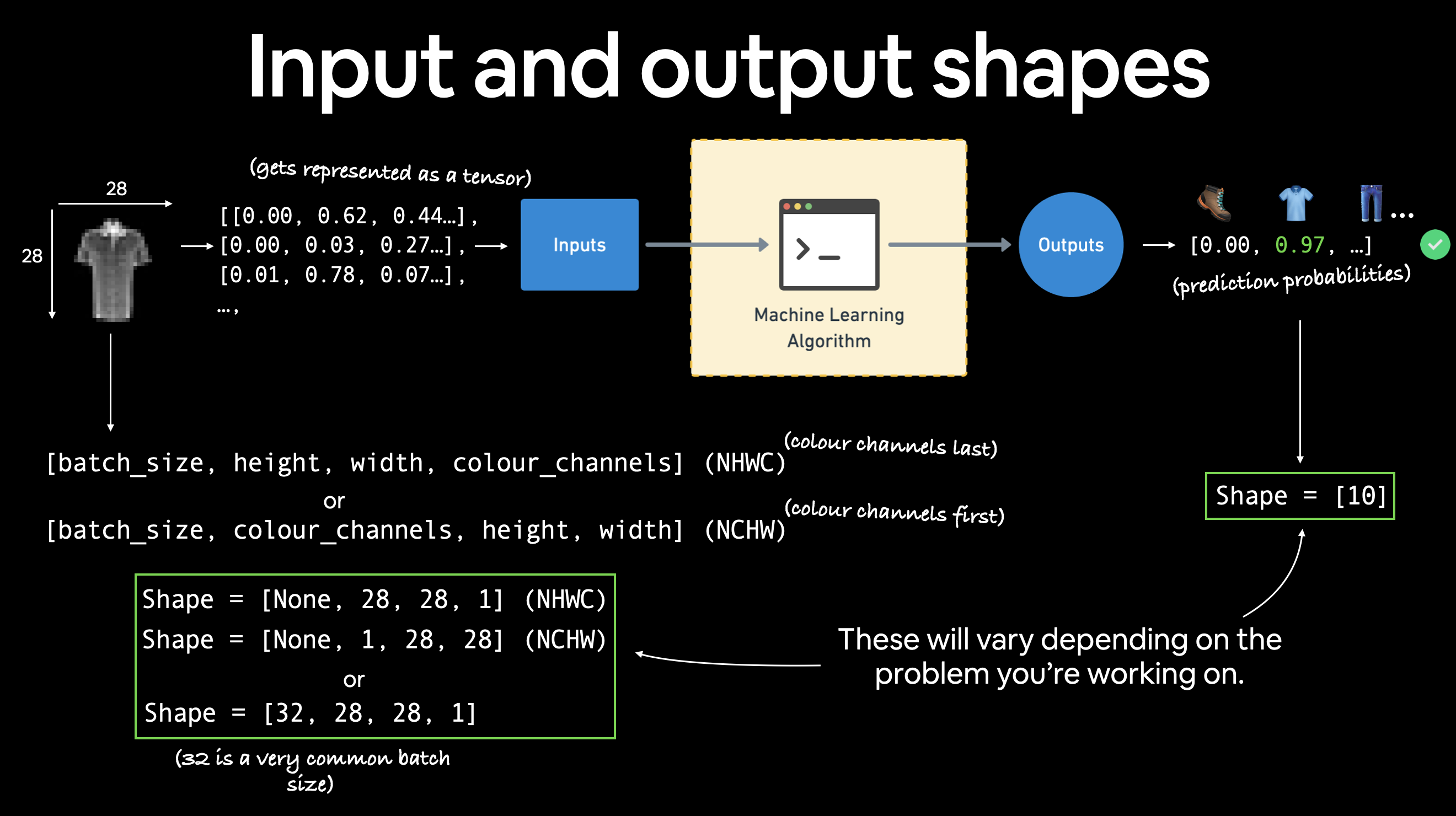
1.1 컴퓨터 비전 모델의 입력 및 출력 모양

이미지를 나타내는 큰 값의 텐서가 있고, 타겟(레이블)을 나타내는 단일 값이 있습니다.

이미지 모양을 확인해 보겠습니다.

# 이미지의 모양은 무엇인가요?
image.shape
torch.Size([1, 28, 28])

이미지 텐서의 모양은 [1, 28, 28]이며 더 구체적으로는 다음과 같습니다:

[색상_채널=1, 높이=28, 너비=28]

색상_채널=1은 이미지가 회색조임을 의미합니다.

FashionMNIST 문제의 예시 입력 및 출력 모양 다양한 문제에는 다양한 입력 및 출력 모양이 있습니다. 하지만 전제는 동일합니다. 데이터를 숫자로 인코딩하고, 해당 숫자에서 패턴을 찾기 위한 모델을 구축하고, 그 패턴을 의미 있는 것으로 변환하는 것입니다.
색상_채널=3인 경우 이미지는 빨간색, 녹색, 파란색의 픽셀 값으로 제공됩니다(이를 RGB 색상 모델이라고도 함).

현재 텐서의 순서는 종종 CHW(색상 채널, 높이, 너비)라고 불립니다.

이미지를 CHW(색상 채널 우선)로 표시해야 하는지 아니면 HWC(색상 채널 마지막)로 표시해야 하는지에 대한 논의가 있습니다.

참고: N이미지 수를 나타내는 NCHWNHWC 형식도 볼 수 있습니다. 예를 들어 batch_size=32인 경우 텐서 모양은 [32, 1, 28, 28]이 될 수 있습니다. 배치 크기는 나중에 다루겠습니다.

PyTorch는 일반적으로 많은 연산자에서 NCHW(채널 우선)를 기본값으로 허용합니다.

그러나 PyTorch는 NHWC(채널 마지막)가 성능이 더 좋으며 권장 사항(best practice)으로 간주된다고 설명합니다.

지금은 데이터셋과 모델이 상대적으로 작기 때문에 큰 차이가 없을 것입니다.

하지만 나중에 더 큰 이미지 데이터셋을 다루고 합성곱 신경망을 사용할 때 이를 염두에 두세요.

데이터의 모양을 더 확인해 보겠습니다.

# 샘플은 몇 개인가요?
len(train_data.data), len(train_data.targets), len(test_data.data), len(test_data.targets)
(60000, 60000, 10000, 10000)

따라서 60,000개의 훈련 샘플과 10,000개의 테스트 샘플이 있습니다.

어떤 클래스가 있나요?

.classes 속성을 통해 이를 찾을 수 있습니다.

# 클래스 확인
class_names = train_data.classes
class_names
['T-shirt/top',
 'Trouser',
 'Pullover',
 'Dress',
 'Coat',
 'Sandal',
 'Shirt',
 'Sneaker',
 'Bag',
 'Ankle boot']

좋습니다! 10가지 서로 다른 종류의 옷을 다루고 있는 것 같네요.

10개의 서로 다른 클래스를 다루고 있기 때문에 우리의 문제는 다중 클래스 분류입니다.

이제 시각화를 해보겠습니다.

1.2 데이터 시각화하기

import matplotlib.pyplot as plt
image, label = train_data[0]
print(f"Image shape: {image.shape}")
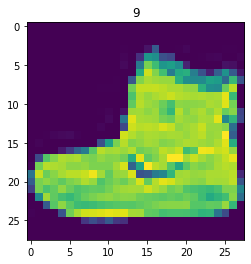
plt.imshow(image.squeeze()) # image shape is [1, 28, 28] (colour channels, height, width)
plt.title(label);
Image shape: torch.Size([1, 28, 28])

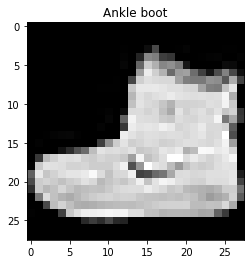
We can turn the image into grayscale using the cmap parameter of plt.imshow().

plt.imshow(image.squeeze(), cmap="gray")
plt.title(class_names[label]);

Beautiful, well as beautiful as a pixelated grayscale ankle boot can get.

Let’s view a few more.

# Plot more images
torch.manual_seed(42)
fig = plt.figure(figsize=(9, 9))
rows, cols = 4, 4
for i in range(1, rows * cols + 1):
    random_idx = torch.randint(0, len(train_data), size=[1]).item()
    img, label = train_data[random_idx]
    fig.add_subplot(rows, cols, i)
    plt.imshow(img.squeeze(), cmap="gray")
    plt.title(class_names[label])
    plt.axis(False);

Hmmm, this dataset doesn’t look too aesthetic.

But the principles we’re going to learn on how to build a model for it will be similar across a wide range of computer vision problems.

In essence, taking pixel values and building a model to find patterns in them to use on future pixel values.

Plus, even for this small dataset (yes, even 60,000 images in deep learning is considered quite small), could you write a program to classify each one of them?

You probably could.

But I think coding a model in PyTorch would be faster.

Question: Do you think the above data can be model with only straight (linear) lines? Or do you think you’d also need non-straight (non-linear) lines?

2. DataLoader 준비하기

이제 데이터셋이 준비되었습니다.

다음 단계는 torch.utils.data.DataLoader 또는 줄여서 DataLoader를 사용하여 준비하는 것입니다.

DataLoader는 이름에서 짐작할 수 있는 역할을 합니다.

모델에 데이터를 로드하는 것을 돕습니다.

훈련과 추론을 위해서요.

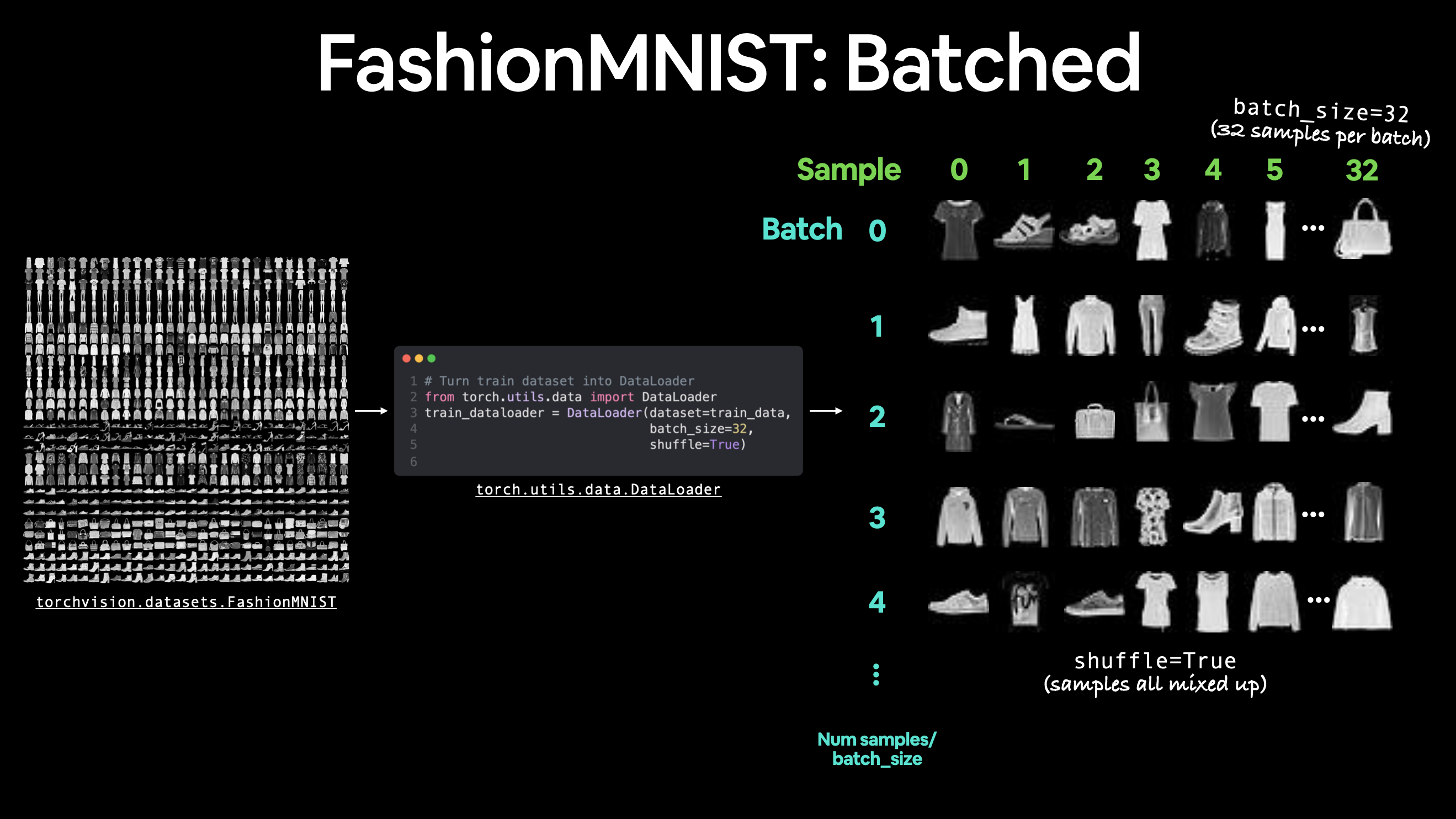
Dataset을 작은 덩어리의 파이썬 이터러블로 변환합니다.

이러한 작은 덩어리를 배치(batch) 또는 미니 배치(mini-batch)라고 하며 batch_size 매개변수로 설정할 수 있습니다.

왜 이렇게 할까요?

컴퓨팅 효율성이 더 높기 때문입니다.

이상적인 세상에서는 모든 데이터를 한 번에 순전파 및 역전파할 수 있을 것입니다.

하지만 정말 큰 데이터셋을 사용하기 시작하면 무한한 컴퓨팅 파워가 없는 한 데이터를 배치로 나누는 것이 더 쉽습니다.

또한 모델이 개선될 기회를 더 많이 제공합니다.

미니 배치(데이터의 작은 부분)를 사용하면 에포크(epoch)당 한 번이 아니라 미니 배치당 한 번씩 경사 하강법이 더 자주 수행됩니다.

좋은 배치 크기는 얼마일까요?

32는 시작하기 좋은 지점입니다.

하지만 이는 사용자가 설정할 수 있는 값(하이퍼파라미터)이므로 모든 종류의 값을 시도해 볼 수 있습니다. 다만 일반적으로 2의 거듭제곱(예: 32, 64, 128, 256, 512)이 가장 자주 사용됩니다.

배치된 데이터셋의 예시 FashionMNIST를 배치 크기 32로 배치하고 셔플을 켠 모습입니다. 다른 데이터셋에 대해서도 유사한 배치 프로세스가 발생하지만 배치 크기에 따라 달라집니다.
훈련 세트와 테스트 세트를 위한 DataLoader를 만들어 보겠습니다.

from torch.utils.data import DataLoader

# Setup the batch size hyperparameter
BATCH_SIZE = 32

# Turn datasets into iterables (batches)
train_dataloader = DataLoader(train_data, # dataset to turn into iterable
    batch_size=BATCH_SIZE, # how many samples per batch? 
    shuffle=True # shuffle data every epoch?
)

test_dataloader = DataLoader(test_data,
    batch_size=BATCH_SIZE,
    shuffle=False # don't necessarily have to shuffle the testing data
)

# Let's check out what we've created
print(f"Dataloaders: {train_dataloader, test_dataloader}") 
print(f"Length of train dataloader: {len(train_dataloader)} batches of {BATCH_SIZE}")
print(f"Length of test dataloader: {len(test_dataloader)} batches of {BATCH_SIZE}")
Dataloaders: (<torch.utils.data.dataloader.DataLoader object at 0x7f9e193a8a90>, <torch.utils.data.dataloader.DataLoader object at 0x7f9e193b0700>)
Length of train dataloader: 1875 batches of 32
Length of test dataloader: 313 batches of 32
# Check out what's inside the training dataloader
train_features_batch, train_labels_batch = next(iter(train_dataloader))
train_features_batch.shape, train_labels_batch.shape
(torch.Size([32, 1, 28, 28]), torch.Size([32]))

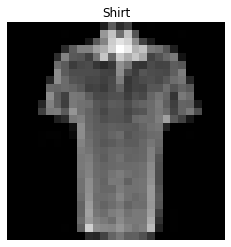
And we can see that the data remains unchanged by checking a single sample.

# Show a sample
torch.manual_seed(42)
random_idx = torch.randint(0, len(train_features_batch), size=[1]).item()
img, label = train_features_batch[random_idx], train_labels_batch[random_idx]
plt.imshow(img.squeeze(), cmap="gray")
plt.title(class_names[label])
plt.axis("Off");
print(f"Image size: {img.shape}")
print(f"Label: {label}, label size: {label.shape}")
Image size: torch.Size([1, 28, 28])
Label: 6, label size: torch.Size([])

3. 모델 0: 베이스라인 모델 구축하기

데이터 로드 및 준비 완료!

이제 nn.Module을 상속받아 베이스라인 모델을 구축할 시간입니다.

베이스라인 모델은 상상할 수 있는 가장 간단한 모델 중 하나입니다.

베이스라인을 시작점으로 사용하고 이후의 더 복잡한 모델로 이를 개선하려고 노력합니다.

우리의 베이스라인은 두 개의 nn.Linear() 레이어로 구성됩니다.

이전 섹션에서 이 작업을 수행했지만 한 가지 약간의 차이점이 있습니다.

이미지 데이터를 다루고 있기 때문에 시작을 위해 다른 레이어를 사용할 것입니다.

바로 nn.Flatten() 레이어입니다.

nn.Flatten()은 텐서의 차원을 단일 벡터로 압축합니다.

이것은 직접 보면 이해하기 더 쉽습니다.

# Flatten 레이어 생성
flatten_model = nn.Flatten() # 모든 nn 모듈은 모델로 작동합니다(순전파를 수행할 수 있음)

# 단일 샘플 가져오기
x = train_features_batch[0]

# 샘플을 평탄화(flatten)
output = flatten_model(x) # 순전파 수행

# 결과 출력
print(f"평탄화 전 모양: {x.shape} -> [color_channels, height, width]")
print(f"평탄화 후 모양: {output.shape} -> [color_channels, height*width]")

# 아래 주석을 해제하고 어떤 일이 일어나는지 확인해 보세요
#print(x)
#print(output)
Shape before flattening: torch.Size([1, 28, 28]) -> [color_channels, height, width]
Shape after flattening: torch.Size([1, 784]) -> [color_channels, height*width]

nn.Flatten() 레이어는 모양을 [color_channels, height, width]에서 [color_channels, height*width]로 바꿨습니다.

왜 이렇게 할까요?

높이와 너비 차원의 픽셀 데이터를 하나의 긴 특성 벡터(feature vector)로 변환했기 때문입니다.

그리고 nn.Linear() 레이어는 입력이 특성 벡터 형태인 것을 선호합니다.

첫 번째 레이어로 nn.Flatten()을 사용하여 첫 번째 모델을 만들어 보겠습니다.

from torch import nn
class FashionMNISTModelV0(nn.Module):
    def __init__(self, input_shape: int, hidden_units: int, output_shape: int):
        super().__init__()
        self.layer_stack = nn.Sequential(
            nn.Flatten(), # 신경망은 입력이 벡터 형태인 것을 선호합니다.
            nn.Linear(in_features=input_shape, out_features=hidden_units), # in_features = 데이터 샘플의 특성 수(784픽셀)
            nn.Linear(in_features=hidden_units, out_features=output_shape)
        )
    
    def forward(self, x):
        return self.layer_stack(x)

멋지네요!

이제 사용할 수 있는 베이스라인 모델 클래스가 생겼으니 모델을 인스턴스화해 보겠습니다.

다음 매개변수를 설정해야 합니다: * input_shape=784 - 모델에 들어가는 특성 수입니다. 우리의 경우 대상 이미지의 각 픽셀에 대해 하나씩입니다(높이 28픽셀 x 너비 28픽셀 = 784개의 특성). * hidden_units=10 - 은닉 레이어의 유닛/뉴런 수입니다. 이 숫자는 원하는 대로 설정할 수 있지만 모델을 작게 유지하기 위해 10으로 시작합니다. * output_shape=len(class_names) - 다중 클래스 분류 문제를 다루고 있으므로 데이터셋의 각 클래스당 하나의 출력 뉴런이 필요합니다.

이제 모델 인스턴스를 만들고 지금은 CPU로 보냅니다(곧 CPU에서 model_0을 실행하는 것과 GPU에서 유사한 모델을 실행하는 것에 대한 작은 테스트를 수행할 것입니다).

torch.manual_seed(42)

# 입력 매개변수로 모델 설정
model_0 = FashionMNISTModelV0(input_shape=784, # 모든 픽셀에 대해 하나씩 (28x28)
    hidden_units=10, # 은닉 레이어의 유닛 수
    output_shape=len(class_names) # 각 클래스에 대해 하나씩
)
model_0.to("cpu") # 우선 모델을 CPU에 둡니다. 
FashionMNISTModelV0(
  (layer_stack): Sequential(
    (0): Flatten(start_dim=1, end_dim=-1)
    (1): Linear(in_features=784, out_features=10, bias=True)
    (2): Linear(in_features=10, out_features=10, bias=True)
  )
)

3.1 손실 함수, 옵티마이저 및 평가 지표 설정

분류 문제를 다루고 있으므로 helper_functions.py 스크립트를 가져오고, 이어서 노트북 02에서 정의한 accuracy_fn()을 가져오겠습니다.

참고: 자체 정확도 함수나 평가 지표를 임포트하여 사용하는 대신 TorchMetrics 패키지에서 다양한 평가 지표를 임포트할 수도 있습니다.

import requests
from pathlib import Path 

# Learn PyTorch 저장소에서 helper functions 다운로드 (이미 다운로드되지 않은 경우)
if Path("helper_functions.py").is_file():
  print("helper_functions.py already exists, skipping download")
else:
  print("Downloading helper_functions.py")
  # 참고: 이것이 작동하려면 "raw" GitHub URL이 필요합니다.
  request = requests.get("https://raw.githubusercontent.com/mrdbourke/pytorch-deep-learning/main/helper_functions.py")
  with open("helper_functions.py", "wb") as f:
    f.write(request.content)
helper_functions.py already exists, skipping download
# 정확도 지표 임포트
from helper_functions import accuracy_fn # 참고: torchmetrics.Accuracy()를 사용할 수도 있습니다.

# 손실 함수 및 옵티마이저 설정
loss_fn = nn.CrossEntropyLoss() # 이것은 일부 장소에서 "criterion" 또는 "cost function"으로도 불립니다.
optimizer = torch.optim.SGD(params=model_0.parameters(), lr=0.1)

3.2 실험 시간을 측정하는 함수 만들기

손실 함수와 옵티마이저가 준비되었습니다!

이제 모델 훈련을 시작할 시간입니다.

하지만 훈련하는 동안 작은 실험을 하나 해보면 어떨까요?

모델이 CPU에서 훈련되는 시간과 GPU를 사용하여 훈련되는 시간을 측정하는 타이밍 함수를 만들어 보겠습니다.

이 모델은 CPU에서 훈련하지만 다음 모델은 GPU에서 훈련하고 어떤 일이 일어나는지 살펴보겠습니다.

우리의 타이밍 함수는 파이썬 timeit 모듈에서 timeit.default_timer() 함수를 임포트할 것입니다.

from timeit import default_timer as timer 
def print_train_time(start: float, end: float, device: torch.device = None):
    """시작 시간과 종료 시간 사이의 차이를 출력합니다.

    Args:
        start (float): 계산 시작 시간 (timeit 형식 선호). 
        end (float): 계산 종료 시간.
        device ([type], optional): 계산이 실행되는 장치. 기본값은 None.

    Returns:
        float: 시작 시간과 종료 시간 사이의 초 단위 시간 (높을수록 더 긺).
    """
    total_time = end - start
    print(f"Train time on {device}: {total_time:.3f} seconds")
    return total_time

3.3 훈련 루프 생성 및 데이터 배치로 모델 훈련하기

아름답네요!

타이머, 손실 함수, 옵티마이저, 모델, 그리고 가장 중요한 데이터까지 모든 퍼즐 조각이 준비된 것 같습니다.

이제 모델을 훈련하고 평가하기 위해 훈련 루프와 테스트 루프를 만들어 보겠습니다.

이전 노트북과 동일한 단계를 사용하겠지만, 데이터가 이제 배치 형태이므로 데이터 배치를 반복하기 위한 또 다른 루프를 추가할 것입니다.

데이터 배치는 각각 훈련 및 테스트 데이터 분할을 위한 DataLoadertrain_dataloadertest_dataloader에 포함되어 있습니다.

하나의 배치는 BATCH_SIZE개의 X(특성)와 y(레이블) 샘플이며, BATCH_SIZE=32를 사용하고 있으므로 배치는 32개의 이미지와 타겟 샘플을 가집니다.

그리고 데이터 배치에 대해 계산을 수행하므로 손실 및 평가 지표는 전체 데이터셋이 아니라 배치당 계산됩니다.

즉, 손실 및 정확도 값을 각 데이터셋의 해당 데이터로더에 있는 배치 수로 나누어야 함을 의미합니다.

단계별로 살펴보겠습니다: 1. 에포크를 반복합니다. 2. 훈련 배치를 반복하고, 훈련 단계를 수행하며, 배치당 훈련 손실을 계산합니다. 3. 테스트 배치를 반복하고, 테스트 단계를 수행하며, 배치당 테스트 손실을 계산합니다. 4. 진행 상황을 출력합니다. 5. 전체 시간을 측정합니다(재미로요).

몇 가지 단계가 있지만…

…의심스러우면 코드로 구현해 보세요.

# 진행률 표시줄을 위한 tqdm 임포트
from tqdm.auto import tqdm

# 시드 설정 및 타이머 시작
torch.manual_seed(42)
train_time_start_on_cpu = timer()

# 에포크 수 설정 (빠른 훈련 시간을 위해 작게 유지)
epochs = 3

# 훈련 및 테스트 루프 생성
for epoch in tqdm(range(epochs)):
    print(f"에포크: {epoch}\n-------")
    ### 훈련
    train_loss = 0
    # 훈련 배치를 반복하기 위한 루프 추가
    for batch, (X, y) in enumerate(train_dataloader):
        model_0.train() 
        # 1. 순전파
        y_pred = model_0(X)

        # 2. 손실 계산 (배치당)
        loss = loss_fn(y_pred, y)
        train_loss += loss # 에포크당 손실을 누적해서 더함

        # 3. 옵티마이저 제로 그라디언트
        optimizer.zero_grad()

        # 4. 손실 역전파
        loss.backward()

        # 5. 옵티마이저 단계 수행
        optimizer.step()

        # 지금까지 본 샘플 수 출력
        if batch % 400 == 0:
            print(f"{batch * len(X)}/{len(train_dataloader.dataset)} 샘플 확인")

    # 전체 훈련 손실을 훈련 데이터로더의 길이로 나눔 (에포크당 배치당 평균 손실)
    train_loss /= len(train_dataloader)
    
    ### 테스트
    # 손실 및 정확도를 누적해서 더하기 위한 변수 설정
    test_loss, test_acc = 0, 0 
    model_0.eval()
    with torch.inference_mode():
        for X, y in test_dataloader:
            # 1. 순전파
            test_pred = model_0(X)
           
            # 2. 손실 계산 (누적)
            test_loss += loss_fn(test_pred, y) # 에포크당 손실을 누적해서 더함

            # 3. 정확도 계산 (예측값이 y_true와 같아야 함)
            test_acc += accuracy_fn(y_true=y, y_pred=test_pred.argmax(dim=1))
        
        # 테스트 지표 계산은 torch.inference_mode() 내부에서 이루어져야 합니다.
        # 전체 테스트 손실을 테스트 데이터로더의 길이로 나눔 (배치당)
        test_loss /= len(test_dataloader)

        # 전체 정확도를 테스트 데이터로더의 길이로 나눔 (배치당)
        test_acc /= len(test_dataloader)

    ## 진행 상황 출력
    print(f"\n훈련 손실: {train_loss:.5f} | 테스트 손실: {test_loss:.5f}, 테스트 정확도: {test_acc:.2f}%\n")

# 훈련 시간 계산
train_time_end_on_cpu = timer()
total_train_time_model_0 = print_train_time(start=train_time_start_on_cpu, 
                                           end=train_time_end_on_cpu,
                                           device=str(next(model_0.parameters()).device))
Epoch: 0
-------
Looked at 0/60000 samples
Looked at 12800/60000 samples
Looked at 25600/60000 samples
Looked at 38400/60000 samples
Looked at 51200/60000 samples

Train loss: 0.59039 | Test loss: 0.50954, Test acc: 82.04%

Epoch: 1
-------
Looked at 0/60000 samples
Looked at 12800/60000 samples
Looked at 25600/60000 samples
Looked at 38400/60000 samples
Looked at 51200/60000 samples

Train loss: 0.47633 | Test loss: 0.47989, Test acc: 83.20%

Epoch: 2
-------
Looked at 0/60000 samples
Looked at 12800/60000 samples
Looked at 25600/60000 samples
Looked at 38400/60000 samples
Looked at 51200/60000 samples

Train loss: 0.45503 | Test loss: 0.47664, Test acc: 83.43%

Train time on cpu: 14.975 seconds

좋습니다! 베이스라인 모델이 꽤 잘 작동하는 것 같네요.

CPU에서도 훈련하는 데 그리 오래 걸리지 않았습니다. GPU에서는 더 빨라질까요?

이제 모델을 평가하는 코드를 작성해 보겠습니다.

4. 예측 수행 및 모델 0 결과 가져오기

앞으로 몇 가지 모델을 구축할 것이므로, 모두 유사한 방식으로 평가하는 코드를 작성하는 것이 좋습니다.

구체적으로, 훈련된 모델, DataLoader, 손실 함수 및 정확도 함수를 입력으로 받는 함수를 만들어 보겠습니다.

이 함수는 모델을 사용하여 DataLoader의 데이터에 대해 예측을 수행한 다음, 손실 함수와 정확도 함수를 사용하여 해당 예측을 평가합니다.

torch.manual_seed(42)
def eval_model(model: torch.nn.Module, 
               data_loader: torch.utils.data.DataLoader, 
               loss_fn: torch.nn.Module, 
               accuracy_fn):
    """data_loader에 대한 모델의 예측 결과를 딕셔너리로 반환합니다.

    Args:
        model (torch.nn.Module): data_loader에 대해 예측을 수행할 수 있는 PyTorch 모델.
        data_loader (torch.utils.data.DataLoader): 예측 대상 데이터셋.
        loss_fn (torch.nn.Module): 모델의 손실 함수.
        accuracy_fn: 모델의 예측을 실제 레이블과 비교하는 정확도 함수.

    Returns:
        (dict): data_loader에 대한 모델의 예측 결과.
    """
    loss, acc = 0, 0
    model.eval()
    with torch.inference_mode():
        for X, y in data_loader:
            # 모델로 예측 수행
            y_pred = model(X)
            
            # 배치당 손실 및 정확도 값 누적
            loss += loss_fn(y_pred, y)
            acc += accuracy_fn(y_true=y, 
                                y_pred=y_pred.argmax(dim=1)) # 정확도를 위해 예측 레이블이 필요함 (logits -> pred_prob -> pred_labels)
        
        # 배치당 평균 손실/정확도를 찾기 위해 손실 및 정확도 스케일링
        loss /= len(data_loader)
        acc /= len(data_loader)
        
    return {"model_name": model.__class__.__name__, # 모델이 클래스로 생성된 경우에만 작동함
            "model_loss": loss.item(),
            "model_acc": acc}

# 테스트 데이터셋에 대해 모델 0 결과 계산
model_0_results = eval_model(model=model_0, data_loader=test_dataloader,
    loss_fn=loss_fn, accuracy_fn=accuracy_fn
)
model_0_results
{'model_name': 'FashionMNISTModelV0',
 'model_loss': 0.47663894295692444,
 'model_acc': 83.42651757188499}

좋아 보이네요!

이 딕셔너리를 사용하여 나중에 베이스라인 모델 결과를 다른 모델과 비교할 수 있습니다.

5. 장치 중립적(device-agnostic) 코드 설정 (GPU 사용 가능 시)

CPU에서 60,000개 샘플에 대해 PyTorch 모델을 훈련하는 데 얼마나 걸리는지 확인했습니다.

참고: 모델 훈련 시간은 사용된 하드웨어에 따라 다릅니다. 일반적으로 프로세서가 많을수록 훈련 속도가 빨라지며, 작은 데이터셋의 작은 모델은 종종 큰 데이터셋의 큰 모델보다 빠르게 훈련됩니다.

이제 모델과 데이터를 GPU(사용 가능한 경우)에서 실행할 수 있도록 장치 중립적 코드를 설정해 보겠습니다.

Google Colab에서 이 노트북을 실행 중이고 아직 GPU를 켜지 않았다면, 지금 런타임 -> 런타임 유형 변경 -> 하드웨어 가속기 -> GPU를 통해 켜야 할 때입니다. 이 작업을 수행하면 런타임이 재설정될 가능성이 높으므로 런타임 -> 이전 셀 실행을 통해 위의 모든 셀을 다시 실행해야 합니다.

# 장치 중립적 코드 설정
import torch
device = "cuda" if torch.cuda.is_available() else "cpu"
device
'cuda'

멋지네요!

이제 다른 모델을 구축해 보겠습니다.

6. 모델 1: 비선형성을 이용한 더 나은 모델 구축하기

노트북 02에서 비선형성의 힘에 대해 배웠습니다.

우리가 다루고 있는 데이터를 보았을 때, 비선형 함수가 필요하다고 생각하시나요?

선형은 직선을, 비선형은 직선이 아님을 의미한다는 것을 기억하세요.

한번 확인해 봅시다.

이전과 유사한 모델을 만들되, 이번에는 각 선형 레이어 사이에 비선형 함수(nn.ReLU())를 추가해 보겠습니다.

# 비선형 및 선형 레이어가 있는 모델 생성
class FashionMNISTModelV1(nn.Module):
    def __init__(self, input_shape: int, hidden_units: int, output_shape: int):
        super().__init__()
        self.layer_stack = nn.Sequential(
            nn.Flatten(), # 입력을 단일 벡터로 평탄화
            nn.Linear(in_features=input_shape, out_features=hidden_units),
            nn.ReLU(),
            nn.Linear(in_features=hidden_units, out_features=output_shape),
            nn.ReLU()
        )
    
    def forward(self, x: torch.Tensor):
        return self.layer_stack(x)

좋아 보이네요.

이제 이전과 동일한 설정으로 인스턴스화해 보겠습니다.

input_shape=784(이미지 데이터의 특성 수와 동일), hidden_units=10(작게 시작하며 베이스라인 모델과 동일), output_shape=len(class_names)(클래스당 하나의 출력 유닛)가 필요합니다.

참고: 한 가지 변화(비선형 레이어 추가)를 제외하고 모델의 대부분의 설정을 동일하게 유지한 것에 주목하세요. 이것은 일련의 머신러닝 실험을 수행할 때 표준적인 관행입니다. 한 가지를 바꾸고 어떤 일이 일어나는지 확인한 다음, 다시 반복하는 것이죠.

torch.manual_seed(42)
model_1 = FashionMNISTModelV1(input_shape=784, # 입력 특성 수
    hidden_units=10,
    output_shape=len(class_names) # 원하는 출력 클래스 수
).to(device) # 사용 가능한 경우 모델을 GPU로 보냅니다.
next(model_1.parameters()).device # 모델 장치 확인
device(type='cuda', index=0)

6.1 손실 함수, 옵티마이저 및 평가 지표 설정

평소와 같이 손실 함수, 옵티마이저 및 평가 지표를 설정하겠습니다(여러 평가 지표를 사용할 수 있지만 지금은 정확도를 고수하겠습니다).

from helper_functions import accuracy_fn
loss_fn = nn.CrossEntropyLoss()
optimizer = torch.optim.SGD(params=model_1.parameters(), 
                            lr=0.1)

6.2 훈련 및 테스트 루프 기능화하기

지금까지는 훈련 및 테스트 루프를 반복해서 작성했습니다.

이제 이를 다시 작성하되, 반복해서 호출할 수 있도록 함수에 넣어 보겠습니다.

그리고 이제 장치 중립적 코드를 사용하고 있으므로 특성(X) 및 타겟(y) 텐서에 대해 .to(device)를 호출해야 합니다.

훈련 루프를 위해 모델, DataLoader, 손실 함수 및 옵티마이저를 입력으로 받는 train_step() 함수를 만들겠습니다.

테스트 루프도 비슷하게 만들되 test_step()이라고 부르고 모델, DataLoader, 손실 함수 및 평가 함수를 입력으로 받겠습니다.

참고: 함수이기 때문에 원하는 방식으로 커스터마이징할 수 있습니다. 여기서 만드는 것은 특정 분류 사용 사례를 위한 기본적인 훈련 및 테스트 함수라고 볼 수 있습니다.

def train_step(model: torch.nn.Module,
               data_loader: torch.utils.data.DataLoader,
               loss_fn: torch.nn.Module,
               optimizer: torch.optim.Optimizer,
               accuracy_fn,
               device: torch.device = device):
    train_loss, train_acc = 0, 0
    for batch, (X, y) in enumerate(data_loader):
        # 데이터를 GPU로 보냄
        X, y = X.to(device), y.to(device)

        # 1. 순전파
        y_pred = model(X)

        # 2. 손실 계산
        loss = loss_fn(y_pred, y)
        train_loss += loss
        train_acc += accuracy_fn(y_true=y,
                                 y_pred=y_pred.argmax(dim=1)) # logits -> pred labels로 변환

        # 3. 옵티마이저 제로 그라디언트
        optimizer.zero_grad()

        # 4. 손실 역전파
        loss.backward()

        # 5. 옵티마이저 단계 수행
        optimizer.step()

    # 에포크당 손실 및 정확도 계산 및 출력
    train_loss /= len(data_loader)
    train_acc /= len(data_loader)
    print(f"훈련 손실: {train_loss:.5f} | 훈련 정확도: {train_acc:.2f}%")

def test_step(data_loader: torch.utils.data.DataLoader,
              model: torch.nn.Module,
              loss_fn: torch.nn.Module,
              accuracy_fn,
              device: torch.device = device):
    test_loss, test_acc = 0, 0
    model.eval() # 모델을 평가 모드로 설정
    # 추론 모드 컨텍스트 매니저 켜기
    with torch.inference_mode(): 
        for X, y in data_loader:
            # 데이터를 GPU로 보냄
            X, y = X.to(device), y.to(device)
            
            # 1. 순전파
            test_pred = model(X)
            
            # 2. 손실 및 정확도 계산
            test_loss += loss_fn(test_pred, y)
            test_acc += accuracy_fn(y_true=y,
                y_pred=test_pred.argmax(dim=1) # logits -> pred labels로 변환
            )
        
        # 지표 조정 및 출력
        test_loss /= len(data_loader)
        test_acc /= len(data_loader)
        print(f"테스트 손실: {test_loss:.5f} | 테스트 정확도: {test_acc:.2f}%\n")

야호!

이제 모델을 훈련하고 테스트하기 위한 함수가 생겼으니 실행해 보겠습니다.

각 에포크에 대해 또 다른 루프 내부에서 이를 수행할 것입니다.

그렇게 하면 각 에포크마다 훈련 및 테스트 단계를 거치게 됩니다.

참고: 테스트 단계를 얼마나 자주 수행할지 커스텀할 수 있습니다. 때로는 5에포크 또는 10에포크마다 수행하기도 하지만, 여기서는 매 에포크마다 수행합니다.

GPU에서 코드를 실행하는 데 걸리는 시간도 측정해 보겠습니다.

torch.manual_seed(42)

# 시간 측정
from timeit import default_timer as timer
train_time_start_on_gpu = timer()

epochs = 3
for epoch in tqdm(range(epochs)):
    print(f"에포크: {epoch}\n---------")
    train_step(data_loader=train_dataloader, 
        model=model_1, 
        loss_fn=loss_fn,
        optimizer=optimizer,
        accuracy_fn=accuracy_fn
    )
    test_step(data_loader=test_dataloader,
        model=model_1,
        loss_fn=loss_fn,
        accuracy_fn=accuracy_fn
    )

train_time_end_on_gpu = timer()
total_train_time_model_1 = print_train_time(start=train_time_start_on_gpu,
                                            end=train_time_end_on_gpu,
                                            device=device)
Epoch: 0
---------
Train loss: 1.09199 | Train accuracy: 61.34%
Test loss: 0.95636 | Test accuracy: 65.00%

Epoch: 1
---------
Train loss: 0.78101 | Train accuracy: 71.93%
Test loss: 0.72227 | Test accuracy: 73.91%

Epoch: 2
---------
Train loss: 0.67027 | Train accuracy: 75.94%
Test loss: 0.68500 | Test accuracy: 75.02%

Train time on cuda: 16.943 seconds

훌륭합니다!

모델이 훈련되었지만 훈련 시간이 더 오래 걸렸나요?

참고: CUDA 대 CPU 훈련 시간은 주로 사용하는 CPU/GPU의 품질에 따라 달라집니다. 더 자세한 설명은 아래를 읽어보세요.

질문: “GPU를 사용했는데 모델 훈련 속도가 빨라지지 않았습니다. 이유가 무엇일까요?”

답변: 한 가지 이유는 데이터셋과 모델이 모두 매우 작기 때문에(우리가 다루는 데이터셋과 모델처럼), GPU를 사용함으로써 얻는 이점보다 실제로 데이터를 GPU로 전송하는 데 걸리는 시간이 더 크기 때문일 수 있습니다.

CPU 메모리(기본값)에서 GPU 메모리로 데이터를 복사하는 사이에 작은 병목 현상이 발생합니다.

따라서 작은 모델과 데이터셋의 경우 실제로는 CPU가 계산하기에 최적의 장소일 수 있습니다.

하지만 큰 데이터셋과 모델의 경우 GPU가 제공할 수 있는 계산 속도는 대개 데이터를 전송하는 비용보다 훨씬 큽니다.

그러나 이것은 주로 사용 중인 하드웨어에 따라 달라집니다. 연습을 통해 모델을 훈련하기에 가장 좋은 장소가 어디인지 익숙해질 것입니다.

이제 eval_model() 함수를 사용하여 훈련된 model_1을 평가하고 어떻게 되었는지 확인해 보겠습니다.

torch.manual_seed(42)

# 참고: This will error due to `eval_model()` not using device agnostic code 
model_1_results = eval_model(model=model_1, 
    data_loader=test_dataloader,
    loss_fn=loss_fn, 
    accuracy_fn=accuracy_fn) 
model_1_results 
---------------------------------------------------------------------------
RuntimeError                              Traceback (most recent call last)
/tmp/ipykernel_1084458/2906876561.py in <module>
      2 
      3 # Note: This will error due to `eval_model()` not using device agnostic code
----> 4 model_1_results = eval_model(model=model_1, 
      5     data_loader=test_dataloader,
      6     loss_fn=loss_fn,

/tmp/ipykernel_1084458/2300884397.py in eval_model(model, data_loader, loss_fn, accuracy_fn)
     20         for X, y in data_loader:
     21             # Make predictions with the model
---> 22             y_pred = model(X)
     23 
     24             # Accumulate the loss and accuracy values per batch

~/code/pytorch/env/lib/python3.9/site-packages/torch/nn/modules/module.py in _call_impl(self, *input, **kwargs)
   1108         if not (self._backward_hooks or self._forward_hooks or self._forward_pre_hooks or _global_backward_hooks
   1109                 or _global_forward_hooks or _global_forward_pre_hooks):
-> 1110             return forward_call(*input, **kwargs)
   1111         # Do not call functions when jit is used
   1112         full_backward_hooks, non_full_backward_hooks = [], []

/tmp/ipykernel_1084458/3744982926.py in forward(self, x)
     12 
     13     def forward(self, x: torch.Tensor):
---> 14         return self.layer_stack(x)

~/code/pytorch/env/lib/python3.9/site-packages/torch/nn/modules/module.py in _call_impl(self, *input, **kwargs)
   1108         if not (self._backward_hooks or self._forward_hooks or self._forward_pre_hooks or _global_backward_hooks
   1109                 or _global_forward_hooks or _global_forward_pre_hooks):
-> 1110             return forward_call(*input, **kwargs)
   1111         # Do not call functions when jit is used
   1112         full_backward_hooks, non_full_backward_hooks = [], []

~/code/pytorch/env/lib/python3.9/site-packages/torch/nn/modules/container.py in forward(self, input)
    139     def forward(self, input):
    140         for module in self:
--> 141             input = module(input)
    142         return input
    143 

~/code/pytorch/env/lib/python3.9/site-packages/torch/nn/modules/module.py in _call_impl(self, *input, **kwargs)
   1108         if not (self._backward_hooks or self._forward_hooks or self._forward_pre_hooks or _global_backward_hooks
   1109                 or _global_forward_hooks or _global_forward_pre_hooks):
-> 1110             return forward_call(*input, **kwargs)
   1111         # Do not call functions when jit is used
   1112         full_backward_hooks, non_full_backward_hooks = [], []

~/code/pytorch/env/lib/python3.9/site-packages/torch/nn/modules/linear.py in forward(self, input)
    101 
    102     def forward(self, input: Tensor) -> Tensor:
--> 103         return F.linear(input, self.weight, self.bias)
    104 
    105     def extra_repr(self) -> str:

RuntimeError: Expected all tensors to be on the same device, but found at least two devices, cuda:0 and cpu! (when checking argument for argument mat1 in method wrapper_addmm)

안돼요!

eval_model() 함수에서 다음과 같은 오류가 발생합니다.

RuntimeError: Expected all tensors to be on the same device, but found at least two devices, cuda:0 and cpu! (when checking argument for argument mat1 in method wrapper_addmm)

그 이유는 데이터와 모델은 장치 중립적 코드를 사용하도록 설정했지만 평가 함수는 그렇지 않았기 때문입니다.

eval_model() 함수에 타겟 device 매개변수를 전달하여 이를 해결해 볼까요?

그런 다음 결과를 다시 계산해 보겠습니다.

# Move values to device
torch.manual_seed(42)
def eval_model(model: torch.nn.Module, 
               data_loader: torch.utils.data.DataLoader, 
               loss_fn: torch.nn.Module, 
               accuracy_fn, 
               device: torch.device = device):
    """Evaluates a given model on a given dataset.

    Args:
        model (torch.nn.Module): A PyTorch model capable of making predictions on data_loader.
        data_loader (torch.utils.data.DataLoader): The target dataset to predict on.
        loss_fn (torch.nn.Module): The loss function of model.
        accuracy_fn: An accuracy function to compare the models predictions to the truth labels.
        device (str, optional): Target device to compute on. Defaults to device.

    Returns:
        (dict): Results of model making predictions on data_loader.
    """
    loss, acc = 0, 0
    model.eval()
    with torch.inference_mode():
        for X, y in data_loader:
            # Send data to the target device
            X, y = X.to(device), y.to(device)
            y_pred = model(X)
            loss += loss_fn(y_pred, y)
            acc += accuracy_fn(y_true=y, y_pred=y_pred.argmax(dim=1))
        
        # Scale loss and acc
        loss /= len(data_loader)
        acc /= len(data_loader)
    return {"model_name": model.__class__.__name__, # only works when model was created with a class
            "model_loss": loss.item(),
            "model_acc": acc}

# Calculate model 1 results with device-agnostic code 
model_1_results = eval_model(model=model_1, data_loader=test_dataloader,
    loss_fn=loss_fn, accuracy_fn=accuracy_fn,
    device=device
)
model_1_results
{'model_name': 'FashionMNISTModelV1',
 'model_loss': 0.6850008964538574,
 'model_acc': 75.01996805111821}
# Check baseline results
model_0_results
{'model_name': 'FashionMNISTModelV0',
 'model_loss': 0.47663894295692444,
 'model_acc': 83.42651757188499}

이런, 이 경우에는 모델에 비선형성을 추가했음에도 베이스라인보다 성능이 떨어졌습니다.

머신러닝에서 주의해야 할 점은, 효과가 있을 것이라고 생각했던 것이 그렇지 않을 때가 있고, 그 반대의 경우도 있다는 것입니다.

이것은 과학이기도 하지만 예술이기도 합니다.

겉보기에는 우리 모델이 훈련 데이터에 과적합(overfitting)된 것으로 보입니다.

과적합은 모델이 훈련 데이터는 잘 학습하지만 그 패턴이 테스트 데이터로 일반화되지 않는 것을 의미합니다.

과적합을 해결하는 두 가지 주요 방법은 다음과 같습니다. 1. 더 작거나 다른 모델을 사용합니다(일부 모델은 특정 종류의 데이터에 다른 모델보다 더 잘 맞습니다). 2. 더 큰 데이터셋을 사용합니다(데이터가 많을수록 모델이 일반화 가능한 패턴을 학습할 기회가 더 많아집니다).

더 많은 방법이 있지만, 그것은 여러분이 탐구해 볼 과제로 남겨두겠습니다.

온라인에서 “머신러닝에서 과적합을 방지하는 방법”을 검색하여 무엇이 나오는지 확인해 보세요.

그동안 우리는 1번 방법인 다른 모델 사용하기를 살펴보겠습니다.

7. 모델 2: 합성곱 신경망 (CNN) 구축하기

좋습니다. 이제 한 단계 더 나아가 볼 시간입니다.

이제 합성곱 신경망(Convolutional Neural Network)(CNN 또는 ConvNet)을 만들 차례입니다.

CNN은 시각적 데이터에서 패턴을 찾는 능력으로 잘 알려져 있습니다.

우리는 시각적 데이터를 다루고 있으므로 CNN 모델을 사용하여 베이스라인을 개선할 수 있는지 확인해 보겠습니다.

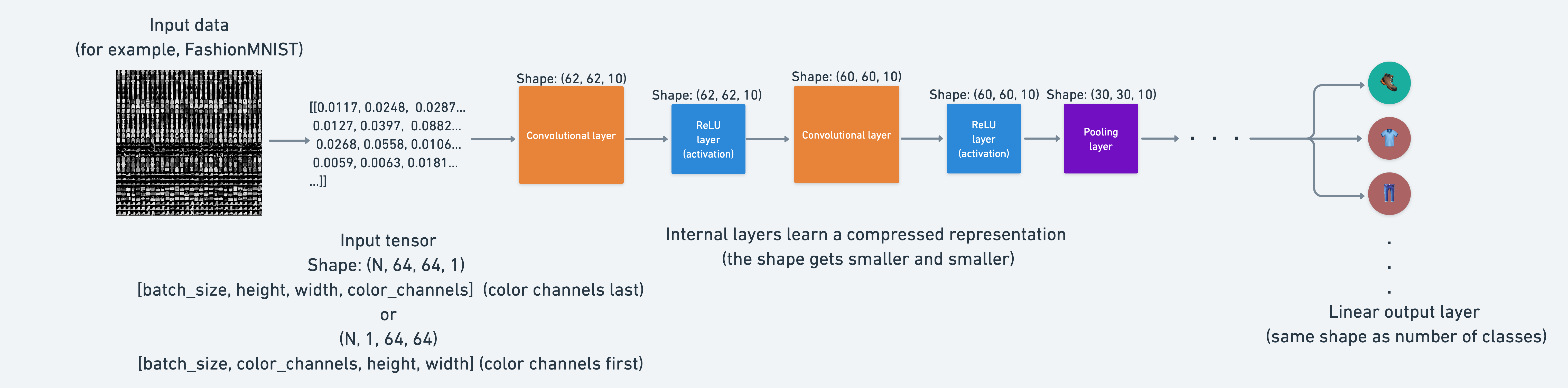
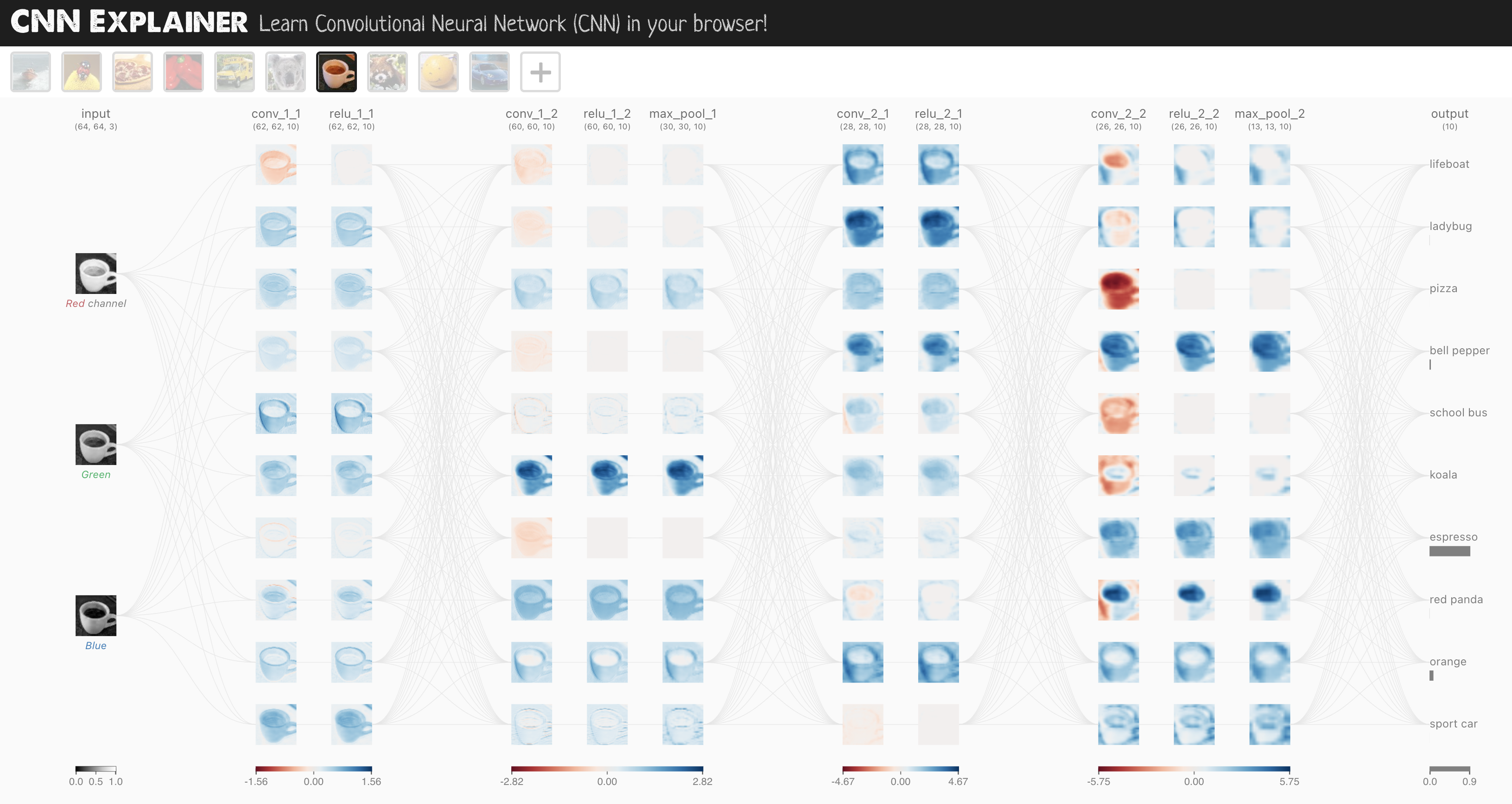
우리가 사용할 CNN 모델은 CNN Explainer 웹사이트의 TinyVGG로 알려진 모델입니다.

이 모델은 합성곱 신경망의 전형적인 구조를 따릅니다.

입력 레이어 -> [합성곱 레이어 -> 활성화 레이어 -> 풀링 레이어] -> 출력 레이어

[합성곱 레이어 -> 활성화 레이어 -> 풀링 레이어]의 내용은 요구 사항에 따라 여러 번 반복되고 확장될 수 있습니다.

어떤 모델을 사용해야 하나요?

질문: 잠깐만요, CNN이 이미지에 좋다고 하셨는데, 제가 알아야 할 다른 모델 유형이 있나요?

좋은 질문입니다.

이 표는 어떤 모델을 사용할지에 대한 일반적인 가이드입니다(예외는 있습니다).

문제 유형 사용할 모델 (일반적으로) 코드 예시
정형 데이터 (Excel 스프레드시트, 행 및 열 데이터) 그라디언트 부스팅 모델, 랜덤 포레스트, XGBoost sklearn.ensemble, XGBoost 라이브러리
비정형 데이터 (이미지, 오디오, 언어) 합성곱 신경망, 트랜스포머 torchvision.models, HuggingFace Transformers

참고: 위의 표는 참고용일 뿐이며, 결국 사용하게 될 모델은 작업 중인 문제와 제약 조건(데이터 양, 지연 시간 요구 사항)에 따라 크게 달라집니다.

모델에 대한 이야기는 이쯤 하고, 이제 CNN Explainer 웹사이트의 모델을 복제하는 CNN을 구축해 보겠습니다.

TinyVGG 아키텍처, CNN Explainer 웹사이트의 설정

이를 위해 torch.nnnn.Conv2d()nn.MaxPool2d() 레이어를 활용할 것입니다.

# Create a convolutional neural network 
class FashionMNISTModelV2(nn.Module):
    """
    Model architecture copying TinyVGG from: 
    https://poloclub.github.io/cnn-explainer/
    """
    def __init__(self, input_shape: int, hidden_units: int, output_shape: int):
        super().__init__()
        self.block_1 = nn.Sequential(
            nn.Conv2d(in_channels=input_shape, 
                      out_channels=hidden_units, 
                      kernel_size=3, # how big is the square that's going over the image?
                      stride=1, # default
                      padding=1),# options = "valid" (no padding) or "same" (output has same shape as input) or int for specific number 
            nn.ReLU(),
            nn.Conv2d(in_channels=hidden_units, 
                      out_channels=hidden_units,
                      kernel_size=3,
                      stride=1,
                      padding=1),
            nn.ReLU(),
            nn.MaxPool2d(kernel_size=2,
                         stride=2) # default stride value is same as kernel_size
        )
        self.block_2 = nn.Sequential(
            nn.Conv2d(hidden_units, hidden_units, 3, padding=1),
            nn.ReLU(),
            nn.Conv2d(hidden_units, hidden_units, 3, padding=1),
            nn.ReLU(),
            nn.MaxPool2d(2)
        )
        self.classifier = nn.Sequential(
            nn.Flatten(),
            # Where did this in_features shape come from? 
            # It's because each layer of our network compresses and changes the shape of our inputs data.
            nn.Linear(in_features=hidden_units*7*7, 
                      out_features=output_shape)
        )
    
    def forward(self, x: torch.Tensor):
        x = self.block_1(x)
        # print(x.shape)
        x = self.block_2(x)
        # print(x.shape)
        x = self.classifier(x)
        # print(x.shape)
        return x

torch.manual_seed(42)
model_2 = FashionMNISTModelV2(input_shape=1, 
    hidden_units=10, 
    output_shape=len(class_names)).to(device)
model_2
FashionMNISTModelV2(
  (block_1): Sequential(
    (0): Conv2d(1, 10, kernel_size=(3, 3), stride=(1, 1), padding=(1, 1))
    (1): ReLU()
    (2): Conv2d(10, 10, kernel_size=(3, 3), stride=(1, 1), padding=(1, 1))
    (3): ReLU()
    (4): MaxPool2d(kernel_size=2, stride=2, padding=0, dilation=1, ceil_mode=False)
  )
  (block_2): Sequential(
    (0): Conv2d(10, 10, kernel_size=(3, 3), stride=(1, 1), padding=(1, 1))
    (1): ReLU()
    (2): Conv2d(10, 10, kernel_size=(3, 3), stride=(1, 1), padding=(1, 1))
    (3): ReLU()
    (4): MaxPool2d(kernel_size=2, stride=2, padding=0, dilation=1, ceil_mode=False)
  )
  (classifier): Sequential(
    (0): Flatten(start_dim=1, end_dim=-1)
    (1): Linear(in_features=490, out_features=10, bias=True)
  )
)

Nice!

Our biggest model yet!

What we’ve done is a common practice in machine learning.

Find a model architecture somewhere and replicate it with code.

7.1 nn.Conv2d() 단계별로 살펴보기

위에서 만든 모델을 바로 사용할 수도 있지만, 먼저 새로 추가한 두 개의 레이어를 단계별로 살펴보겠습니다. * nn.Conv2d(): 합성곱 레이어(convolutional layer)라고도 합니다. * nn.MaxPool2d(): 최대 풀링 레이어(max pooling layer)라고도 합니다.

질문: nn.Conv2d()에서 “2d”는 무엇을 의미하나요?

2d는 2차원(2-dimensional) 데이터를 의미합니다. 우리의 이미지는 높이와 너비라는 두 개의 차원을 가집니다. 색상 채널 차원도 있지만, 각 색상 채널 차원 자체도 높이와 너비라는 두 개의 차원을 가집니다.

다른 차원의 데이터(텍스트의 경우 1D, 3D 객체의 경우 3D)를 위해 nn.Conv1d()nn.Conv3d()도 존재합니다.

레이어를 테스트하기 위해 CNN Explainer에서 사용된 데이터와 유사한 장난감 데이터(toy data)를 만들어 보겠습니다.

torch.manual_seed(42)

# 이미지 배치와 동일한 크기의 무작위 숫자 샘플 배치 생성
images = torch.randn(size=(32, 3, 64, 64)) # [batch_size, color_channels, height, width]
test_image = images[0] # 테스트를 위한 단일 이미지 가져오기
print(f"이미지 배치 모양: {images.shape} -> [batch_size, color_channels, height, width]")
print(f"단일 이미지 모양: {test_image.shape} -> [color_channels, height, width]") 
print(f"단일 이미지 픽셀 값:\n{test_image}")

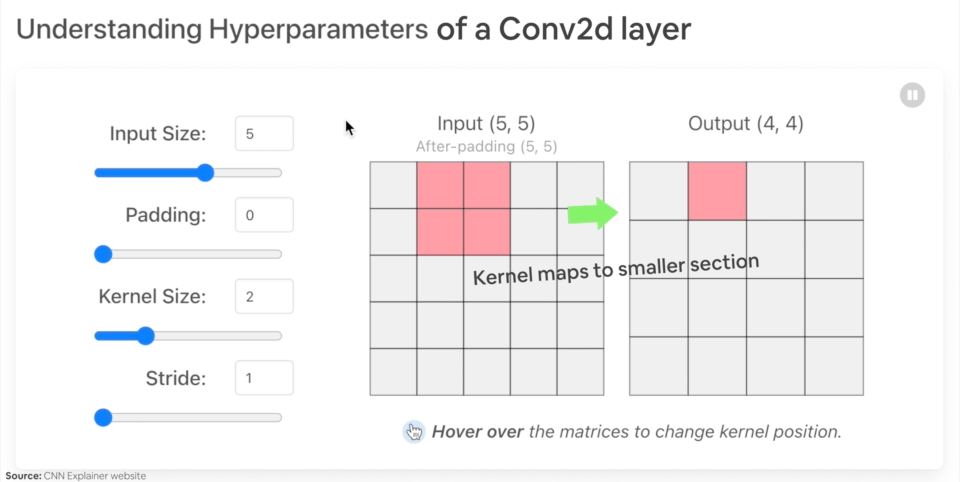
다양한 매개변수를 사용하여 nn.Conv2d() 예시를 만들어 보겠습니다. * in_channels (int) - 입력 이미지의 채널 수. * out_channels (int) - 합성곱에 의해 생성된 채널 수. * kernel_size (int 또는 tuple) - 합성곱 커널/필터의 크기. * stride (int 또는 tuple, 선택 사항) - 합성곱 커널이 한 번에 이동하는 단계의 크기. 기본값: 1. * padding (int, tuple, str) - 입력의 네 면 모두에 추가되는 패딩. 기본값: 0.

Conv2d 레이어의 다양한 매개변수를 살펴보는 예시

nn.Conv2d() 레이어의 하이퍼파라미터를 변경할 때 일어나는 일의 예시입니다.

torch.manual_seed(42)

# TinyVGG와 동일한 차원의 합성곱 레이어 생성
# (매개변수를 변경해 보며 어떤 일이 일어나는지 확인해 보세요)
conv_layer = nn.Conv2d(in_channels=3,
                       out_channels=10,
                       kernel_size=3,
                       stride=1,
                       padding=0) # 여기서 "valid" 또는 "same"도 사용해 보세요 

# 합성곱 레이어에 데이터 통과
conv_layer(test_image) # 참고: PyTorch <1.11.0 버전을 실행 중인 경우 모양 문제로 인해 오류가 발생합니다(nn.Conv2d()는 4D 텐서를 입력으로 기대함) 

단일 이미지를 통과시키려고 하면 모양 불일치 오류가 발생합니다.

RuntimeError: Expected 4-dimensional input for 4-dimensional weight [10, 3, 3, 3], but got 3-dimensional input of size [3, 64, 64] instead

참고: PyTorch 1.11.0 이상 버전을 실행 중이라면 이 오류는 발생하지 않습니다.

이는 nn.Conv2d() 레이어가 (N, C, H, W) 또는 [batch_size, color_channels, height, width] 크기의 4차원 텐서를 입력으로 기대하기 때문입니다.

현재 단일 이미지 test_image[color_channels, height, width] 또는 [3, 64, 64] 모양만 가지고 있습니다.

test_image.unsqueeze(dim=0)을 사용하여 N에 대한 추가 차원을 더함으로써 이를 해결할 수 있습니다.

# 테스트 이미지에 추가 차원 더하기
test_image.unsqueeze(dim=0).shape
# 추가 차원이 있는 테스트 이미지를 conv_layer에 통과시키기
conv_layer(test_image.unsqueeze(dim=0)).shape

Hmm, notice what happens to our shape (the same shape as the first layer of TinyVGG on CNN Explainer), we get different channel sizes as well as different pixel sizes.

What if we changed the values of conv_layer?

torch.manual_seed(42)
# Create a new conv_layer with different values (try setting these to whatever you like)
conv_layer_2 = nn.Conv2d(in_channels=3, # same number of color channels as our input image
                         out_channels=10,
                         kernel_size=(5, 5), # kernel is usually a square so a tuple also works
                         stride=2,
                         padding=0)

# Pass single image through new conv_layer_2 (this calls nn.Conv2d()'s forward() method on the input)
conv_layer_2(test_image.unsqueeze(dim=0)).shape
torch.Size([1, 10, 30, 30])

Woah, we get another shape change.

Now our image is of shape [1, 10, 30, 30] (it will be different if you use different values) or [batch_size=1, color_channels=10, height=30, width=30].

What’s going on here?

Behind the scenes, our nn.Conv2d() is compressing the information stored in the image.

It does this by performing operations on the input (our test image) against its internal parameters.

The goal of this is similar to all of the other neural networks we’ve been building.

Data goes in and the layers try to update their internal parameters (patterns) to lower the loss function thanks to some help of the optimizer.

The only difference is how the different layers calculate their parameter updates or in PyTorch terms, the operation present in the layer forward() method.

If we check out our conv_layer_2.state_dict() we’ll find a similar weight and bias setup as we’ve seen before.

# Check out the conv_layer_2 internal parameters
print(conv_layer_2.state_dict())
OrderedDict([('weight', tensor([[[[ 0.0883,  0.0958, -0.0271,  0.1061, -0.0253],
          [ 0.0233, -0.0562,  0.0678,  0.1018, -0.0847],
          [ 0.1004,  0.0216,  0.0853,  0.0156,  0.0557],
          [-0.0163,  0.0890,  0.0171, -0.0539,  0.0294],
          [-0.0532, -0.0135, -0.0469,  0.0766, -0.0911]],

         [[-0.0532, -0.0326, -0.0694,  0.0109, -0.1140],
          [ 0.1043, -0.0981,  0.0891,  0.0192, -0.0375],
          [ 0.0714,  0.0180,  0.0933,  0.0126, -0.0364],
          [ 0.0310, -0.0313,  0.0486,  0.1031,  0.0667],
          [-0.0505,  0.0667,  0.0207,  0.0586, -0.0704]],

         [[-0.1143, -0.0446, -0.0886,  0.0947,  0.0333],
          [ 0.0478,  0.0365, -0.0020,  0.0904, -0.0820],
          [ 0.0073, -0.0788,  0.0356, -0.0398,  0.0354],
          [-0.0241,  0.0958, -0.0684, -0.0689, -0.0689],
          [ 0.1039,  0.0385,  0.1111, -0.0953, -0.1145]]],


        [[[-0.0903, -0.0777,  0.0468,  0.0413,  0.0959],
          [-0.0596, -0.0787,  0.0613, -0.0467,  0.0701],
          [-0.0274,  0.0661, -0.0897, -0.0583,  0.0352],
          [ 0.0244, -0.0294,  0.0688,  0.0785, -0.0837],
          [-0.0616,  0.1057, -0.0390, -0.0409, -0.1117]],

         [[-0.0661,  0.0288, -0.0152, -0.0838,  0.0027],
          [-0.0789, -0.0980, -0.0636, -0.1011, -0.0735],
          [ 0.1154,  0.0218,  0.0356, -0.1077, -0.0758],
          [-0.0384,  0.0181, -0.1016, -0.0498, -0.0691],
          [ 0.0003, -0.0430, -0.0080, -0.0782, -0.0793]],

         [[-0.0674, -0.0395, -0.0911,  0.0968, -0.0229],
          [ 0.0994,  0.0360, -0.0978,  0.0799, -0.0318],
          [-0.0443, -0.0958, -0.1148,  0.0330, -0.0252],
          [ 0.0450, -0.0948,  0.0857, -0.0848, -0.0199],
          [ 0.0241,  0.0596,  0.0932,  0.1052, -0.0916]]],


        [[[ 0.0291, -0.0497, -0.0127, -0.0864,  0.1052],
          [-0.0847,  0.0617,  0.0406,  0.0375, -0.0624],
          [ 0.1050,  0.0254,  0.0149, -0.1018,  0.0485],
          [-0.0173, -0.0529,  0.0992,  0.0257, -0.0639],
          [-0.0584, -0.0055,  0.0645, -0.0295, -0.0659]],

         [[-0.0395, -0.0863,  0.0412,  0.0894, -0.1087],
          [ 0.0268,  0.0597,  0.0209, -0.0411,  0.0603],
          [ 0.0607,  0.0432, -0.0203, -0.0306,  0.0124],
          [-0.0204, -0.0344,  0.0738,  0.0992, -0.0114],
          [-0.0259,  0.0017, -0.0069,  0.0278,  0.0324]],

         [[-0.1049, -0.0426,  0.0972,  0.0450, -0.0057],
          [-0.0696, -0.0706, -0.1034, -0.0376,  0.0390],
          [ 0.0736,  0.0533, -0.1021, -0.0694, -0.0182],
          [ 0.1117,  0.0167, -0.0299,  0.0478, -0.0440],
          [-0.0747,  0.0843, -0.0525, -0.0231, -0.1149]]],


        [[[ 0.0773,  0.0875,  0.0421, -0.0805, -0.1140],
          [-0.0938,  0.0861,  0.0554,  0.0972,  0.0605],
          [ 0.0292, -0.0011, -0.0878, -0.0989, -0.1080],
          [ 0.0473, -0.0567, -0.0232, -0.0665, -0.0210],
          [-0.0813, -0.0754,  0.0383, -0.0343,  0.0713]],

         [[-0.0370, -0.0847, -0.0204, -0.0560, -0.0353],
          [-0.1099,  0.0646, -0.0804,  0.0580,  0.0524],
          [ 0.0825, -0.0886,  0.0830, -0.0546,  0.0428],
          [ 0.1084, -0.0163, -0.0009, -0.0266, -0.0964],
          [ 0.0554, -0.1146,  0.0717,  0.0864,  0.1092]],

         [[-0.0272, -0.0949,  0.0260,  0.0638, -0.1149],
          [-0.0262, -0.0692, -0.0101, -0.0568, -0.0472],
          [-0.0367, -0.1097,  0.0947,  0.0968, -0.0181],
          [-0.0131, -0.0471, -0.1043, -0.1124,  0.0429],
          [-0.0634, -0.0742, -0.0090, -0.0385, -0.0374]]],


        [[[ 0.0037, -0.0245, -0.0398, -0.0553, -0.0940],
          [ 0.0968, -0.0462,  0.0306, -0.0401,  0.0094],
          [ 0.1077,  0.0532, -0.1001,  0.0458,  0.1096],
          [ 0.0304,  0.0774,  0.1138, -0.0177,  0.0240],
          [-0.0803, -0.0238,  0.0855,  0.0592, -0.0731]],

         [[-0.0926, -0.0789, -0.1140, -0.0891, -0.0286],
          [ 0.0779,  0.0193, -0.0878, -0.0926,  0.0574],
          [-0.0859, -0.0142,  0.0554, -0.0534, -0.0126],
          [-0.0101, -0.0273, -0.0585, -0.1029, -0.0933],
          [-0.0618,  0.1115, -0.0558, -0.0775,  0.0280]],

         [[ 0.0318,  0.0633,  0.0878,  0.0643, -0.1145],
          [ 0.0102,  0.0699, -0.0107, -0.0680,  0.1101],
          [-0.0432, -0.0657, -0.1041,  0.0052,  0.0512],
          [ 0.0256,  0.0228, -0.0876, -0.1078,  0.0020],
          [ 0.1053,  0.0666, -0.0672, -0.0150, -0.0851]]],


        [[[-0.0557,  0.0209,  0.0629,  0.0957, -0.1060],
          [ 0.0772, -0.0814,  0.0432,  0.0977,  0.0016],
          [ 0.1051, -0.0984, -0.0441,  0.0673, -0.0252],
          [-0.0236, -0.0481,  0.0796,  0.0566,  0.0370],
          [-0.0649, -0.0937,  0.0125,  0.0342, -0.0533]],

         [[-0.0323,  0.0780,  0.0092,  0.0052, -0.0284],
          [-0.1046, -0.1086, -0.0552, -0.0587,  0.0360],
          [-0.0336, -0.0452,  0.1101,  0.0402,  0.0823],
          [-0.0559, -0.0472,  0.0424, -0.0769, -0.0755],
          [-0.0056, -0.0422, -0.0866,  0.0685,  0.0929]],

         [[ 0.0187, -0.0201, -0.1070, -0.0421,  0.0294],
          [ 0.0544, -0.0146, -0.0457,  0.0643, -0.0920],
          [ 0.0730, -0.0448,  0.0018, -0.0228,  0.0140],
          [-0.0349,  0.0840, -0.0030,  0.0901,  0.1110],
          [-0.0563, -0.0842,  0.0926,  0.0905, -0.0882]]],


        [[[-0.0089, -0.1139, -0.0945,  0.0223,  0.0307],
          [ 0.0245, -0.0314,  0.1065,  0.0165, -0.0681],
          [-0.0065,  0.0277,  0.0404, -0.0816,  0.0433],
          [-0.0590, -0.0959, -0.0631,  0.1114,  0.0987],
          [ 0.1034,  0.0678,  0.0872, -0.0155, -0.0635]],

         [[ 0.0577, -0.0598, -0.0779, -0.0369,  0.0242],
          [ 0.0594, -0.0448, -0.0680,  0.0156, -0.0681],
          [-0.0752,  0.0602, -0.0194,  0.1055,  0.1123],
          [ 0.0345,  0.0397,  0.0266,  0.0018, -0.0084],
          [ 0.0016,  0.0431,  0.1074, -0.0299, -0.0488]],

         [[-0.0280, -0.0558,  0.0196,  0.0862,  0.0903],
          [ 0.0530, -0.0850, -0.0620, -0.0254, -0.0213],
          [ 0.0095, -0.1060,  0.0359, -0.0881, -0.0731],
          [-0.0960,  0.1006, -0.1093,  0.0871, -0.0039],
          [-0.0134,  0.0722, -0.0107,  0.0724,  0.0835]]],


        [[[-0.1003,  0.0444,  0.0218,  0.0248,  0.0169],
          [ 0.0316, -0.0555, -0.0148,  0.1097,  0.0776],
          [-0.0043, -0.1086,  0.0051, -0.0786,  0.0939],
          [-0.0701, -0.0083, -0.0256,  0.0205,  0.1087],
          [ 0.0110,  0.0669,  0.0896,  0.0932, -0.0399]],

         [[-0.0258,  0.0556, -0.0315,  0.0541, -0.0252],
          [-0.0783,  0.0470,  0.0177,  0.0515,  0.1147],
          [ 0.0788,  0.1095,  0.0062, -0.0993, -0.0810],
          [-0.0717, -0.1018, -0.0579, -0.1063, -0.1065],
          [-0.0690, -0.1138, -0.0709,  0.0440,  0.0963]],

         [[-0.0343, -0.0336,  0.0617, -0.0570, -0.0546],
          [ 0.0711, -0.1006,  0.0141,  0.1020,  0.0198],
          [ 0.0314, -0.0672, -0.0016,  0.0063,  0.0283],
          [ 0.0449,  0.1003, -0.0881,  0.0035, -0.0577],
          [-0.0913, -0.0092, -0.1016,  0.0806,  0.0134]]],


        [[[-0.0622,  0.0603, -0.1093, -0.0447, -0.0225],
          [-0.0981, -0.0734, -0.0188,  0.0876,  0.1115],
          [ 0.0735, -0.0689, -0.0755,  0.1008,  0.0408],
          [ 0.0031,  0.0156, -0.0928, -0.0386,  0.1112],
          [-0.0285, -0.0058, -0.0959, -0.0646, -0.0024]],

         [[-0.0717, -0.0143,  0.0470, -0.1130,  0.0343],
          [-0.0763, -0.0564,  0.0443,  0.0918, -0.0316],
          [-0.0474, -0.1044, -0.0595, -0.1011, -0.0264],
          [ 0.0236, -0.1082,  0.1008,  0.0724, -0.1130],
          [-0.0552,  0.0377, -0.0237, -0.0126, -0.0521]],

         [[ 0.0927, -0.0645,  0.0958,  0.0075,  0.0232],
          [ 0.0901, -0.0190, -0.0657, -0.0187,  0.0937],
          [-0.0857,  0.0262, -0.1135,  0.0605,  0.0427],
          [ 0.0049,  0.0496,  0.0001,  0.0639, -0.0914],
          [-0.0170,  0.0512,  0.1150,  0.0588, -0.0840]]],


        [[[ 0.0888, -0.0257, -0.0247, -0.1050, -0.0182],
          [ 0.0817,  0.0161, -0.0673,  0.0355, -0.0370],
          [ 0.1054, -0.1002, -0.0365, -0.1115, -0.0455],
          [ 0.0364,  0.1112,  0.0194,  0.1132,  0.0226],
          [ 0.0667,  0.0926,  0.0965, -0.0646,  0.1062]],

         [[ 0.0699, -0.0540, -0.0551, -0.0969,  0.0290],
          [-0.0936,  0.0488,  0.0365, -0.1003,  0.0315],
          [-0.0094,  0.0527,  0.0663, -0.1148,  0.1059],
          [ 0.0968,  0.0459, -0.1055, -0.0412, -0.0335],
          [-0.0297,  0.0651,  0.0420,  0.0915, -0.0432]],

         [[ 0.0389,  0.0411, -0.0961, -0.1120, -0.0599],
          [ 0.0790, -0.1087, -0.1005,  0.0647,  0.0623],
          [ 0.0950, -0.0872, -0.0845,  0.0592,  0.1004],
          [ 0.0691,  0.0181,  0.0381,  0.1096, -0.0745],
          [-0.0524,  0.0808, -0.0790, -0.0637,  0.0843]]]])), ('bias', tensor([ 0.0364,  0.0373, -0.0489, -0.0016,  0.1057, -0.0693,  0.0009,  0.0549,
        -0.0797,  0.1121]))])

Look at that! A bunch of random numbers for a weight and bias tensor.

The shapes of these are manipulated by the inputs we passed to nn.Conv2d() when we set it up.

Let’s check them out.

# Get shapes of weight and bias tensors within conv_layer_2
print(f"conv_layer_2 weight shape: \n{conv_layer_2.weight.shape} -> [out_channels=10, in_channels=3, kernel_size=5, kernel_size=5]")
print(f"\nconv_layer_2 bias shape: \n{conv_layer_2.bias.shape} -> [out_channels=10]")
conv_layer_2 weight shape: 
torch.Size([10, 3, 5, 5]) -> [out_channels=10, in_channels=3, kernel_size=5, kernel_size=5]

conv_layer_2 bias shape: 
torch.Size([10]) -> [out_channels=10]

Question: What should we set the parameters of our nn.Conv2d() layers?

That’s a good one. But similar to many other things in machine learning, the values of these aren’t set in stone (and recall, because these values are ones we can set ourselves, they’re referred to as “hyperparameters”).

The best way to find out is to try out different values and see how they effect your model’s performance.

Or even better, find a working example on a problem similar to yours (like we’ve done with TinyVGG) and copy it.

We’re working with a different of layer here to what we’ve seen before.

But the premise remains the same: start with random numbers and update them to better represent the data.

7.2 Stepping through nn.MaxPool2d()

Now let’s check out what happens when we move data through nn.MaxPool2d().

# Print out original image shape without and with unsqueezed dimension
print(f"Test image original shape: {test_image.shape}")
print(f"Test image with unsqueezed dimension: {test_image.unsqueeze(dim=0).shape}")

# Create a sample nn.MaxPoo2d() layer
max_pool_layer = nn.MaxPool2d(kernel_size=2)

# Pass data through just the conv_layer
test_image_through_conv = conv_layer(test_image.unsqueeze(dim=0))
print(f"Shape after going through conv_layer(): {test_image_through_conv.shape}")

# Pass data through the max pool layer
test_image_through_conv_and_max_pool = max_pool_layer(test_image_through_conv)
print(f"Shape after going through conv_layer() and max_pool_layer(): {test_image_through_conv_and_max_pool.shape}")
Test image original shape: torch.Size([3, 64, 64])
Test image with unsqueezed dimension: torch.Size([1, 3, 64, 64])
Shape after going through conv_layer(): torch.Size([1, 10, 62, 62])
Shape after going through conv_layer() and max_pool_layer(): torch.Size([1, 10, 31, 31])

Notice the change in the shapes of what’s happening in and out of a nn.MaxPool2d() layer.

The kernel_size of the nn.MaxPool2d() layer will effects the size of the output shape.

In our case, the shape halves from a 62x62 image to 31x31 image.

Let’s see this work with a smaller tensor.

torch.manual_seed(42)
# Create a random tensor with a similiar number of dimensions to our images
random_tensor = torch.randn(size=(1, 1, 2, 2))
print(f"Random tensor:\n{random_tensor}")
print(f"Random tensor shape: {random_tensor.shape}")

# Create a max pool layer
max_pool_layer = nn.MaxPool2d(kernel_size=2) # see what happens when you change the kernel_size value 

# Pass the random tensor through the max pool layer
max_pool_tensor = max_pool_layer(random_tensor)
print(f"\nMax pool tensor:\n{max_pool_tensor} <- this is the maximum value from random_tensor")
print(f"Max pool tensor shape: {max_pool_tensor.shape}")
Random tensor:
tensor([[[[0.3367, 0.1288],
          [0.2345, 0.2303]]]])
Random tensor shape: torch.Size([1, 1, 2, 2])

Max pool tensor:
tensor([[[[0.3367]]]]) <- this is the maximum value from random_tensor
Max pool tensor shape: torch.Size([1, 1, 1, 1])

random_tensormax_pool_tensor 사이의 마지막 두 차원을 주목해 보세요. [2, 2]에서 [1, 1]로 바뀌었습니다.

본질적으로 절반으로 줄어든 것입니다.

그리고 이 변화는 nn.MaxPool2d()kernel_size 값에 따라 달라질 것입니다.

또한 max_pool_tensor에 남은 값은 random_tensor에서 최댓값(maximum)이라는 점도 주목하세요.

여기서 무슨 일이 일어나고 있는 걸까요?

이것은 신경망 퍼즐의 또 다른 중요한 조각입니다.

기본적으로 신경망의 모든 레이어는 고차원 공간에서 저차원 공간으로 데이터를 압축하려고 시도합니다.

즉, 많은 숫자(원시 데이터)를 가져와서 해당 숫자들에서 패턴을 학습하는 것입니다. 이 패턴은 예측 능력을 갖추면서도 원래 값보다 크기가 작은 패턴입니다.

인공지능의 관점에서 보면 신경망의 전체 목표를 정보의 압축이라고 볼 수 있습니다.

신경망의 각 레이어는 원래 입력 데이터를 더 작은 표현으로 압축하며, 이는 (바라건대) 미래의 입력 데이터에 대해 예측을 수행할 수 있는 능력을 갖춥니다

즉, 신경망의 관점에서 지능은 압축입니다.

이것이 nn.MaxPool2d() 레이어를 사용하는 아이디어입니다. 텐서의 일부에서 최댓값을 가져오고 나머지는 무시하는 것이죠.

본질적으로 정보의 상당 부분을 (바라건대) 유지하면서 텐서의 차원을 낮추는 것입니다.

nn.Conv2d() 레이어의 경우도 마찬가지입니다.

다만 최댓값만 가져오는 대신, nn.Conv2d()는 데이터에 대해 합성곱 연산을 수행합니다(CNN Explainer 웹페이지에서 이를 실제로 확인해 보세요).

과제: nn.AvgPool2d() 레이어는 무엇을 한다고 생각하시나요? 위에서 했던 것처럼 무작위 텐서를 만들어 통과시켜 보세요. 입력 및 출력 모양과 입력 및 출력 값을 확인해 보세요.

추가 학습 자료: “가장 흔한 합성곱 신경망”을 검색해 보세요. 어떤 아키텍처를 찾았나요? 그중 torchvision.models 라이브러리에 포함된 것이 있나요? 이것들로 무엇을 할 수 있을 것 같나요?

7.3 model_2를 위한 손실 함수 및 옵티마이저 설정

첫 번째 CNN의 레이어들을 충분히 살펴보았습니다.

하지만 여전히 명확하지 않은 부분이 있다면 작게 시작해 보세요.

모델의 단일 레이어를 선택하고 일부 데이터를 통과시켜 어떤 일이 일어나는지 확인해 보세요.

이제 앞으로 나아가 훈련을 시작할 시간입니다!

손실 함수와 옵티마이저를 설정해 보겠습니다.

이전과 동일하게 다중 클래스 분류 데이터를 다루고 있으므로 nn.CrossEntropyLoss()를 손실 함수로 사용합니다.

그리고 model_2.parameters()를 학습률 0.1로 최적화하기 위해 torch.optim.SGD()를 옵티마이저로 사용합니다.

# 손실 함수 및 옵티마이저 설정
loss_fn = nn.CrossEntropyLoss()
optimizer = torch.optim.SGD(params=model_2.parameters(), 
                             lr=0.1)

7.4 훈련 및 테스트 함수를 사용하여 model_2 훈련 및 테스트하기

손실 함수와 옵티마이저가 준비되었습니다!

이제 훈련하고 테스트할 시간입니다.

이전에 만든 train_step()test_step() 함수를 사용하겠습니다.

또한 다른 모델과 비교하기 위해 시간을 측정하겠습니다.

torch.manual_seed(42)

# 시간 측정
from timeit import default_timer as timer
train_time_start_model_2 = timer()

# 모델 훈련 및 테스트
epochs = 3
for epoch in tqdm(range(epochs)):
    print(f"에포크: {epoch}\n---------")
    train_step(data_loader=train_dataloader, 
        model=model_2, 
        loss_fn=loss_fn,
        optimizer=optimizer,
        accuracy_fn=accuracy_fn,
        device=device
    )
    test_step(data_loader=test_dataloader,
        model=model_2,
        loss_fn=loss_fn,
        accuracy_fn=accuracy_fn,
        device=device
    )

train_time_end_model_2 = timer()
total_train_time_model_2 = print_train_time(start=train_time_start_model_2,
                                           end=train_time_end_model_2,
                                           device=device)
Epoch: 0
---------
Train loss: 0.59411 | Train accuracy: 78.41%
Test loss: 0.39967 | Test accuracy: 85.70%

Epoch: 1
---------
Train loss: 0.36450 | Train accuracy: 86.81%
Test loss: 0.34607 | Test accuracy: 87.48%

Epoch: 2
---------
Train loss: 0.32553 | Train accuracy: 88.33%
Test loss: 0.32664 | Test accuracy: 88.23%

Train time on cuda: 21.099 seconds

와! 합성곱 레이어와 최대 풀링 레이어가 성능을 약간 향상시킨 것 같네요.

eval_model() 함수를 사용하여 model_2의 결과를 평가해 보겠습니다.

# model_2 결과 가져오기
model_2_results = eval_model(
    model=model_2,
    data_loader=test_dataloader,
    loss_fn=loss_fn,
    accuracy_fn=accuracy_fn
)
model_2_results

8. 모델 결과 및 훈련 시간 비교하기

우리는 세 가지 다른 모델을 훈련했습니다.

  1. model_0 - 두 개의 nn.Linear() 레이어가 있는 베이스라인 모델.
  2. model_1 - 베이스라인 모델과 동일한 설정이지만 nn.Linear() 레이어 사이에 nn.ReLU() 레이어가 추가된 모델.
  3. model_2 - CNN Explainer 웹사이트의 TinyVGG 아키텍처를 모방한 첫 번째 CNN 모델.

이것은 머신러닝에서 일반적인 관행입니다.

여러 모델을 구축하고 여러 번의 훈련 실험을 수행하여 어느 모델이 가장 좋은 성능을 내는지 확인하는 것이죠.

모델 결과 딕셔너리를 DataFrame으로 결합하여 확인해 보겠습니다.

import pandas as pd
compare_results = pd.DataFrame([model_0_results, model_1_results, model_2_results])
compare_results
model_name model_loss model_acc
0 FashionMNISTModelV0 0.476639 83.426518
1 FashionMNISTModelV1 0.685001 75.019968
2 FashionMNISTModelV2 0.326644 88.228834

좋네요!

훈련 시간 값도 추가할 수 있습니다.

# 결과 비교에 훈련 시간 추가
compare_results["training_time"] = [total_train_time_model_0,
                                    total_train_time_model_1,
                                    total_train_time_model_2]
compare_results

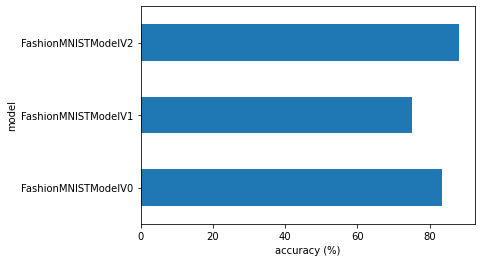
우리 CNN(FashionMNISTModelV2) 모델이 가장 성능이 좋았지만(가장 낮은 손실, 가장 높은 정확도), 훈련 시간은 가장 길었습니다.

그리고 베이스라인 모델(FashionMNISTModelV0)은 model_1(FashionMNISTModelV1)보다 성능이 좋았지만 훈련 시간이 더 오래 걸렸습니다(이는 model_0 훈련에는 CPU를, model_1 훈련에는 GPU를 사용했기 때문일 가능성이 큽니다).

여기서 발생하는 상충 관계를 성능-속도(performance-speed) 상충 관계라고 합니다.

일반적으로 더 크고 복잡한 모델(우리가 model_2로 했던 것처럼)에서 더 나은 성능을 얻을 수 있습니다.

하지만 이러한 성능 향상은 종종 훈련 속도와 추론 속도의 희생을 수반합니다.

참고: 훈련 시간은 사용 중인 하드웨어에 따라 크게 달라집니다.

일반적으로 CPU 코어가 많을수록 CPU에서의 모델 훈련 속도가 빨라집니다. GPU의 경우도 마찬가지입니다.

최신 하드웨어는 기술 발전을 통합하기 때문에 대개 모델 훈련 속도가 더 빠릅니다.

이제 시각화를 해볼까요?

# Visualize our model results
compare_results.set_index("model_name")["model_acc"].plot(kind="barh")
plt.xlabel("accuracy (%)")
plt.ylabel("model");

9. Make and evaluate random predictions with best model

Alright, we’ve compared our models to each other, let’s further evaluate our best performing model, model_2.

To do so, let’s create a function make_predictions() where we can pass the model and some data for it to predict on.

def make_predictions(model: torch.nn.Module, data: list, device: torch.device = device):
    pred_probs = []
    model.eval()
    with torch.inference_mode():
        for sample in data:
            # Prepare sample
            sample = torch.unsqueeze(sample, dim=0).to(device) # Add an extra dimension and send sample to device

            # Forward pass (model outputs raw logit)
            pred_logit = model(sample)

            # Get prediction probability (logit -> prediction probability)
            pred_prob = torch.softmax(pred_logit.squeeze(), dim=0)

            # Get pred_prob off GPU for further calculations
            pred_probs.append(pred_prob.cpu())
            
    # Stack the pred_probs to turn list into a tensor
    return torch.stack(pred_probs)
import random
random.seed(42)
test_samples = []
test_labels = []
for sample, label in random.sample(list(test_data), k=9):
    test_samples.append(sample)
    test_labels.append(label)

# View the first test sample shape and label
print(f"Test sample image shape: {test_samples[0].shape}\nTest sample label: {test_labels[0]} ({class_names[test_labels[0]]})")
Test sample image shape: torch.Size([1, 28, 28])
Test sample label: 5 (Sandal)

And now we can use our make_predictions() function to predict on test_samples.

# Make predictions on test samples with model 2
pred_probs= make_predictions(model=model_2, 
                             data=test_samples)

# View first two prediction probabilities list
pred_probs[:2]
tensor([[2.3550e-07, 1.7185e-08, 4.6618e-07, 6.1371e-08, 5.1185e-08, 9.9957e-01,
         3.7702e-07, 1.5924e-05, 3.7681e-05, 3.7831e-04],
        [7.3275e-02, 6.7410e-01, 3.7231e-03, 8.8129e-02, 1.0114e-01, 6.9186e-05,
         5.8674e-02, 4.2595e-04, 3.8635e-04, 7.1354e-05]])

Excellent!

And now we can go from prediction probabilities to prediction labels by taking the torch.argmax() of the output of the torch.softmax() activation function.

# Turn the prediction probabilities into prediction labels by taking the argmax()
pred_classes = pred_probs.argmax(dim=1)
pred_classes
tensor([5, 1, 7, 4, 3, 0, 4, 7, 1])
# Are our predictions in the same form as our test labels? 
test_labels, pred_classes
([5, 1, 7, 4, 3, 0, 4, 7, 1], tensor([5, 1, 7, 4, 3, 0, 4, 7, 1]))

Now our predicted classes are in the same format as our test labels, we can compare.

Since we’re dealing with image data, let’s stay true to the data explorer’s motto.

“Visualize, visualize, visualize!”

# Plot predictions
plt.figure(figsize=(9, 9))
nrows = 3
ncols = 3
for i, sample in enumerate(test_samples):
  # Create a subplot
  plt.subplot(nrows, ncols, i+1)

  # Plot the target image
  plt.imshow(sample.squeeze(), cmap="gray")

  # Find the prediction label (in text form, e.g. "Sandal")
  pred_label = class_names[pred_classes[i]]

  # Get the truth label (in text form, e.g. "T-shirt")
  truth_label = class_names[test_labels[i]] 

  # Create the title text of the plot
  title_text = f"Pred: {pred_label} | Truth: {truth_label}"
  
  # Check for equality and change title colour accordingly
  if pred_label == truth_label:
      plt.title(title_text, fontsize=10, c="g") # green text if correct
  else:
      plt.title(title_text, fontsize=10, c="r") # red text if wrong
  plt.axis(False);

Well, well, well, doesn’t that look good!

Not bad for a couple dozen lines of PyTorch code!

10. Making a confusion matrix for further prediction evaluation

There are many different evaluation metrics we can use for classification problems.

One of the most visual is a confusion matrix.

A confusion matrix shows you where your classification model got confused between predicitons and true labels.

To make a confusion matrix, we’ll go through three steps: 1. Make predictions with our trained model, model_2 (a confusion matrix compares predictions to true labels). 2. Make a confusion matrix using torch.ConfusionMatrix. 3. Plot the confusion matrix using mlxtend.plotting.plot_confusion_matrix().

Let’s start by making predictions with our trained model.

# Import tqdm for progress bar
from tqdm.auto import tqdm

# 1. Make predictions with trained model
y_preds = []
model_2.eval()
with torch.inference_mode():
  for X, y in tqdm(test_dataloader, desc="Making predictions"):
    # Send data and targets to target device
    X, y = X.to(device), y.to(device)
    # Do the forward pass
    y_logit = model_2(X)
    # Turn predictions from logits -> prediction probabilities -> predictions labels
    y_pred = torch.softmax(y_logit.squeeze(), dim=0).argmax(dim=1)
    # Put predictions on CPU for evaluation
    y_preds.append(y_pred.cpu())
# Concatenate list of predictions into a tensor
y_pred_tensor = torch.cat(y_preds)

Wonderful!

Now we’ve got predictions, let’s go through steps 2 & 3: 2. Make a confusion matrix using torchmetrics.ConfusionMatrix. 3. Plot the confusion matrix using mlxtend.plotting.plot_confusion_matrix().

First we’ll need to make sure we’ve got torchmetrics and mlxtend installed (these two libraries will help us make and visual a confusion matrix).

참고: If you’re using Google Colab, the default version of mlxtend installed is 0.14.0 (as of March 2022), however, for the parameters of the plot_confusion_matrix() function we’d like use, we need 0.19.0 or higher.

# See if torchmetrics exists, if not, install it
try:
    import torchmetrics, mlxtend
    print(f"mlxtend version: {mlxtend.__version__}")
    assert int(mlxtend.__version__.split(".")[1]) >= 19, "mlxtend verison should be 0.19.0 or higher"
except:
    !pip install -q torchmetrics -U mlxtend # <- 참고: If you're using Google Colab, this may require restarting the runtime
    import torchmetrics, mlxtend
    print(f"mlxtend version: {mlxtend.__version__}")
mlxtend version: 0.19.0

To plot the confusion matrix, we need to make sure we’ve got and mlxtend version of 0.19.0 or higher.

# Import mlxtend upgraded version
import mlxtend 
print(mlxtend.__version__)
assert int(mlxtend.__version__.split(".")[1]) >= 19 # should be version 0.19.0 or higher
0.19.0

torchmetrics and mlxtend installed, let’s make a confusion matrix!

First we’ll create a torchmetrics.ConfusionMatrix instance telling it how many classes we’re dealing with by setting num_classes=len(class_names).

Then we’ll create a confusion matrix (in tensor format) by passing our instance our model’s predictions (preds=y_pred_tensor) and targets (target=test_data.targets).

Finally we can plot our confision matrix using the plot_confusion_matrix() function from mlxtend.plotting.

from torchmetrics import ConfusionMatrix
from mlxtend.plotting import plot_confusion_matrix

# 2. Setup confusion matrix instance and compare predictions to targets
confmat = ConfusionMatrix(num_classes=len(class_names))
confmat_tensor = confmat(preds=y_pred_tensor,
                         target=test_data.targets)

# 3. Plot the confusion matrix
fig, ax = plot_confusion_matrix(
    conf_mat=confmat_tensor.numpy(), # matplotlib likes working with NumPy 
    class_names=class_names, # turn the row and column labels into class names
    figsize=(10, 7)
);

9. 최적의 모델로 무작위 예측 수행 및 평가하기

좋습니다. 모델들을 서로 비교해 보았으니, 이제 가장 성능이 좋은 모델인 model_2를 더 평가해 보겠습니다.

이를 위해 모델과 예측할 데이터를 전달할 수 있는 make_predictions() 함수를 만들어 보겠습니다.

def make_predictions(model: torch.nn.Module, data: list, device: torch.device = device):
    pred_probs = []
    model.eval()
    with torch.inference_mode():
        for sample in data:
            # 샘플 준비
            sample = torch.unsqueeze(sample, dim=0).to(device) # 추가 차원을 더하고 샘플을 장치로 보냄

            # 순전파 (모델은 가공되지 않은 로짓을 출력함)
            pred_logit = model(sample)

            # 예측 확률 가져오기 (로짓 -> 예측 확률)
            pred_prob = torch.softmax(pred_logit.squeeze(), dim=0)

            # 후속 계산을 위해 pred_prob를 GPU에서 내림
            pred_probs.append(pred_prob.cpu())
            
    # pred_probs 리스트를 텐서로 변환하기 위해 스택(stack) 수행
    return torch.stack(pred_probs)
import random
random.seed(42)
test_samples = []
test_labels = []
for sample, label in random.sample(list(test_data), k=9):
    test_samples.append(sample)
    test_labels.append(label)

# 첫 번째 테스트 샘플의 모양과 레이블 확인
print(f"테스트 샘플 이미지 모양: {test_samples[0].shape}\n테스트 샘플 레이블: {test_labels[0]} ({class_names[test_labels[0]]})")

이제 make_predictions() 함수를 사용하여 test_samples에 대해 예측을 수행할 수 있습니다.

# 모델 2로 테스트 샘플에 대해 예측 수행
pred_probs= make_predictions(model=model_2, 
                             data=test_samples)

# 처음 두 개의 예측 확률 리스트 확인
pred_probs[:2]

훌륭합니다!

이제 torch.softmax() 활성화 함수의 출력값에 torch.argmax()를 취하여 예측 확률에서 예측 레이블로 변환할 수 있습니다.

# argmax()를 사용하여 예측 확률을 예측 레이블로 변환
pred_classes = pred_probs.argmax(dim=1)
pred_classes
# 예측값이 테스트 레이블과 동일한 형식인가요? 
test_labels, pred_classes

이제 예측 클래스가 테스트 레이블과 동일한 형식이 되었으므로 비교할 수 있습니다.

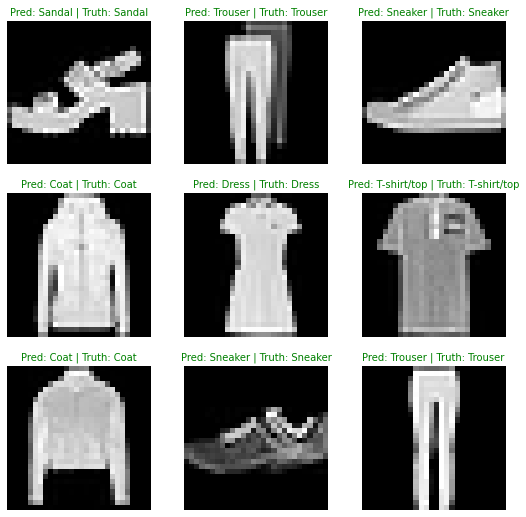
이미지 데이터를 다루고 있으니 데이터 탐색가의 모토를 따릅시다.

“시각화, 시각화, 시각화!”

# 예측 시각화
plt.figure(figsize=(9, 9))
nrows = 3
ncols = 3
for i, sample in enumerate(test_samples):
  # 서브플롯 생성
  plt.subplot(nrows, ncols, i+1)

  # 대상 이미지 그리기
  plt.imshow(sample.squeeze(), cmap="gray")

  # 예측 레이블 찾기 (텍스트 형식, 예: "Sandal")
  pred_label = class_names[pred_classes[i]]

  # 실제 레이블 가져오기 (텍스트 형식, 예: "T-shirt")
  truth_label = class_names[test_labels[i]] 

  # 플롯의 제목 텍스트 생성
  title_text = f"예측: {pred_label} | 실제: {truth_label}"
  
  # 일치 여부를 확인하고 그에 따라 제목 색상 변경
  if pred_label == truth_label:
      plt.title(title_text, fontsize=10, c="g") # 맞으면 초록색 텍스트
  else:
      plt.title(title_text, fontsize=10, c="r") # 틀리면 빨간색 텍스트
  plt.axis(False);

와, 정말 좋아 보이네요!

PyTorch 코드 수십 줄 치고는 나쁘지 않죠!

10. 추가 예측 평가를 위해 혼동 행렬 만들기

분류 문제에 사용할 수 있는 다양한 평가 지표가 많이 있습니다.

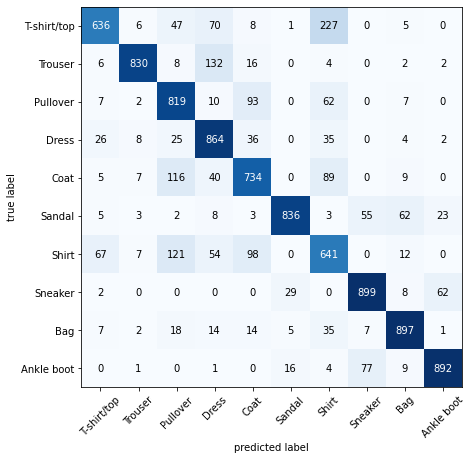
가장 시각적인 것 중 하나는 혼동 행렬(confusion matrix)입니다.

혼동 행렬은 분류 모델이 예측값과 실제 레이블 사이에서 어디서 혼동을 일으켰는지 보여줍니다.

혼동 행렬을 만들기 위해 세 단계를 거칩니다. 1. 훈련된 모델인 model_2로 예측을 수행합니다(혼동 행렬은 예측값을 실제 레이블과 비교합니다). 2. torchmetrics.ConfusionMatrix를 사용하여 혼동 행렬을 만듭니다. 3. mlxtend.plotting.plot_confusion_matrix()를 사용하여 혼동 행렬을 그립니다.

먼저 훈련된 모델로 예측을 수행해 보겠습니다.

# 진행률 표시줄을 위한 tqdm 임포트
from tqdm.auto import tqdm

# 1. 훈련된 모델로 예측 수행
y_preds = []
model_2.eval()
with torch.inference_mode():
  for X, y in tqdm(test_dataloader, desc="예측 수행 중"):
    # 데이터와 타겟을 타겟 장치로 보냄
    X, y = X.to(device), y.to(device)
    # 순전파 수행
    y_logit = model_2(X)
    # 예측값을 로짓 -> 예측 확률 -> 예측 레이블로 변환
    y_pred = torch.softmax(y_logit.squeeze(), dim=0).argmax(dim=1)
    # 평가를 위해 예측값을 CPU에 둠
    y_preds.append(y_pred.cpu())
# 예측 리스트를 텐서로 결합
y_pred_tensor = torch.cat(y_preds)

멋지네요!

이제 예측값이 생겼으니 2단계와 3단계를 진행해 보겠습니다. 2. torchmetrics.ConfusionMatrix를 사용하여 혼동 행렬을 만듭니다. 3. mlxtend.plotting.plot_confusion_matrix()를 사용하여 혼동 행렬을 그립니다.

먼저 torchmetricsmlxtend가 설치되어 있는지 확인해야 합니다(이 두 라이브러리는 혼동 행렬을 만들고 시각화하는 데 도움을 줍니다).

참고: Google Colab을 사용 중이라면 mlxtend의 기본 설치 버전은 0.14.0(2022년 3월 기준)입니다. 하지만 우리가 사용하려는 plot_confusion_matrix() 함수의 매개변수를 위해서는 0.19.0 이상의 버전이 필요합니다.

# torchmetrics가 있는지 확인하고, 없으면 설치합니다.
try:
    import torchmetrics, mlxtend
    print(f"mlxtend 버전: {mlxtend.__version__}")
    assert int(mlxtend.__version__.split(".")[1]) >= 19, "mlxtend 버전은 0.19.0 이상이어야 합니다."
except:
    !pip install -q torchmetrics -U mlxtend # <- 참고: Google Colab을 사용하는 경우 런타임을 다시 시작해야 할 수도 있습니다.
    import torchmetrics, mlxtend
    print(f"mlxtend 버전: {mlxtend.__version__}")

혼동 행렬을 그리려면 mlxtend 버전이 0.19.0 이상이어야 합니다.

# 업그레이드된 mlxtend 버전 임포트
import mlxtend 
print(mlxtend.__version__)
assert int(mlxtend.__version__.split(".")[1]) >= 19 # 0.19.0 이상 버전이어야 함

torchmetricsmlxtend가 설치되었으니 혼동 행렬을 만들어 봅시다!

먼저 num_classes=len(class_names)로 설정하여 우리가 다루는 클래스 수를 알려주는 torchmetrics.ConfusionMatrix 인스턴스를 생성합니다.

그런 다음 모델의 예측값(preds=y_pred_tensor)과 실제 타겟(target=test_data.targets)을 인스턴스에 전달하여 텐서 형식의 혼동 행렬을 생성합니다.

마지막으로 mlxtend.plottingplot_confusion_matrix() 함수를 사용하여 혼동 행렬을 시각화할 수 있습니다.

from torchmetrics import ConfusionMatrix
from mlxtend.plotting import plot_confusion_matrix

# 2. 혼동 행렬 인스턴스를 설정하고 예측값과 타겟을 비교합니다.
confmat = ConfusionMatrix(num_classes=len(class_names))
confmat_tensor = confmat(preds=y_pred_tensor,
                         target=test_data.targets)

# 3. 혼동 행렬을 그립니다.
fig, ax = plot_confusion_matrix(
    conf_mat=confmat_tensor.numpy(), # matplotlib은 NumPy와 함께 작동하는 것을 선호합니다. 
    class_names=class_names, # 행과 열 레이블을 클래스 이름으로 바꿉니다.
    figsize=(10, 7)
);

와! 정말 좋아 보이지 않나요?

대부분의 어두운 사각형이 왼쪽 위에서 오른쪽 아래로 이어지는 대각선에 몰려 있는 것을 통해 우리 모델이 꽤 잘 작동하고 있음을 알 수 있습니다(이상적인 모델은 이 대각선 사각형에만 값이 있고 나머지는 모두 0일 것입니다).

모델은 서로 비슷한 클래스에서 가장 많이 “혼동”을 일으킵니다. 예를 들어 실제로는 “Shirt”로 레이블이 지정된 이미지에 대해 “Pullover”라고 예측하는 경우입니다.

실제로 “T-shirt/top”으로 레이블이 지정된 클래스에 대해 “Shirt”라고 예측하는 경우도 마찬가지입니다.

이러한 정보는 단일 정확도 지표보다 훨씬 더 유용할 때가 많습니다. 모델이 어디서 틀리고 있는지 알려주기 때문입니다.

또한 모델이 특정한 실수를 하는지에 대한 힌트도 제공합니다.

모델이 “T-shirt/top”으로 레이블이 지정된 이미지를 가끔 “Shirt”라고 예측하는 것은 충분히 이해할 수 있는 일입니다.

이러한 정보를 사용하여 모델과 데이터를 더 자세히 조사하고 어떻게 개선할 수 있을지 파악할 수 있습니다.

과제: 훈련된 model_2를 사용하여 테스트용 FashionMNIST 데이터셋에 대해 예측을 수행해 보세요. 그런 다음 모델이 틀린 몇 가지 예측을 해당 이미지의 실제 레이블과 함께 시각화해 보세요. 이러한 예측을 시각화한 후, 이것이 모델링 오류에 가까운지 아니면 데이터 오류에 가까운지 생각해 보세요. 즉, 모델이 더 잘할 수 있었을까요, 아니면 데이터의 레이블이 서로 너무 비슷했나요(예: “Shirt” 레이블과 “T-shirt/top”이 너무 비슷함)?

11. 가장 성능이 좋은 모델 저장 및 불러오기

가장 성능이 좋은 모델을 저장하고 불러오는 것으로 이 섹션을 마무리하겠습니다.

노트북 01에서 보았듯이 다음 함수들을 조합하여 PyTorch 모델을 저장하고 불러올 수 있습니다. * torch.save: 전체 PyTorch 모델 또는 모델의 state_dict()를 저장하는 함수입니다. * torch.load: 저장된 PyTorch 객체를 불러오는 함수입니다. * torch.nn.Module.load_state_dict(): 저장된 state_dict()를 기존 모델 인스턴스로 불러오는 함수입니다.

이 세 가지에 대한 자세한 내용은 PyTorch 모델 저장 및 불러오기 문서에서 확인할 수 있습니다.

이제 model_2state_dict()를 저장한 다음, 다시 불러와서 평가하여 저장과 불러오기가 올바르게 수행되었는지 확인해 보겠습니다.

from pathlib import Path

# 모델 디렉토리 생성 (이미 존재하지 않는 경우), 참고: https://docs.python.org/3/library/pathlib.html#pathlib.Path.mkdir
MODEL_PATH = Path("models")
MODEL_PATH.mkdir(parents=True, # 필요한 경우 부모 디렉토리 생성
                 exist_ok=True # 모델 디렉토리가 이미 존재해도 오류를 발생시키지 않음
)

# 모델 저장 경로 생성
MODEL_NAME = "03_pytorch_computer_vision_model_2.pth"
MODEL_SAVE_PATH = MODEL_PATH / MODEL_NAME

# 모델 state dict 저장
print(f"모델 저장 중: {MODEL_SAVE_PATH}")
torch.save(obj=model_2.state_dict(), # state_dict()만 저장하면 학습된 매개변수만 저장됩니다.
           f=MODEL_SAVE_PATH)

저장된 모델 state_dict()가 있으므로 load_state_dict()torch.load()를 조합하여 다시 불러올 수 있습니다.

load_state_dict()를 사용하므로 저장된 모델 state_dict()와 동일한 입력 매개변수를 사용하여 FashionMNISTModelV2()의 새 인스턴스를 만들어야 합니다.

# FashionMNISTModelV2의 새 인스턴스 생성 (저장된 state_dict()와 동일한 클래스)
# 참고: 여기서의 모양이 저장된 버전과 같지 않으면 모델 로드 시 오류가 발생합니다.
loaded_model_2 = FashionMNISTModelV2(input_shape=1, 
                                    hidden_units=10, # 이것을 128로 변경하고 어떤 일이 일어나는지 확인해 보세요 
                                    output_shape=10) 

# 저장된 state_dict() 불러오기
loaded_model_2.load_state_dict(torch.load(f=MODEL_SAVE_PATH))

# 모델을 GPU로 보냄
loaded_model_2 = loaded_model_2.to(device)

이제 불러온 모델이 있으므로 eval_model()로 평가하여 해당 매개변수가 저장 전의 model_2와 유사하게 작동하는지 확인해 보겠습니다.

# 불러온 모델 평가
torch.manual_seed(42)

loaded_model_2_results = eval_model(
    model=loaded_model_2,
    data_loader=test_dataloader,
    loss_fn=loss_fn, 
    accuracy_fn=accuracy_fn
)

loaded_model_2_results

이 결과가 model_2_results와 동일하게 보이나요?

model_2_results

torch.isclose()를 사용하고 atol(절대 허용 오차) 및 rtol(상대 허용 오차) 매개변수를 통해 근접도 허용 수준을 전달하여 두 텐서가 서로 가까운지 확인할 수 있습니다.

모델의 결과가 가깝다면 torch.isclose()의 출력은 True여야 합니다.

# 결과가 서로 가까운지 확인 (너무 멀리 떨어져 있으면 오류가 있을 수 있음)
torch.isclose(torch.tensor(model_2_results["model_loss"]), 
              torch.tensor(loaded_model_2_results["model_loss"]),
              atol=1e-08, # 절대 허용 오차
              rtol=0.0001) # 상대 허용 오차

연습 문제

모든 연습 문제는 위 섹션의 코드를 연습하는 데 중점을 둡니다.

각 섹션을 참조하거나 링크된 리소스를 따라가며 완료할 수 있어야 합니다.

모든 연습 문제는 장치 중립적 코드를 사용하여 완료해야 합니다.

리소스: * 03 연습 문제 템플릿 노트북 * 03 연습 문제 예시 솔루션 노트북 (솔루션을 보기 전에 직접 풀어보세요)

  1. 현재 컴퓨터 비전이 사용되고 있는 산업 분야 3가지는 무엇인가요?
  2. “머신러닝에서 과적합(overfitting)이란 무엇인가”를 검색하고 찾은 내용에 대해 한 문장으로 적어보세요.
  3. “머신러닝에서 과적합을 방지하는 방법”을 검색하여 3가지를 적고 각각에 대해 한 문장으로 설명하세요. 참고: 방법이 아주 많으므로 너무 걱정하지 말고 3가지만 골라 시작해 보세요.
  4. CNN Explainer 웹사이트를 20분 동안 읽고 클릭해 보세요.
    • “upload” 버튼을 사용하여 자신의 예시 이미지를 업로드하고 이미지가 CNN의 각 레이어를 통과할 때 어떤 일이 일어나는지 확인해 보세요.
  5. torchvision.datasets.MNIST() 훈련 및 테스트 데이터셋을 로드하세요.
  6. MNIST 훈련 데이터셋에서 적어도 5개의 서로 다른 샘플을 시각화하세요.
  7. torch.utils.data.DataLoader를 사용하여 MNIST 훈련 및 테스트 데이터셋을 데이터로더로 변환하고 batch_size=32로 설정하세요.
  8. MNIST 데이터셋에 적합한, 이 노트북에서 사용된 model_2(CNN Explainer 웹사이트의 모델, TinyVGG로도 알려짐)를 재현하세요.
  9. 8번 연습 문제에서 구축한 모델을 CPU와 GPU에서 훈련하고 각각 얼마나 걸리는지 확인해 보세요.
  10. 훈련된 모델을 사용하여 예측을 수행하고 적어도 5개를 시각화하여 예측값과 실제 레이블을 비교해 보세요.
  11. 모델의 예측값을 실제 레이블과 비교하는 혼동 행렬을 그리세요.
  12. 모양이 [1, 3, 64, 64]인 무작위 텐서를 만들고 다양한 하이퍼파라미터 설정(원하는 설정 가능)으로 nn.Conv2d() 레이어에 통과시키세요. kernel_size 매개변수가 커지거나 작아지면 어떤 변화가 나타나나요?
  13. 이 노트북의 훈련된 model_2와 유사한 모델을 사용하여 테스트용 torchvision.datasets.FashionMNIST 데이터셋에 대해 예측을 수행하세요.
    • 그런 다음 모델이 틀린 몇 가지 예측을 해당 이미지의 실제 레이블과 함께 시각화하세요.
    • 이러한 예측을 시각화한 후, 이것이 모델링 오류에 가까운지 아니면 데이터 오류에 가까운지 생각해 보세요.
    • 즉, 모델이 더 잘할 수 있었을까요, 아니면 데이터의 레이블이 서로 너무 비슷했나요(예: “Shirt” 레이블과 “T-shirt/top”이 너무 비슷함)?

추가 학습 자료

  • 시청: MIT의 딥 컴퓨터 비전 입문 강의. 합성곱 신경망 뒤에 숨겨진 훌륭한 직관을 제공할 것입니다.
  • PyTorch vision 라이브러리의 다양한 옵션을 10분 동안 클릭해 보세요. 어떤 모듈들을 사용할 수 있나요?
  • “가장 흔한 합성곱 신경망”을 검색해 보세요. 어떤 아키텍처를 찾았나요? 그중 torchvision.models 라이브러리에 포함된 것이 있나요? 이것들로 무엇을 할 수 있을 것 같나요?
  • 수많은 사전 훈련된 PyTorch 컴퓨터 비전 모델과 PyTorch의 컴퓨터 비전 기능에 대한 다양한 확장 기능은 Ross Wightman의 PyTorch Image Models 라이브러리 timm(Torch Image Models)을 확인해 보세요.