코드 보기
from datetime import datetime

now = datetime.now()
print(now)
2026-02-26 10:11:29.316797이 장에서는 파이썬에서 날짜와 시간을 다루는 방법을 설명합니다. 언뜻 보기에 날짜와 시간은 간단해 보입니다. 일상생활에서 항상 사용하며 큰 혼란을 일으키지 않는 것 같기 때문입니다. 하지만 날짜와 시간에 대해 더 많이 배울수록 상황은 더 복잡해지는 것처럼 보입니다. 워밍업으로, 겉보기에는 간단해 보이는 다음 세 가지 질문을 시도해 보세요:
매년이 365일이 아니라는 점은 이미 알고 계시겠지만, 윤년 여부를 결정하는 전체 규칙을 알고 계시나요?
세계의 많은 지역에서 일광 절약 시간제(DST)를 사용하기 때문에 어떤 날은 23시간이고 다른 날은 25시간이라는 점을 기억하셨을 수도 있습니다. 지구의 자전 속도가 점차 느려지고 있기 때문에 때때로 윤초가 추가되어 어떤 분은 61초가 된다는 사실은 몰랐을 수도 있습니다.
날짜와 시간이 어려운 이유는 두 가지 물리적 현상(지구의 자전과 태양 주위의 공도)을 월, 시간대, DST를 포함한 수많은 지정학적 현상과 조화시켜야 하기 때문입니다.
이 장에서는 날짜와 시간에 관한 모든 세부 사항을 다루지는 않겠지만, 일반적인 데이터 분석 과제에 도움이 될 실무 기술의 탄탄한 토대를 제공할 것입니다. 특히 시간과 관련된 코드 작업 중 여기서 다루지 않는 내용에는 주어진 빈도로 스크립트나 함수를 실행하는 방법, 즉 작업 예약(scheduling jobs) 방법이 포함됩니다.
이 장에서는 seaborn 패키지를 설치해야 합니다. 이 장에서는 차세대 버전의 seaborn을 사용하며, 명령줄(터미널)에서 다음을 실행하여 설치할 수 있습니다.
pixi run pip install --pre seaborn또한 pandas 패키지와 수치 계산 패키지인 numpy를 사용할 것입니다.
데이터 과학에서 표현되는 시간의 한 지점은 시각과 날짜로 구성됩니다. 이 두 요소가 합쳐져 datetime이 됩니다.
datetime 객체는 파이썬에서 시간을 다루는 가장 기본적인 객체입니다. (실무에서 훨씬 더 많이 사용하게 될) pandas를 사용한 datetime 연산으로 넘어가기 전에 이것들에 대해 알아두는 것이 유용합니다. 파이썬의 datetime 객체는 연, 월, 일, 시, 초, 마이크로초를 캡처합니다. datetime을 처리하는 클래스(해당 객체들의 타입은 datetime.datetime입니다)를 가져와서 살펴보겠습니다.
from datetime import datetime
now = datetime.now()
print(now)2026-02-26 10:11:29.316797대부분의 사람들은 일-월-연 순서에 더 익숙할 것이고, 어떤 사람들은 월-일-연 순서를 쓰기도 하는데 이는 전혀 말이 되지 않죠! 하지만 datetime은 ISO 8601을 따른다는 점에 유의하세요. 이는 연-월-일-시:분:초 형식이며 시간은 24시간제 형식을 따르는 국제 표준입니다. 코딩할 때도 이 형식을 사용해야 합니다.
우리가 만든 변수에는 year, month, day 등 마이크로초까지 내려가는 메서드들이 있음을 알 수 있습니다. 우리가 만든 now 객체에서 이러한 메서드들을 호출하면 관련 세부 정보를 반환합니다.
{.callout-note} 연습 문제 `datetime.now()` 인스턴스에서 연, 월, 일 함수를 호출해 보세요.
한번 생성된 now는 스스로 갱신되지 않는다는 점에 유의하세요. 생성된 시점의 시간에 고정되어 있습니다.
주어진 수치 정보를 사용하여 datetime을 만드는 명령어는 다음과 같습니다:
specific_datetime = datetime(2019, 11, 28)
print(specific_datetime)
2019-11-28 00:00:00더 명확하고 가독성 좋은 코드를 위해 키워드 인수를 사용하여 호출할 수도 있습니다: datetime(year=2019, month=11, day=28).
시간에 관해 수행해야 할 가장 흔한 변환 중 하나는 “4 July 2002”와 같은 문자열을 datetime으로 바꾸는 것입니다. datetime.strptime()을 사용하여 이를 수행할 수 있습니다. 다음은 예제입니다:
date_string = "16 February in 2002"
datetime.strptime(date_string, "%d %B in %Y")
datetime.datetime(2002, 2, 16, 0, 0)어떻게 된 일일까요? 데이터 문자열의 패턴은 “일 월 ‘in’ 연도”입니다. 파이썬의 strptime() 함수에는 datetime의 각 부분(그리고 이를 표현하는 다양한 방식)에 대한 코드가 있습니다. 예를 들어 월의 정식 명칭 대신 약어를 사용했다면 다음과 같이 될 것입니다:
date_string = "16 Feb in 2002"
datetime.strptime(date_string, "%d %b in %Y")
datetime.datetime(2002, 2, 16, 0, 0)물론 여러분이 전달하는 내용의 세세한 부분까지 항상 신경 쓰고 싶지는 않을 것입니다. 내장된 dateutil 패키지는 형식을 유연하게 파싱해야 할 때 도움을 줄 수 있습니다(하지만 명시적인 것이 암시적인 것보다 낫다는 점을 기억하세요!):
from dateutil.parser import parse

date_string = "03 Feb 02"
print(parse(date_string))
date_string = "3rd February 2002"
print(parse(date_string))
2002-02-03 00:00:00
2002-02-03 00:00:00datetime을 문자열로 바꾸는 것은 어떨까요? 동일한 코드를 사용하여 이 또한 가능합니다.
now.strftime("%A, %m, %Y")'Thursday, 02, 2026'대부분의 strftime 코드 목록은 https://strftime.org/에서 확인할 수 있으며, 편의를 위해 아래 표에 재현해 두었습니다.
| 코드 | 의미 | 예시 |
|---|---|---|
| %a | 로케일 기준 요일 약어. | Mon |
| %A | 로케일 기준 요일 정식 명칭. | Monday |
| %w | 일요일은 0, 토요일은 6으로 표시하는 십진수 요일. | 1 |
| %d | 0이 채워진 십진수 형태의 일(day). | 30 |
| %-d | 십진수 형태의 일(day). (플랫폼 의존적) | 30 |
| %b | 로케일 기준 월 약어. | Sep |
| %B | 로케일 기준 월 정식 명칭. | September |
| %m | 0이 채워진 십진수 형태의 월. | 09 |
| %-m | 십진수 형태의 월. (플랫폼 의존적) | 9 |
| %y | 세기(century)를 제외하고 0이 채워진 십진수 형태의 연도. | 13 |
| %Y | 세기를 포함하여 십진수 형태의 연도. | 2013 |
| %H | 0이 채워진 십진수 형태의 시 (24시간제). | 07 |
| %-H | 십진수 형태의 시 (24시간제). (플랫폼 의존적) | 7 |
| %I | 0이 채워진 십진수 형태의 시 (12시간제). | 07 |
| %-I | 십진수 형태의 시 (12시간제). (플랫폼 의존적) | 7 |
| %p | 로케일 기준 AM 또는 PM. | AM |
| %M | 0이 채워진 십진수 형태의 분. | 06 |
| %-M | 십진수 형태의 분. (플랫폼 의존적) | 6 |
| %S | 0이 채워진 십진수 형태의 초. | 05 |
| %-S | 십진수 형태의 초. (플랫폼 의존적) | 5 |
| %f | 왼쪽에 0이 채워진 십진수 형태의 마이크로초. | 000000 |
| %z | +HHMM 또는 -HHMM 형태의 UTC 오프셋 (순수 객체인 경우 빈 문자열). | |
| %Z | 시간대 이름 (순수 객체인 경우 빈 문자열). | |
| %j | 0이 채워진 십진수 형태의 연중 일수. | 273 |
| %-j | 십진수 형태의 연중 일수. (플랫폼 의존적) | 273 |
| %U | 일요일을 한 주의 시작으로 하는 0이 채워진 십진수 형태의 연중 주차. | 39 |
| %W | 월요일을 한 주의 시작으로 하는 십진수 형태의 연중 주차. | 39 |
| %c | 로케일 기준 적절한 날짜 및 시간 표현. | Mon Sep 30 07:06:05 2013 |
| %x | 로케일 기준 적절한 날짜 표현. | 09/30/13 |
| %X | 로케일 기준 적절한 시간 표현. | 07:06:05 |
| %% | 리터럴 ‘%’ 문자. | % |
datetime과 관련하여 여러분이 기대하는 많은 연산이 작동합니다. 예를 들어:
now > specific_datetimeTrue단일 datetime을 기록하거나 비교하는 것 외에도, datetime의 차이에 관심을 가질 때가 많습니다. 하나를 생성한 다음 그 타입을 확인해 보겠습니다.
time_diff = now - datetime(year=2020, month=1, day=1)
print(time_diff)
2248 days, 10:11:29.316797이는 일, 시간, 분, 초, 마이크로초 형식으로 되어 있습니다. type()으로 타입을 확인해 보겠습니다:
type(time_diff)datetime.timedelta이는 datetime.timedelta 타입입니다.
날짜 및 시간 객체는 시간대 정보 포함 여부에 따라 ‘인식형(aware)’ 또는 ’순수형(naive)’으로 분류될 수 있습니다. 인식형 객체는 다른 인식형 객체에 대한 자신의 상대적 위치를 파악할 수 있지만, 순수형 객체는 다른 날짜/시간 객체에 대한 자신의 상대적 위치를 모호함 없이 파악하기에 충분한 정보를 담고 있지 않습니다. 지금까지 우리는 순수형 datetime 객체로 작업해 왔습니다.
pytz 패키지는 시간대 작업을 도와줄 수 있습니다. 두 가지 주요 유스케이스가 있습니다: i) 시간대 정보가 없는 datetime을 로컬라이즈하여 시간대 정보를 갖게 하는 것, ii) 한 시간대의 datetime을 다른 시간대로 변환하는 것입니다.
코딩에서의 기본 시간대는 UTC입니다. ’UTC’는 협정 세계시(Coordinated Universal Time)입니다. 이는 그리니치 표준시(GMT) 및 다양한 세계시 정의의 후계자이면서 동시에 구별되는 개념입니다. UTC는 현재 시계와 시간 측정을 조절하기 위한 전 세계적인 표준입니다.
다른 모든 시간대는 UTC를 기준으로 정의되며, 로컬 시간을 도출하기 위해 UTC에 더하거나 빼야 할 시간인 UTC+0800과 같은 오프셋을 포함합니다. UTC에서는 일광 절약 시간제가 발생하지 않으므로, 일광 절약 시간제 전환이나 국가의 시간대 변경, 또는 여러 시간대를 로밍하는 모바일 컴퓨터로 인한 혼란과 모호함 없이 날짜 산술 연산을 수행하기에 유용한 시간대입니다.
이제 강력한 numpy 패키지를 사용한 datetime의 벡터화 연산에 대해 알아보겠습니다(이것은 pandas에서도 사용됩니다). numpy에는 np.datetime64라는 자체적인 datetime 버전이 있으며, 대규모 작업에서 매우 효율적입니다. 실제 작동하는 모습을 보겠습니다:
import numpy as np

date = np.array("2020-01-01", dtype=np.datetime64)
date
array('2020-01-01', dtype='datetime64[D]')’D’는 여기서 가장 작은 단위가 일(day)임을 알려줍니다. 이 객체로부터 날짜 벡터를 쉽게 만들 수 있습니다:
date + range(32)array(['2020-01-01', '2020-01-02', '2020-01-03', '2020-01-04',
'2020-01-05', '2020-01-06', '2020-01-07', '2020-01-08',
'2020-01-09', '2020-01-10', '2020-01-11', '2020-01-12',
'2020-01-13', '2020-01-14', '2020-01-15', '2020-01-16',
'2020-01-17', '2020-01-18', '2020-01-19', '2020-01-20',
'2020-01-21', '2020-01-22', '2020-01-23', '2020-01-24',
'2020-01-25', '2020-01-26', '2020-01-27', '2020-01-28',
'2020-01-29', '2020-01-30', '2020-01-31', '2020-02-01'],
dtype='datetime64[D]')마지막 날짜가 다음 달로 어떻게 넘어가는지 확인하세요.
일(day)보다 더 정밀한 단위로 datetime을 생성하면, numpy는 입력으로부터 이를 파악합니다. 예를 들어 다음은 초 단위까지의 해상도를 제공합니다.
np.datetime64("2020-01-01 09:00")np.datetime64('2020-01-01T09:00')numpy와 datetime에 관한 한 가지 주의 사항이 있습니다: 더 정밀하게 갈수록(펨토초(\(10^{-15}\) 초)까지 가능합니다), 더 정밀하게 갈수록 도달할 수 있는 날짜 범위가 좁아집니다. 인기 있는 정밀도 선택지는 datetime64[ns]이며, 이는 서기 1678년부터 2262년까지의 시간을 인코딩할 수 있습니다. 초(second) 단위를 사용하면 기원전 2.9\(\times 10^9\)년부터 서기 2.9\(\times 10^9\)년까지 가능합니다.
pandas는 파이썬에서 시계열 분석을 위한 핵심 도구입니다. 기본 객체는 timestamp입니다. pd.to_datetime() 함수는 datetime을 합리적으로 나타내는 문자열로부터 타임스탬프를 생성합니다. pd.to_datetime()을 사용하여 타임스탬프를 생성하는 예제를 보고 살펴보겠습니다.
import pandas as pd

date = pd.to_datetime("16th of February, 2020")
date
Timestamp('2020-02-16 00:00:00')이것은 Timestamp 타입이며, 이전 장의 내장 파이썬 datetime.datetime 클래스와 동일한 속성을 많이 가지고 있음을 알 수 있습니다. 이와 마찬가지로 tz(시간대) 및 tzinfo의 기본 설정은 None입니다. 하지만 빈도를 나타내는 freq와 같은 추가적인 속성들이 있는데, 이는 단지 한두 개의 datetime이 아니라 시계열(time series)을 조작할 때 매우 유용할 것입니다.
pandas를 사용하여 시계열을 생성하게 될 주요 시나리오는 두 가지입니다: i) 처음부터 새로 생성하거나, ii) 파일에서 데이터를 읽어오는 것입니다. 먼저 i)를 수행하는 몇 가지 방법을 보겠습니다.
위에서 만든 날짜를 가져와 pandas의 timedelta 함수를 사용하여 확장함으로써 시계열을 만들 수 있습니다:
date + pd.to_timedelta(np.arange(12), "D")DatetimeIndex(['2020-02-16', '2020-02-17', '2020-02-18', '2020-02-19',
'2020-02-20', '2020-02-21', '2020-02-22', '2020-02-23',
'2020-02-24', '2020-02-25', '2020-02-26', '2020-02-27'],
dtype='datetime64[ns]', freq=None)이것은 datetime65[ns] 타입의 datetime 인덱스를 생성했습니다(인덱스는 pandas 열의 특별한 유형임을 기억하세요). 여기서 “ns”는 나노초 해상도를 의미합니다.
또 다른 방법은 날짜 범위를 만드는 것입니다(freq= 키워드 인수를 사용하여 빈도를 전달합니다):
pd.date_range(start="2018/1/1", end="2018/1/8")DatetimeIndex(['2018-01-01', '2018-01-02', '2018-01-03', '2018-01-04',
'2018-01-05', '2018-01-06', '2018-01-07', '2018-01-08'],
dtype='datetime64[ns]', freq='D')범위를 생성하는 또 다른 방법은 기간(periods) 수와 빈도를 지정하는 것입니다:
pd.date_range("2018-01-01", periods=3, freq="h")DatetimeIndex(['2018-01-01 00:00:00', '2018-01-01 01:00:00',
'2018-01-01 02:00:00'],
dtype='datetime64[ns]', freq='h')이전 장의 시간대 논의에 이어, pandas 데이터 프레임에서 직접 시간대를 로컬라이즈할 수도 있습니다:
dti = pd.date_range("2018-01-01", periods=3, freq="h").tz_localize("UTC")
dti.tz_convert("US/Pacific")
DatetimeIndex(['2017-12-31 16:00:00-08:00', '2017-12-31 17:00:00-08:00',
'2017-12-31 18:00:00-08:00'],
dtype='datetime64[ns, US/Pacific]', freq='h')이제 datetime 타입이 아닌 상태로 읽어온 데이터를 datetime 열로 바꾸는 방법을 보겠습니다. 이는 실무에서 항상 일어나는 일입니다. 정보 통신 업종의 일자리 구인 데이터(ONS 코드 UNEM-JP9P)를 읽어온 다음, 주어진 “date” 열을 pandas datetime 열로 가공해 보겠습니다.
import requests

url = "https://api.beta.ons.gov.uk/v1/data?uri=/employmentandlabourmarket/peopleinwork/employmentandemployeetypes/timeseries/jp9z/lms/previous/v108"

# ONS API로부터 데이터 가져오기:
json_data = requests.get(url).json()
df = pd.DataFrame(pd.json_normalize(json_data["months"]))
df["value"] = pd.to_numeric(df["value"])
df = df[["date", "value"]]
df = df.rename(columns={"value": "구인수 (ICT), 천명"})
df.head()| date | 구인수 (ICT), 천명 | |
|---|---|---|
| 0 | 2001 MAY | 568 |
| 1 | 2001 JUN | 563 |
| 2 | 2001 JUL | 554 |
| 3 | 2001 AUG | 554 |
| 4 | 2001 SEP | 536 |
데이터를 가져왔습니다. 들어온 열의 타입들을 확인해 보겠습니다.
df.info()<class 'pandas.core.frame.DataFrame'>
RangeIndex: 281 entries, 0 to 280
Data columns (total 2 columns):
# Column Non-Null Count Dtype
--- ------ -------------- -----
0 date 281 non-null object
1 구인수 (ICT), 천명 281 non-null int64
dtypes: int64(1), object(1)
memory usage: 4.5+ KB기본값인 ‘object’ 타입이지만, 우리는 date 열이 datetime 타입인 datetime64[ns]를 갖기를 원합니다. 다시 pd.to_datetime()을 사용합니다:
df["date"] = pd.to_datetime(df["date"])
df["date"].head()
/tmp/ipykernel_5908/3535541307.py:1: UserWarning: Could not infer format, so each element will be parsed individually, falling back to `dateutil`. To ensure parsing is consistent and as-expected, please specify a format.
df["date"] = pd.to_datetime(df["date"])0 2001-05-01
1 2001-06-01
2 2001-07-01
3 2001-08-01
4 2001-09-01
Name: date, dtype: datetime64[ns]이 경우에는 “2001 MAY”라는 형식으로 입력된 데이터가 추가 설정 없이 바로 datetime으로 성공적으로 변환되었습니다. pd.to_datetime은 항상 형식에 대해 교육된 추측을 시도하지만, 항상 성공하는 것은 아닙니다.
읽어오기 더 까다로운 datetime 열이 있는 경우에는 어떻게 될까요? 실무에서 자주 발생하므로 예제를 살펴보는 것이 좋습니다. 월이 먼저 오고 그 뒤에 연도, 그 뒤에 일이 오는 특이한 형식(예: “1, ’19, 29” 등)의 날짜를 가진 무작위 데이터를 만들어 보겠습니다.
small_df = pd.DataFrame({"date": ["1, '19, 22", "1, '19, 23"], "values": ["1", "2"]})
small_df["date"]
0 1, '19, 22
1 1, '19, 23
Name: date, dtype: object이제 추가 정보 없이 pd.to_datetime을 실행하면, 예를 들어 첫 번째 날짜를 2022-01-19로 잘못 해석할 것입니다. 따라서 이를 돕기 위해 pd.to_datetime에 조금 더 많은 정보를 전달해야 합니다. datetime이 취하는 형식을 담은 format= 키워드 인수를 전달할 수 있습니다. 여기서는 숫자 형식의 월을 위해 %m, 2자리 형식의 연도를 위해 %y, 2자리 일을 위해 %d를 사용하겠습니다. 또한 ' 및 ,와 같은 다른 문자들도 추가할 수 있습니다. datetime 형식 식별자 목록은 위에서 보았거나 https://strftime.org/에서 확인할 수 있습니다.
pd.to_datetime(small_df["date"], format="%m, '%y, %d")0 2019-01-22
1 2019-01-23
Name: date, dtype: datetime64[ns]현재 df에 담긴 데이터는 해당 달의 시작인 것처럼 읽혔지만, 이 데이터는 지난 한 달을 의미하므로 해당 달의 끝이어야 합니다. 다행히 시간 오프셋을 사용하여 이를 변경할 수 있습니다.
df["date"] = df["date"] + pd.offsets.MonthEnd()
df.head()| date | 구인수 (ICT), 천명 | |
|---|---|---|
| 0 | 2001-05-31 | 568 |
| 1 | 2001-06-30 | 563 |
| 2 | 2001-07-31 | 554 |
| 3 | 2001-08-31 | 554 |
| 4 | 2001-09-30 | 536 |
여기서는 MonthEnd 오프셋을 사용했지만, 사용할 수 있는 다양한 오프셋이 많습니다. 여기에서 날짜 오프셋 전체 표를 찾을 수 있습니다.
.dt 접근자datetime 열이 있을 때, .dt 접근자를 사용하여 minute, month 등 유용한 정보를 많이 가져올 수 있습니다. 단순한 속성 접근자가 아니라 함수인 것들은 함수이기 때문에 뒤에 괄호 ()가 붙습니다. 몇 가지 유용한 예제입니다:
print("`dt.day_name()` 사용하기")
print(df["date"].dt.day_name().head())
print("`dt.isocalendar()` 사용하기")
print(df["date"].dt.isocalendar().head())
print("`dt.month` 사용하기")
print(df["date"].dt.month.head())
`dt.day_name()` 사용하기
0 Thursday
1 Saturday
2 Tuesday
3 Friday
4 Sunday
Name: date, dtype: object
`dt.isocalendar()` 사용하기
year week day
0 2001 22 4
1 2001 26 6
2 2001 31 2
3 2001 35 5
4 2001 39 7
`dt.month` 사용하기
0 5
1 6
2 7
3 8
4 9
Name: date, dtype: int32다음 파트를 위해, datetime 열을 데이터 프레임의 인덱스로 설정하겠습니다. 이것은 시계열을 다룰 때 사용하게 될 표준 설정입니다.
df = df.set_index("date")
df.head()| 구인수 (ICT), 천명 | |
|---|---|
| date | |
| 2001-05-31 | 568 |
| 2001-06-30 | 563 |
| 2001-07-31 | 554 |
| 2001-08-31 | 554 |
| 2001-09-30 | 536 |
이제 위에서처럼 head를 사용하여 데이터 프레임의 인덱스(datetime 인덱스)의 처음 몇 개 항목을 보면 freq= 파라미터가 None으로 설정된 것을 볼 수 있습니다.
df.index[:5]DatetimeIndex(['2001-05-31', '2001-06-30', '2001-07-31', '2001-08-31',
'2001-09-30'],
dtype='datetime64[ns]', name='date', freq=None)이는 asfreq() 함수를 사용하여 전체 데이터 프레임에 대해 설정할 수 있습니다:
df = df.asfreq("M")
df.index[:5]
/tmp/ipykernel_5908/2067773505.py:1: FutureWarning: 'M' is deprecated and will be removed in a future version, please use 'ME' instead.
df = df.asfreq("M")DatetimeIndex(['2001-05-31', '2001-06-30', '2001-07-31', '2001-08-31',
'2001-09-30'],
dtype='datetime64[ns]', name='date', freq='ME')freq=None인 것이 대부분의 경우 문제가 되지 않지만, 일부 집계 연산은 작동하기 위해 시계열의 빈도를 알아야 하므로 데이터가 정기적이라면 이를 설정하는 것이 좋은 습관입니다. asfreq를 사용하여 높은 빈도에서 낮은 빈도로 갈 수도 있습니다: 낮은 빈도와 일치하는 높은 빈도의 마지막 항목이 선택됩니다. 예를 들어 월에서 연으로 갈 때 12월의 값이 사용됩니다.
datetime 인덱스가 특정 빈도와 일치하지 않을 때 빈도를 설정하려고 하면 에러나 문제가 발생할 수 있음에 유의하세요.
알아두면 유용한 몇 가지 빈도가 아래 표에 있습니다. 이들 모두 pd.to_datetime()과 함께 사용할 수도 있습니다.
| 코드 | 의미 |
|---|---|
| D | 달력상의 일(day) |
| W | 주별(weekly) |
| M | 월말 |
| Q | 분기말 |
| A | 연말 |
| H | 시간별 |
| T | 분별 |
| S | 초별 |
| B | 영업일 |
| BM | 영업일 기준 월말 |
| BQ | 영업일 기준 분기말 |
| BA | 영업일 기준 연말 |
| BH | 영업 시간 |
| MS | 월초 |
| QS | 분기초 |
| W-SUN | 일요일로 시작하는 주 (다른 요일에 대해서도 유사함) |
| 2M | 2개월마다 (숫자와 코드의 다른 조합도 가능) |
시계열을 데이터 프레임에 넣고 과정 중에 문자열 타입의 열을 datetime 타입의 열로 변환했다면, 종종 결과물을 보고 싶을 것입니다! datetime 인덱스가 있다면 plot() 명령을 사용하여 이를 수행할 수 있습니다.
df.plot();/home/runner/work/python4DS/python4DS/.pixi/envs/default/lib/python3.10/site-packages/IPython/core/events.py:82: UserWarning: Glyph 44396 (\N{HANGUL SYLLABLE GU}) missing from font(s) STIXGeneral.
func(*args, **kwargs)
/home/runner/work/python4DS/python4DS/.pixi/envs/default/lib/python3.10/site-packages/IPython/core/events.py:82: UserWarning: Glyph 51064 (\N{HANGUL SYLLABLE IN}) missing from font(s) STIXGeneral.
func(*args, **kwargs)
/home/runner/work/python4DS/python4DS/.pixi/envs/default/lib/python3.10/site-packages/IPython/core/events.py:82: UserWarning: Glyph 49688 (\N{HANGUL SYLLABLE SU}) missing from font(s) STIXGeneral.
func(*args, **kwargs)
/home/runner/work/python4DS/python4DS/.pixi/envs/default/lib/python3.10/site-packages/IPython/core/events.py:82: UserWarning: Glyph 52380 (\N{HANGUL SYLLABLE CEON}) missing from font(s) STIXGeneral.
func(*args, **kwargs)
/home/runner/work/python4DS/python4DS/.pixi/envs/default/lib/python3.10/site-packages/IPython/core/events.py:82: UserWarning: Glyph 47749 (\N{HANGUL SYLLABLE MYEONG}) missing from font(s) STIXGeneral.
func(*args, **kwargs)
/home/runner/work/python4DS/python4DS/.pixi/envs/default/lib/python3.10/site-packages/IPython/core/pylabtools.py:170: UserWarning: Glyph 44396 (\N{HANGUL SYLLABLE GU}) missing from font(s) STIXGeneral.
fig.canvas.print_figure(bytes_io, **kw)
/home/runner/work/python4DS/python4DS/.pixi/envs/default/lib/python3.10/site-packages/IPython/core/pylabtools.py:170: UserWarning: Glyph 51064 (\N{HANGUL SYLLABLE IN}) missing from font(s) STIXGeneral.
fig.canvas.print_figure(bytes_io, **kw)
/home/runner/work/python4DS/python4DS/.pixi/envs/default/lib/python3.10/site-packages/IPython/core/pylabtools.py:170: UserWarning: Glyph 49688 (\N{HANGUL SYLLABLE SU}) missing from font(s) STIXGeneral.
fig.canvas.print_figure(bytes_io, **kw)
/home/runner/work/python4DS/python4DS/.pixi/envs/default/lib/python3.10/site-packages/IPython/core/pylabtools.py:170: UserWarning: Glyph 52380 (\N{HANGUL SYLLABLE CEON}) missing from font(s) STIXGeneral.
fig.canvas.print_figure(bytes_io, **kw)
/home/runner/work/python4DS/python4DS/.pixi/envs/default/lib/python3.10/site-packages/IPython/core/pylabtools.py:170: UserWarning: Glyph 47749 (\N{HANGUL SYLLABLE MYEONG}) missing from font(s) STIXGeneral.
fig.canvas.print_figure(bytes_io, **kw)
/home/runner/work/python4DS/python4DS/.pixi/envs/default/lib/python3.10/site-packages/IPython/core/pylabtools.py:170: UserWarning: Glyph 44396 (\N{HANGUL SYLLABLE GU}) missing from font(s) STIXGeneral.
fig.canvas.print_figure(bytes_io, **kw)
/home/runner/work/python4DS/python4DS/.pixi/envs/default/lib/python3.10/site-packages/IPython/core/pylabtools.py:170: UserWarning: Glyph 51064 (\N{HANGUL SYLLABLE IN}) missing from font(s) STIXGeneral.
fig.canvas.print_figure(bytes_io, **kw)
/home/runner/work/python4DS/python4DS/.pixi/envs/default/lib/python3.10/site-packages/IPython/core/pylabtools.py:170: UserWarning: Glyph 49688 (\N{HANGUL SYLLABLE SU}) missing from font(s) STIXGeneral.
fig.canvas.print_figure(bytes_io, **kw)
/home/runner/work/python4DS/python4DS/.pixi/envs/default/lib/python3.10/site-packages/IPython/core/pylabtools.py:170: UserWarning: Glyph 52380 (\N{HANGUL SYLLABLE CEON}) missing from font(s) STIXGeneral.
fig.canvas.print_figure(bytes_io, **kw)
/home/runner/work/python4DS/python4DS/.pixi/envs/default/lib/python3.10/site-packages/IPython/core/pylabtools.py:170: UserWarning: Glyph 47749 (\N{HANGUL SYLLABLE MYEONG}) missing from font(s) STIXGeneral.
fig.canvas.print_figure(bytes_io, **kw)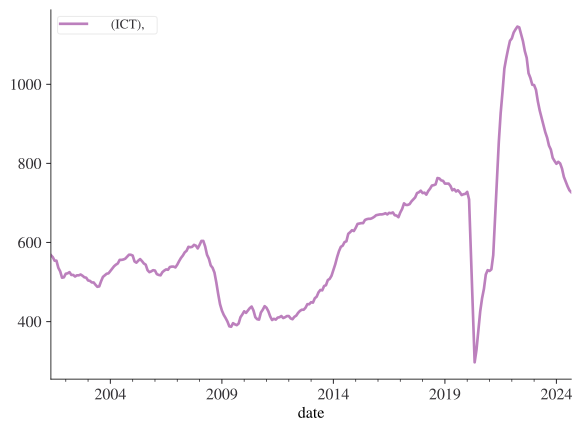
이제 데이터에 datetime 인덱스가 있으므로, 몇 가지 일반적인 시계열 연산이 매우 쉬워집니다.
주어진 시계열의 빈도를 바꾸고 싶은 상황이 상당히 자주 발생합니다. 시간 인덱스 기반의 데이터 프레임은 resample() 함수를 통해 이를 쉽게 만들어 줍니다. resample()에는 평균이나 중앙값 등을 통해 데이터를 어떻게 리샘플링하고 싶은지 알려주어야 합니다. 다음은 월간 데이터를 연간 데이터로 리샘플링하고 평균을 구하는 예제입니다:
df.resample("A").mean()/tmp/ipykernel_5908/311401334.py:1: FutureWarning: 'A' is deprecated and will be removed in a future version, please use 'YE' instead.
df.resample("A").mean()| 구인수 (ICT), 천명 | |
|---|---|
| date | |
| 2001-12-31 | 540.625000 |
| 2002-12-31 | 517.500000 |
| 2003-12-31 | 504.166667 |
| 2004-12-31 | 551.916667 |
| 2005-12-31 | 544.666667 |
| 2006-12-31 | 529.500000 |
| 2007-12-31 | 576.333333 |
| 2008-12-31 | 544.583333 |
| 2009-12-31 | 402.750000 |
| 2010-12-31 | 424.166667 |
| 2011-12-31 | 413.250000 |
| 2012-12-31 | 423.916667 |
| 2013-12-31 | 480.250000 |
| 2014-12-31 | 592.416667 |
| 2015-12-31 | 655.166667 |
| 2016-12-31 | 671.250000 |
| 2017-12-31 | 704.750000 |
| 2018-12-31 | 742.666667 |
| 2019-12-31 | 734.166667 |
| 2020-12-31 | 487.500000 |
| 2021-12-31 | 843.416667 |
| 2022-12-31 | 1092.083333 |
| 2023-12-31 | 894.500000 |
| 2024-12-31 | 767.888889 |
리샘플링은 집계의 특별한 유형일 뿐이므로, 내장 함수나 사용자 정의 함수를 포함하여 일반적인 집계 함수들이 모두 작동합니다.
df.resample("5YE").agg(["mean", "std"]).head()| 구인수 (ICT), 천명 | ||
|---|---|---|
| mean | std | |
| date | ||
| 2001-12-31 | 540.625000 | 22.398581 |
| 2006-12-31 | 529.550000 | 20.434621 |
| 2011-12-31 | 472.216667 | 77.919796 |
| 2016-12-31 | 564.600000 | 99.829210 |
| 2021-12-31 | 702.500000 | 164.019480 |
리샘플링은 빈도를 높이는 것(업샘플링)뿐만 아니라 낮추는 것도 가능하지만, 더 이상 집계 함수를 선택할 필요는 없습니다. 대신 원래 데이터에는 없었던 빈도들에 대해 공백을 어떻게 채울지 선택해야 합니다. 아래 예제에서는 단순히 NaN으로 남겨둡니다.
df.resample("D").asfreq()| 구인수 (ICT), 천명 | |
|---|---|
| date | |
| 2001-05-31 | 568.0 |
| 2001-06-01 | NaN |
| 2001-06-02 | NaN |
| 2001-06-03 | NaN |
| 2001-06-04 | NaN |
| ... | ... |
| 2024-09-26 | NaN |
| 2024-09-27 | NaN |
| 2024-09-28 | NaN |
| 2024-09-29 | NaN |
| 2024-09-30 | 727.0 |
8524 rows × 1 columns
누락된 시계열 데이터를 채우는 옵션으로는 각각 다음 또는 이전 사용 가능한 값을 기준으로 공백을 채우는 bfill 또는 ffill, 혹은 interpolate()가 있습니다( limit 키워드 인수를 사용하여 처음 3개의 NaN만 교체되는 방식에 유의하세요):
df.resample("D").interpolate(method="linear", limit_direction="forward", limit=3)[:6]| 구인수 (ICT), 천명 | |
|---|---|
| date | |
| 2001-05-31 | 568.000000 |
| 2001-06-01 | 567.833333 |
| 2001-06-02 | 567.666667 |
| 2001-06-03 | 567.500000 |
| 2001-06-04 | NaN |
| 2001-06-05 | NaN |
Jake Vanderplas의 차트를 따라 만든 이 주식 시장 데이터에서 채우기 방식 간의 차이를 더 명확하게 볼 수 있습니다.
# 주식 시장 데이터 가져오기
import pandas_datareader as web

xf = web.DataReader("AAPL", "stooq", start="2017-01-01", end="2019-06-01")
xf = xf.sort_index()plt.rcParams["axes.prop_cycle"]| 'color' |
|---|
| '#bc80bd' |
| '#fb8072' |
| '#b3de69' |
| '#fdb462' |
| '#fccde5' |
| '#8dd3c7' |
| '#ffed6f' |
| '#bebada' |
| '#80b1d3' |
| '#ccebc5' |
| '#d9d9d9' |
from itertools import cycle

fig, ax = plt.subplots()
data = xf.iloc[:10, 3]
colour_wheel = cycle(plt.rcParams["axes.prop_cycle"])

data.asfreq("D").plot(ax=ax, marker="o", linestyle="None", zorder=3)
data.asfreq("D", method="bfill").plot(
    ax=ax, style="-.o", lw=1, color=next(colour_wheel)["color"]
)
data.asfreq("D", method="ffill").plot(
    ax=ax, style="--o", lw=1, color=next(colour_wheel)["color"]
)
ax.set_ylabel("종가 ($)")
ax.legend(["원본", "후방 채우기 (back-fill)", "전방 채우기 (forward-fill)"]);
/home/runner/work/python4DS/python4DS/.pixi/envs/default/lib/python3.10/site-packages/IPython/core/events.py:82: UserWarning: Glyph 51333 (\N{HANGUL SYLLABLE JONG}) missing from font(s) STIXGeneral.
func(*args, **kwargs)
/home/runner/work/python4DS/python4DS/.pixi/envs/default/lib/python3.10/site-packages/IPython/core/events.py:82: UserWarning: Glyph 44032 (\N{HANGUL SYLLABLE GA}) missing from font(s) STIXGeneral.
func(*args, **kwargs)
/home/runner/work/python4DS/python4DS/.pixi/envs/default/lib/python3.10/site-packages/IPython/core/events.py:82: UserWarning: Glyph 50896 (\N{HANGUL SYLLABLE WEON}) missing from font(s) STIXGeneral.
func(*args, **kwargs)
/home/runner/work/python4DS/python4DS/.pixi/envs/default/lib/python3.10/site-packages/IPython/core/events.py:82: UserWarning: Glyph 48376 (\N{HANGUL SYLLABLE BON}) missing from font(s) STIXGeneral.
func(*args, **kwargs)
/home/runner/work/python4DS/python4DS/.pixi/envs/default/lib/python3.10/site-packages/IPython/core/events.py:82: UserWarning: Glyph 54980 (\N{HANGUL SYLLABLE HU}) missing from font(s) STIXGeneral.
func(*args, **kwargs)
/home/runner/work/python4DS/python4DS/.pixi/envs/default/lib/python3.10/site-packages/IPython/core/events.py:82: UserWarning: Glyph 48169 (\N{HANGUL SYLLABLE BANG}) missing from font(s) STIXGeneral.
func(*args, **kwargs)
/home/runner/work/python4DS/python4DS/.pixi/envs/default/lib/python3.10/site-packages/IPython/core/events.py:82: UserWarning: Glyph 52292 (\N{HANGUL SYLLABLE CAE}) missing from font(s) STIXGeneral.
func(*args, **kwargs)
/home/runner/work/python4DS/python4DS/.pixi/envs/default/lib/python3.10/site-packages/IPython/core/events.py:82: UserWarning: Glyph 50864 (\N{HANGUL SYLLABLE U}) missing from font(s) STIXGeneral.
func(*args, **kwargs)
/home/runner/work/python4DS/python4DS/.pixi/envs/default/lib/python3.10/site-packages/IPython/core/events.py:82: UserWarning: Glyph 44592 (\N{HANGUL SYLLABLE GI}) missing from font(s) STIXGeneral.
func(*args, **kwargs)
/home/runner/work/python4DS/python4DS/.pixi/envs/default/lib/python3.10/site-packages/IPython/core/events.py:82: UserWarning: Glyph 51204 (\N{HANGUL SYLLABLE JEON}) missing from font(s) STIXGeneral.
func(*args, **kwargs)
/home/runner/work/python4DS/python4DS/.pixi/envs/default/lib/python3.10/site-packages/IPython/core/pylabtools.py:170: UserWarning: Glyph 51333 (\N{HANGUL SYLLABLE JONG}) missing from font(s) STIXGeneral.
fig.canvas.print_figure(bytes_io, **kw)
/home/runner/work/python4DS/python4DS/.pixi/envs/default/lib/python3.10/site-packages/IPython/core/pylabtools.py:170: UserWarning: Glyph 44032 (\N{HANGUL SYLLABLE GA}) missing from font(s) STIXGeneral.
fig.canvas.print_figure(bytes_io, **kw)
/home/runner/work/python4DS/python4DS/.pixi/envs/default/lib/python3.10/site-packages/IPython/core/pylabtools.py:170: UserWarning: Glyph 50896 (\N{HANGUL SYLLABLE WEON}) missing from font(s) STIXGeneral.
fig.canvas.print_figure(bytes_io, **kw)
/home/runner/work/python4DS/python4DS/.pixi/envs/default/lib/python3.10/site-packages/IPython/core/pylabtools.py:170: UserWarning: Glyph 48376 (\N{HANGUL SYLLABLE BON}) missing from font(s) STIXGeneral.
fig.canvas.print_figure(bytes_io, **kw)
/home/runner/work/python4DS/python4DS/.pixi/envs/default/lib/python3.10/site-packages/IPython/core/pylabtools.py:170: UserWarning: Glyph 54980 (\N{HANGUL SYLLABLE HU}) missing from font(s) STIXGeneral.
fig.canvas.print_figure(bytes_io, **kw)
/home/runner/work/python4DS/python4DS/.pixi/envs/default/lib/python3.10/site-packages/IPython/core/pylabtools.py:170: UserWarning: Glyph 48169 (\N{HANGUL SYLLABLE BANG}) missing from font(s) STIXGeneral.
fig.canvas.print_figure(bytes_io, **kw)
/home/runner/work/python4DS/python4DS/.pixi/envs/default/lib/python3.10/site-packages/IPython/core/pylabtools.py:170: UserWarning: Glyph 52292 (\N{HANGUL SYLLABLE CAE}) missing from font(s) STIXGeneral.
fig.canvas.print_figure(bytes_io, **kw)
/home/runner/work/python4DS/python4DS/.pixi/envs/default/lib/python3.10/site-packages/IPython/core/pylabtools.py:170: UserWarning: Glyph 50864 (\N{HANGUL SYLLABLE U}) missing from font(s) STIXGeneral.
fig.canvas.print_figure(bytes_io, **kw)
/home/runner/work/python4DS/python4DS/.pixi/envs/default/lib/python3.10/site-packages/IPython/core/pylabtools.py:170: UserWarning: Glyph 44592 (\N{HANGUL SYLLABLE GI}) missing from font(s) STIXGeneral.
fig.canvas.print_figure(bytes_io, **kw)
/home/runner/work/python4DS/python4DS/.pixi/envs/default/lib/python3.10/site-packages/IPython/core/pylabtools.py:170: UserWarning: Glyph 51204 (\N{HANGUL SYLLABLE JEON}) missing from font(s) STIXGeneral.
fig.canvas.print_figure(bytes_io, **kw)
/home/runner/work/python4DS/python4DS/.pixi/envs/default/lib/python3.10/site-packages/IPython/core/pylabtools.py:170: UserWarning: Glyph 51333 (\N{HANGUL SYLLABLE JONG}) missing from font(s) STIXGeneral.
fig.canvas.print_figure(bytes_io, **kw)
/home/runner/work/python4DS/python4DS/.pixi/envs/default/lib/python3.10/site-packages/IPython/core/pylabtools.py:170: UserWarning: Glyph 44032 (\N{HANGUL SYLLABLE GA}) missing from font(s) STIXGeneral.
fig.canvas.print_figure(bytes_io, **kw)
/home/runner/work/python4DS/python4DS/.pixi/envs/default/lib/python3.10/site-packages/IPython/core/pylabtools.py:170: UserWarning: Glyph 50896 (\N{HANGUL SYLLABLE WEON}) missing from font(s) STIXGeneral.
fig.canvas.print_figure(bytes_io, **kw)
/home/runner/work/python4DS/python4DS/.pixi/envs/default/lib/python3.10/site-packages/IPython/core/pylabtools.py:170: UserWarning: Glyph 48376 (\N{HANGUL SYLLABLE BON}) missing from font(s) STIXGeneral.
fig.canvas.print_figure(bytes_io, **kw)
/home/runner/work/python4DS/python4DS/.pixi/envs/default/lib/python3.10/site-packages/IPython/core/pylabtools.py:170: UserWarning: Glyph 54980 (\N{HANGUL SYLLABLE HU}) missing from font(s) STIXGeneral.
fig.canvas.print_figure(bytes_io, **kw)
/home/runner/work/python4DS/python4DS/.pixi/envs/default/lib/python3.10/site-packages/IPython/core/pylabtools.py:170: UserWarning: Glyph 48169 (\N{HANGUL SYLLABLE BANG}) missing from font(s) STIXGeneral.
fig.canvas.print_figure(bytes_io, **kw)
/home/runner/work/python4DS/python4DS/.pixi/envs/default/lib/python3.10/site-packages/IPython/core/pylabtools.py:170: UserWarning: Glyph 52292 (\N{HANGUL SYLLABLE CAE}) missing from font(s) STIXGeneral.
fig.canvas.print_figure(bytes_io, **kw)
/home/runner/work/python4DS/python4DS/.pixi/envs/default/lib/python3.10/site-packages/IPython/core/pylabtools.py:170: UserWarning: Glyph 50864 (\N{HANGUL SYLLABLE U}) missing from font(s) STIXGeneral.
fig.canvas.print_figure(bytes_io, **kw)
/home/runner/work/python4DS/python4DS/.pixi/envs/default/lib/python3.10/site-packages/IPython/core/pylabtools.py:170: UserWarning: Glyph 44592 (\N{HANGUL SYLLABLE GI}) missing from font(s) STIXGeneral.
fig.canvas.print_figure(bytes_io, **kw)
/home/runner/work/python4DS/python4DS/.pixi/envs/default/lib/python3.10/site-packages/IPython/core/pylabtools.py:170: UserWarning: Glyph 51204 (\N{HANGUL SYLLABLE JEON}) missing from font(s) STIXGeneral.
fig.canvas.print_figure(bytes_io, **kw)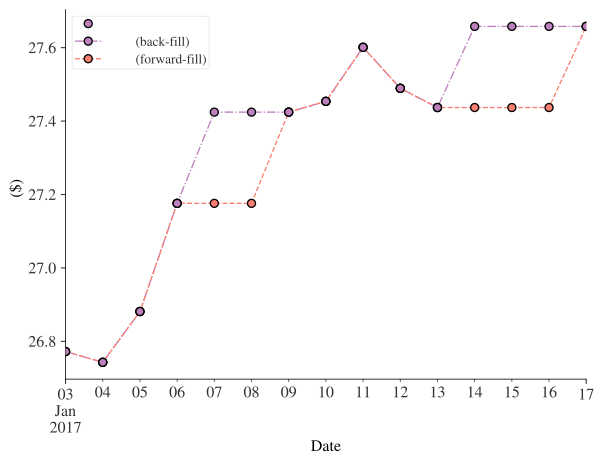
The rolling() 및 ewm() 메서드는 둘 다 이동 창 함수입니다. 첫 번째는 다음 시퀀스의 함수들을 포함합니다
\[ y_t = f(\{x_{t-i} \}_{i=0}^{i=R-1}) \]
여기서 \(R\)은 이동 창에 사용할 기간 수입니다. 예를 들어 함수가 평균이라면 \(f\)는 \(\frac{1}{R}\displaystyle\sum_{i=0}^{i=R-1} x_{t-i}\) 형태를 취합니다.
아래 예제는 2개 기간 이동 평균입니다:
df.rolling(2).mean()| 구인수 (ICT), 천명 | |
|---|---|
| date | |
| 2001-05-31 | NaN |
| 2001-06-30 | 565.5 |
| 2001-07-31 | 558.5 |
| 2001-08-31 | 554.0 |
| 2001-09-30 | 545.0 |
| ... | ... |
| 2024-05-31 | 776.5 |
| 2024-06-30 | 760.0 |
| 2024-07-31 | 748.0 |
| 2024-08-31 | 737.0 |
| 2024-09-30 | 729.5 |
281 rows × 1 columns
ewm()은 데이터 포인트 \(x_{t-i}\)가 가중치 \(w_i = (1-\alpha)^i\)를 가지는 함수 클래스를 포함합니다. \(0 < \alpha < 1\)이므로, 시간적으로 더 먼 과거의 포인트들에 더 적은 가중치가 부여됩니다. 예를 들어 지수 이동 평균은 다음과 같이 주어집니다
\[ y_t = \frac{x_t + (1 - \alpha)x_{t-1} + (1 - \alpha)^2 x_{t-2} + ... + (1 - \alpha)^t x_{0}}{1 + (1 - \alpha) + (1 - \alpha)^2 + ... + (1 - \alpha)^t} \]
아래 예제는 지수 가중 이동 평균 코드를 보여줍니다:
df.ewm(alpha=0.2).mean()| 구인수 (ICT), 천명 | |
|---|---|
| date | |
| 2001-05-31 | 568.000000 |
| 2001-06-30 | 565.222222 |
| 2001-07-31 | 560.622951 |
| 2001-08-31 | 558.379404 |
| 2001-09-30 | 551.722037 |
| ... | ... |
| 2024-05-31 | 813.183347 |
| 2024-06-30 | 801.346677 |
| 2024-07-31 | 789.477342 |
| 2024-08-31 | 777.981873 |
| 2024-09-30 | 767.785499 |
281 rows × 1 columns
주식 시장 데이터에서 이러한 메서드들을 함께 살펴보겠습니다.
fig, ax = plt.subplots()
roll_num = 28
alpha = 0.03
xf["Close"].plot(label="Raw", alpha=0.5)
xf["Close"].expanding().mean().plot(label="누적 평균 (Expanding Average)", style=":")
xf["Close"].ewm(alpha=alpha).mean().plot(
    label=f"EWMA ($\\alpha=${alpha:.2f})", style="--"
)
xf["Close"].rolling(roll_num).mean().plot(label=f"{roll_num}일 이동평균", style="-.")
ax.legend()
ax.set_ylabel("종가 ($)");
/home/runner/work/python4DS/python4DS/.pixi/envs/default/lib/python3.10/site-packages/IPython/core/events.py:82: UserWarning: Glyph 51333 (\N{HANGUL SYLLABLE JONG}) missing from font(s) STIXGeneral.
func(*args, **kwargs)
/home/runner/work/python4DS/python4DS/.pixi/envs/default/lib/python3.10/site-packages/IPython/core/events.py:82: UserWarning: Glyph 44032 (\N{HANGUL SYLLABLE GA}) missing from font(s) STIXGeneral.
func(*args, **kwargs)
/home/runner/work/python4DS/python4DS/.pixi/envs/default/lib/python3.10/site-packages/IPython/core/events.py:82: UserWarning: Glyph 45572 (\N{HANGUL SYLLABLE NU}) missing from font(s) STIXGeneral.
func(*args, **kwargs)
/home/runner/work/python4DS/python4DS/.pixi/envs/default/lib/python3.10/site-packages/IPython/core/events.py:82: UserWarning: Glyph 51201 (\N{HANGUL SYLLABLE JEOG}) missing from font(s) STIXGeneral.
func(*args, **kwargs)
/home/runner/work/python4DS/python4DS/.pixi/envs/default/lib/python3.10/site-packages/IPython/core/events.py:82: UserWarning: Glyph 54217 (\N{HANGUL SYLLABLE PYEONG}) missing from font(s) STIXGeneral.
func(*args, **kwargs)
/home/runner/work/python4DS/python4DS/.pixi/envs/default/lib/python3.10/site-packages/IPython/core/events.py:82: UserWarning: Glyph 44512 (\N{HANGUL SYLLABLE GYUN}) missing from font(s) STIXGeneral.
func(*args, **kwargs)
/home/runner/work/python4DS/python4DS/.pixi/envs/default/lib/python3.10/site-packages/IPython/core/events.py:82: UserWarning: Glyph 51068 (\N{HANGUL SYLLABLE IL}) missing from font(s) STIXGeneral.
func(*args, **kwargs)
/home/runner/work/python4DS/python4DS/.pixi/envs/default/lib/python3.10/site-packages/IPython/core/events.py:82: UserWarning: Glyph 51060 (\N{HANGUL SYLLABLE I}) missing from font(s) STIXGeneral.
func(*args, **kwargs)
/home/runner/work/python4DS/python4DS/.pixi/envs/default/lib/python3.10/site-packages/IPython/core/events.py:82: UserWarning: Glyph 46041 (\N{HANGUL SYLLABLE DONG}) missing from font(s) STIXGeneral.
func(*args, **kwargs)
/home/runner/work/python4DS/python4DS/.pixi/envs/default/lib/python3.10/site-packages/IPython/core/pylabtools.py:170: UserWarning: Glyph 51333 (\N{HANGUL SYLLABLE JONG}) missing from font(s) STIXGeneral.
fig.canvas.print_figure(bytes_io, **kw)
/home/runner/work/python4DS/python4DS/.pixi/envs/default/lib/python3.10/site-packages/IPython/core/pylabtools.py:170: UserWarning: Glyph 44032 (\N{HANGUL SYLLABLE GA}) missing from font(s) STIXGeneral.
fig.canvas.print_figure(bytes_io, **kw)
/home/runner/work/python4DS/python4DS/.pixi/envs/default/lib/python3.10/site-packages/IPython/core/pylabtools.py:170: UserWarning: Glyph 45572 (\N{HANGUL SYLLABLE NU}) missing from font(s) STIXGeneral.
fig.canvas.print_figure(bytes_io, **kw)
/home/runner/work/python4DS/python4DS/.pixi/envs/default/lib/python3.10/site-packages/IPython/core/pylabtools.py:170: UserWarning: Glyph 51201 (\N{HANGUL SYLLABLE JEOG}) missing from font(s) STIXGeneral.
fig.canvas.print_figure(bytes_io, **kw)
/home/runner/work/python4DS/python4DS/.pixi/envs/default/lib/python3.10/site-packages/IPython/core/pylabtools.py:170: UserWarning: Glyph 54217 (\N{HANGUL SYLLABLE PYEONG}) missing from font(s) STIXGeneral.
fig.canvas.print_figure(bytes_io, **kw)
/home/runner/work/python4DS/python4DS/.pixi/envs/default/lib/python3.10/site-packages/IPython/core/pylabtools.py:170: UserWarning: Glyph 44512 (\N{HANGUL SYLLABLE GYUN}) missing from font(s) STIXGeneral.
fig.canvas.print_figure(bytes_io, **kw)
/home/runner/work/python4DS/python4DS/.pixi/envs/default/lib/python3.10/site-packages/IPython/core/pylabtools.py:170: UserWarning: Glyph 51068 (\N{HANGUL SYLLABLE IL}) missing from font(s) STIXGeneral.
fig.canvas.print_figure(bytes_io, **kw)
/home/runner/work/python4DS/python4DS/.pixi/envs/default/lib/python3.10/site-packages/IPython/core/pylabtools.py:170: UserWarning: Glyph 51060 (\N{HANGUL SYLLABLE I}) missing from font(s) STIXGeneral.
fig.canvas.print_figure(bytes_io, **kw)
/home/runner/work/python4DS/python4DS/.pixi/envs/default/lib/python3.10/site-packages/IPython/core/pylabtools.py:170: UserWarning: Glyph 46041 (\N{HANGUL SYLLABLE DONG}) missing from font(s) STIXGeneral.
fig.canvas.print_figure(bytes_io, **kw)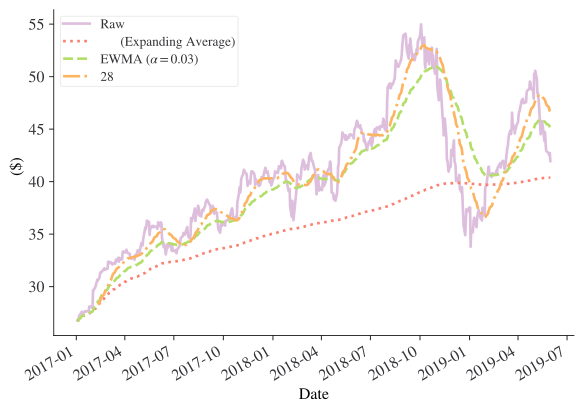
주식 분석을 위한 더 많은 도구는 Pandas TA 패키지를 참고하세요.
또한 rolling()을 둘 이상의 집계 유형을 만드는 중간 단계로 사용할 수도 있습니다:
roll = xf["Close"].rolling(50, center=True)

fig, ax = plt.subplots()
m = roll.agg(["mean", "std"])
m["mean"].plot(ax=ax)
ax.fill_between(m.index, m["mean"] - m["std"], m["mean"] + m["std"], alpha=0.2)
ax.set_ylabel("종가 ($)");
/home/runner/work/python4DS/python4DS/.pixi/envs/default/lib/python3.10/site-packages/IPython/core/events.py:82: UserWarning: Glyph 51333 (\N{HANGUL SYLLABLE JONG}) missing from font(s) STIXGeneral.
func(*args, **kwargs)
/home/runner/work/python4DS/python4DS/.pixi/envs/default/lib/python3.10/site-packages/IPython/core/events.py:82: UserWarning: Glyph 44032 (\N{HANGUL SYLLABLE GA}) missing from font(s) STIXGeneral.
func(*args, **kwargs)
/home/runner/work/python4DS/python4DS/.pixi/envs/default/lib/python3.10/site-packages/IPython/core/pylabtools.py:170: UserWarning: Glyph 51333 (\N{HANGUL SYLLABLE JONG}) missing from font(s) STIXGeneral.
fig.canvas.print_figure(bytes_io, **kw)
/home/runner/work/python4DS/python4DS/.pixi/envs/default/lib/python3.10/site-packages/IPython/core/pylabtools.py:170: UserWarning: Glyph 44032 (\N{HANGUL SYLLABLE GA}) missing from font(s) STIXGeneral.
fig.canvas.print_figure(bytes_io, **kw)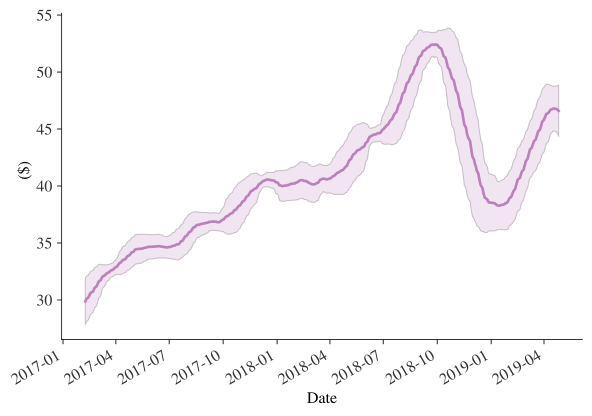
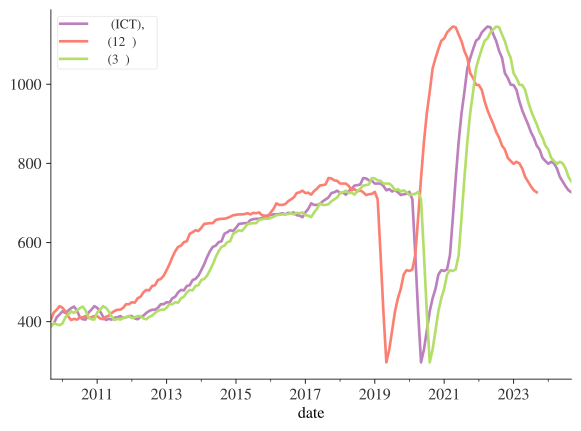
시프팅은 시리즈를 시간상으로 이동시킬 수 있습니다. 시계열의 리드(leads)와 래그(lags)를 만드는 데 필요한 기능입니다. 데이터에서 리드와 래그를 만들어 보겠습니다. 리드는 데이터의 패턴을 왼쪽으로(즉, 시간상 더 이르게) 이동시키고, 래그는 패턴을 시간상 나중으로(즉, 오른쪽으로) 이동시킨다는 점을 기억하세요.
lead = 12
lag = 3
orig_series_name = df.columns[0]
df[f"리드 ({lead}개월)"] = df[orig_series_name].shift(-lead)
df[f"래그 ({lag}개월)"] = df[orig_series_name].shift(lag)
df.head()| 구인수 (ICT), 천명 | 리드 (12개월) | 래그 (3개월) | |
|---|---|---|---|
| date | |||
| 2001-05-31 | 568 | 518.0 | NaN |
| 2001-06-30 | 563 | 514.0 | NaN |
| 2001-07-31 | 554 | 517.0 | NaN |
| 2001-08-31 | 554 | 517.0 | 568.0 |
| 2001-09-30 | 536 | 519.0 | 563.0 |
df.iloc[100:300, :].plot();/home/runner/work/python4DS/python4DS/.pixi/envs/default/lib/python3.10/site-packages/IPython/core/events.py:82: UserWarning: Glyph 44396 (\N{HANGUL SYLLABLE GU}) missing from font(s) STIXGeneral.
func(*args, **kwargs)
/home/runner/work/python4DS/python4DS/.pixi/envs/default/lib/python3.10/site-packages/IPython/core/events.py:82: UserWarning: Glyph 51064 (\N{HANGUL SYLLABLE IN}) missing from font(s) STIXGeneral.
func(*args, **kwargs)
/home/runner/work/python4DS/python4DS/.pixi/envs/default/lib/python3.10/site-packages/IPython/core/events.py:82: UserWarning: Glyph 49688 (\N{HANGUL SYLLABLE SU}) missing from font(s) STIXGeneral.
func(*args, **kwargs)
/home/runner/work/python4DS/python4DS/.pixi/envs/default/lib/python3.10/site-packages/IPython/core/events.py:82: UserWarning: Glyph 52380 (\N{HANGUL SYLLABLE CEON}) missing from font(s) STIXGeneral.
func(*args, **kwargs)
/home/runner/work/python4DS/python4DS/.pixi/envs/default/lib/python3.10/site-packages/IPython/core/events.py:82: UserWarning: Glyph 47749 (\N{HANGUL SYLLABLE MYEONG}) missing from font(s) STIXGeneral.
func(*args, **kwargs)
/home/runner/work/python4DS/python4DS/.pixi/envs/default/lib/python3.10/site-packages/IPython/core/events.py:82: UserWarning: Glyph 47532 (\N{HANGUL SYLLABLE RI}) missing from font(s) STIXGeneral.
func(*args, **kwargs)
/home/runner/work/python4DS/python4DS/.pixi/envs/default/lib/python3.10/site-packages/IPython/core/events.py:82: UserWarning: Glyph 46300 (\N{HANGUL SYLLABLE DEU}) missing from font(s) STIXGeneral.
func(*args, **kwargs)
/home/runner/work/python4DS/python4DS/.pixi/envs/default/lib/python3.10/site-packages/IPython/core/events.py:82: UserWarning: Glyph 44060 (\N{HANGUL SYLLABLE GAE}) missing from font(s) STIXGeneral.
func(*args, **kwargs)
/home/runner/work/python4DS/python4DS/.pixi/envs/default/lib/python3.10/site-packages/IPython/core/events.py:82: UserWarning: Glyph 50900 (\N{HANGUL SYLLABLE WEOL}) missing from font(s) STIXGeneral.
func(*args, **kwargs)
/home/runner/work/python4DS/python4DS/.pixi/envs/default/lib/python3.10/site-packages/IPython/core/events.py:82: UserWarning: Glyph 47000 (\N{HANGUL SYLLABLE RAE}) missing from font(s) STIXGeneral.
func(*args, **kwargs)
/home/runner/work/python4DS/python4DS/.pixi/envs/default/lib/python3.10/site-packages/IPython/core/events.py:82: UserWarning: Glyph 44536 (\N{HANGUL SYLLABLE GEU}) missing from font(s) STIXGeneral.
func(*args, **kwargs)
/home/runner/work/python4DS/python4DS/.pixi/envs/default/lib/python3.10/site-packages/IPython/core/pylabtools.py:170: UserWarning: Glyph 44396 (\N{HANGUL SYLLABLE GU}) missing from font(s) STIXGeneral.
fig.canvas.print_figure(bytes_io, **kw)
/home/runner/work/python4DS/python4DS/.pixi/envs/default/lib/python3.10/site-packages/IPython/core/pylabtools.py:170: UserWarning: Glyph 51064 (\N{HANGUL SYLLABLE IN}) missing from font(s) STIXGeneral.
fig.canvas.print_figure(bytes_io, **kw)
/home/runner/work/python4DS/python4DS/.pixi/envs/default/lib/python3.10/site-packages/IPython/core/pylabtools.py:170: UserWarning: Glyph 49688 (\N{HANGUL SYLLABLE SU}) missing from font(s) STIXGeneral.
fig.canvas.print_figure(bytes_io, **kw)
/home/runner/work/python4DS/python4DS/.pixi/envs/default/lib/python3.10/site-packages/IPython/core/pylabtools.py:170: UserWarning: Glyph 52380 (\N{HANGUL SYLLABLE CEON}) missing from font(s) STIXGeneral.
fig.canvas.print_figure(bytes_io, **kw)
/home/runner/work/python4DS/python4DS/.pixi/envs/default/lib/python3.10/site-packages/IPython/core/pylabtools.py:170: UserWarning: Glyph 47749 (\N{HANGUL SYLLABLE MYEONG}) missing from font(s) STIXGeneral.
fig.canvas.print_figure(bytes_io, **kw)
/home/runner/work/python4DS/python4DS/.pixi/envs/default/lib/python3.10/site-packages/IPython/core/pylabtools.py:170: UserWarning: Glyph 47532 (\N{HANGUL SYLLABLE RI}) missing from font(s) STIXGeneral.
fig.canvas.print_figure(bytes_io, **kw)
/home/runner/work/python4DS/python4DS/.pixi/envs/default/lib/python3.10/site-packages/IPython/core/pylabtools.py:170: UserWarning: Glyph 46300 (\N{HANGUL SYLLABLE DEU}) missing from font(s) STIXGeneral.
fig.canvas.print_figure(bytes_io, **kw)
/home/runner/work/python4DS/python4DS/.pixi/envs/default/lib/python3.10/site-packages/IPython/core/pylabtools.py:170: UserWarning: Glyph 44060 (\N{HANGUL SYLLABLE GAE}) missing from font(s) STIXGeneral.
fig.canvas.print_figure(bytes_io, **kw)
/home/runner/work/python4DS/python4DS/.pixi/envs/default/lib/python3.10/site-packages/IPython/core/pylabtools.py:170: UserWarning: Glyph 50900 (\N{HANGUL SYLLABLE WEOL}) missing from font(s) STIXGeneral.
fig.canvas.print_figure(bytes_io, **kw)
/home/runner/work/python4DS/python4DS/.pixi/envs/default/lib/python3.10/site-packages/IPython/core/pylabtools.py:170: UserWarning: Glyph 47000 (\N{HANGUL SYLLABLE RAE}) missing from font(s) STIXGeneral.
fig.canvas.print_figure(bytes_io, **kw)
/home/runner/work/python4DS/python4DS/.pixi/envs/default/lib/python3.10/site-packages/IPython/core/pylabtools.py:170: UserWarning: Glyph 44536 (\N{HANGUL SYLLABLE GEU}) missing from font(s) STIXGeneral.
fig.canvas.print_figure(bytes_io, **kw)
/home/runner/work/python4DS/python4DS/.pixi/envs/default/lib/python3.10/site-packages/IPython/core/pylabtools.py:170: UserWarning: Glyph 44396 (\N{HANGUL SYLLABLE GU}) missing from font(s) STIXGeneral.
fig.canvas.print_figure(bytes_io, **kw)
/home/runner/work/python4DS/python4DS/.pixi/envs/default/lib/python3.10/site-packages/IPython/core/pylabtools.py:170: UserWarning: Glyph 51064 (\N{HANGUL SYLLABLE IN}) missing from font(s) STIXGeneral.
fig.canvas.print_figure(bytes_io, **kw)
/home/runner/work/python4DS/python4DS/.pixi/envs/default/lib/python3.10/site-packages/IPython/core/pylabtools.py:170: UserWarning: Glyph 49688 (\N{HANGUL SYLLABLE SU}) missing from font(s) STIXGeneral.
fig.canvas.print_figure(bytes_io, **kw)
/home/runner/work/python4DS/python4DS/.pixi/envs/default/lib/python3.10/site-packages/IPython/core/pylabtools.py:170: UserWarning: Glyph 52380 (\N{HANGUL SYLLABLE CEON}) missing from font(s) STIXGeneral.
fig.canvas.print_figure(bytes_io, **kw)
/home/runner/work/python4DS/python4DS/.pixi/envs/default/lib/python3.10/site-packages/IPython/core/pylabtools.py:170: UserWarning: Glyph 47749 (\N{HANGUL SYLLABLE MYEONG}) missing from font(s) STIXGeneral.
fig.canvas.print_figure(bytes_io, **kw)
/home/runner/work/python4DS/python4DS/.pixi/envs/default/lib/python3.10/site-packages/IPython/core/pylabtools.py:170: UserWarning: Glyph 47532 (\N{HANGUL SYLLABLE RI}) missing from font(s) STIXGeneral.
fig.canvas.print_figure(bytes_io, **kw)
/home/runner/work/python4DS/python4DS/.pixi/envs/default/lib/python3.10/site-packages/IPython/core/pylabtools.py:170: UserWarning: Glyph 46300 (\N{HANGUL SYLLABLE DEU}) missing from font(s) STIXGeneral.
fig.canvas.print_figure(bytes_io, **kw)
/home/runner/work/python4DS/python4DS/.pixi/envs/default/lib/python3.10/site-packages/IPython/core/pylabtools.py:170: UserWarning: Glyph 44060 (\N{HANGUL SYLLABLE GAE}) missing from font(s) STIXGeneral.
fig.canvas.print_figure(bytes_io, **kw)
/home/runner/work/python4DS/python4DS/.pixi/envs/default/lib/python3.10/site-packages/IPython/core/pylabtools.py:170: UserWarning: Glyph 50900 (\N{HANGUL SYLLABLE WEOL}) missing from font(s) STIXGeneral.
fig.canvas.print_figure(bytes_io, **kw)
/home/runner/work/python4DS/python4DS/.pixi/envs/default/lib/python3.10/site-packages/IPython/core/pylabtools.py:170: UserWarning: Glyph 47000 (\N{HANGUL SYLLABLE RAE}) missing from font(s) STIXGeneral.
fig.canvas.print_figure(bytes_io, **kw)
/home/runner/work/python4DS/python4DS/.pixi/envs/default/lib/python3.10/site-packages/IPython/core/pylabtools.py:170: UserWarning: Glyph 44536 (\N{HANGUL SYLLABLE GEU}) missing from font(s) STIXGeneral.
fig.canvas.print_figure(bytes_io, **kw)