// 저자: tinger

#let chapter = figure.with(
  kind: "chapter",
  // 제목과 동일
  numbering: none,
  // 제목처럼 자동으로 번역될 수 없으므로 figure와 다른 방식으로 처리됩니다.
  supplement: "Chapter",
  // 개요(outline)에 포함되기 위해 필요한 빈 캡션
  caption: [],
)

// show 규칙을 만들어 요소 함수처럼 에뮬레이트합니다.
#show figure.where(kind: "chapter"): it => {
  set text(22pt)
  counter(heading).update(0)
  if it.numbering != none { strong(it.counter.display(it.numbering)) } + [ ] + strong(it.body)
}

// outline(indent: it => ...)에서 요소에 접근할 수 없으므로,
// outline 내부가 아닌 여기서 들여쓰기를 처리해야 합니다.
#show outline.entry: it => {
  if it.element.func() == figure {
    // 여기서 장(chapter) 출력을 설정하며, 약간의 수정을 더해 기본 show 구현을 효과적으로 재현합니다.
    let res = link(it.element.location(),
      // 위에서 만든 show 규칙의 일부를 다시 재현해야 합니다.
      if it.element.numbering != none {
        numbering(it.element.numbering, ..it.element.counter.at(it.element.location()))
      } + [ ] + it.element.body
    )

    if it.fill != none {
      res += [ ] + box(width: 1fr, it.fill) + [ ]
    } else {
      res += h(1fr)
    }

    res += link(it.element.location(), it.page())
    strong(res)
  } else {
    // 여기서 들여쓰기를 수행합니다.
    h(1em * it.level) + it
  }
}

// 기본 개요를 위한 새로운 대상 선택자
#let chapters-and-headings = figure.where(kind: "chapter", outlined: true).or(heading.where(outlined: true))

//
// 실제 문서 서문 시작
//

#set heading(numbering: "1.")

// set을 사용할 수 없으므로 기본 인수로 재할당합니다.
#let chapter = chapter.with(numbering: "I")

// 장(chapter)을 위한 "show 규칙" 예시
// .with()를 사용한 후에는 더 이상 요소가 아니므로 chapter를 직접 사용할 수 없습니다.
#show figure.where(kind: "chapter"): set text(red)

//
// 실제 문서 시작
//

// 보시다시피 이것들은 제목(headings)과 같은 요소가 아니어서 설정이 다소 복잡합니다.
// 장이 제목이 아니기 때문에 번호 매기기에 해당 장이 포함되지 않지만,
// 제목에 대한 show 규칙을 사용하면 포함할 수 있습니다.

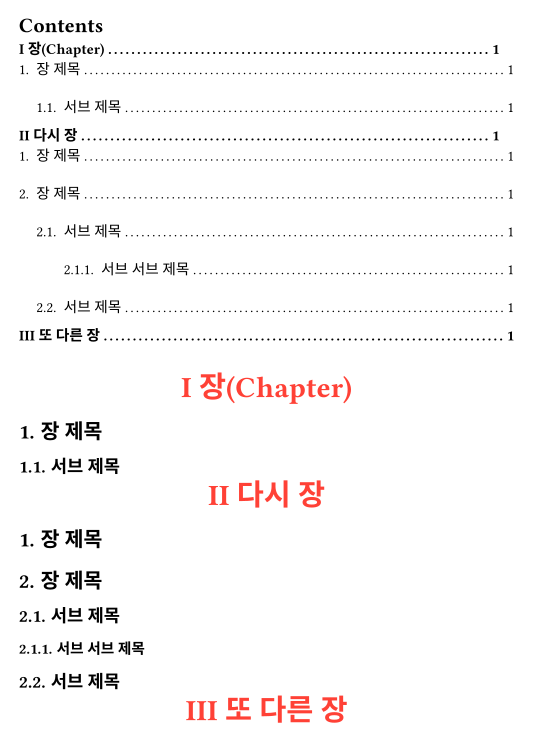
#outline(target: chapters-and-headings)

#chapter[장(Chapter)]
= 장 제목
== 서브 제목

#chapter[다시 장]
= 장 제목
= 장 제목
== 서브 제목
=== 서브 서브 제목
== 서브 제목

#chapter[또 다른 장]