수학 번호 매기기
현재 제목(heading) 기준 번호 매기기
수학 패키지 섹션에서 내장된 번호 매기기 기능도 참조하세요.
/// 원저자: laurmaedje
#set heading(numbering: "1.")

// 각 장(chapter)에서 카운터 초기화
// 표시되는 섹션 번호의 개수를 변경하려면 level을 수정하세요
#show heading.where(level:1): it => {
  counter(math.equation).update(0)
  it
}

#set math.equation(numbering: n => {
  numbering("(1.1)", counter(heading).get().first(), n)
  // 표시되는 섹션 번호의 개수를 변경하려면 다음과 같이 수정하세요:
  /*
  let count = counter(heading).get()
  let h1 = count.first()
  let h2 = count.at(1, default: 0)
  numbering("(1.1.1)", h1, h2, n)
  */
})


= 섹션
== 서브섹션

$ 5 + 3 = 8 $ <a>
$ 5 + 3 = 8 $

= 새로운 섹션
== 서브섹션
$ 5 + 3 = 8 $
== 서브섹션
$ 5 + 3 = 8 $ <b>

@a 와 @b 를 언급합니다.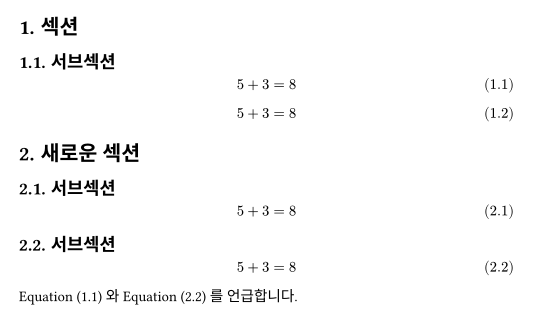
레이블이 있는 수식에만 번호 매기기
간단한 코드
// 저자: shampoohere
#show math.equation:it => {
  if it.fields().keys().contains("label"){
    math.equation(block: true, numbering: "(1)", it)
    // `numbering`에서 원하는 번호 매기기 스타일로
    // 변경하는 것을 잊지 마세요.
    //
    // 이제 #set numbering을 사용할 필요가 없다는 점에 유의하세요.
  } else {
    it
  }
}

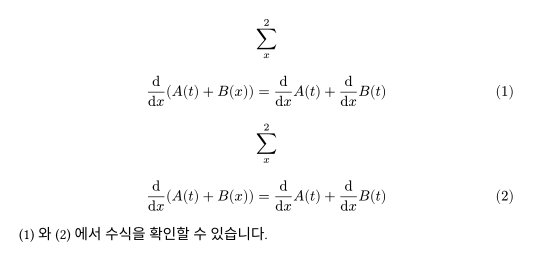
$ sum_x^2 $
$ dif/(dif x)(A(t)+B(x))=dif/(dif x)A(t)+dif/(dif x)B(t) $ <ep-2>
$ sum_x^2 $
$ dif/(dif x)(A(t)+B(x))=dif/(dif x)A(t)+dif/(dif x)B(t) $ <ep-3>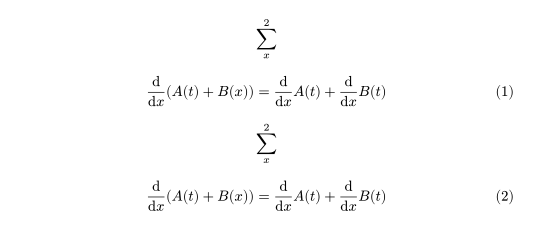
해킹된 참조를 다시 클릭 가능하게 만들기
// 저자: gijsleb
#show math.equation:it => {
  if it.has("label") {
    // `numbering`에서 원하는 번호 매기기 스타일로
    // 변경하는 것을 잊지 마세요.
    math.equation(block: true, numbering: "(1)", it)
  } else {
    it
  }
}

#show ref: it => {
  let el = it.element
  if el != none and el.func() == math.equation {
    link(el.location(), numbering(
      // 실제로 사용 중인 번호 매기기 방식(예: 섹션 번호 포함)에
      // 맞춰 변경하는 것을 잊지 마세요.
      "(1)",
      counter(math.equation).at(el.location()).at(0) + 1
    ))
  } else {
    it
  }
}

$ sum_x^2 $
$ dif/(dif x)(A(t)+B(x))=dif/(dif x)A(t)+dif/(dif x)B(t) $ <ep-2>
$ sum_x^2 $
$ dif/(dif x)(A(t)+B(x))=dif/(dif x)A(t)+dif/(dif x)B(t) $ <ep-3>
@ep-2 와 @ep-3 에서 수식을 확인할 수 있습니다.