배치, 이동, 크기 조절 및 숨기기 (Placing, Moving, Scale & Hide)
레이아웃으로 임의의 작업을 수행하고, 사용자 정의 요소를 만들고, 현재 Typst의 제한 사항을 우회하려는 경우 매우 중요한 섹션입니다.
TODO: 작업 중(WIP), 텍스트 및 더 나은 예제 추가 예정
배치 (Place)
_레이아웃을 무시_하고, 부모 및 현재 위치를 기준으로 특정 개체를 배치합니다. 배치된 개체는 레이아웃에 영향을 주지 않습니다.
참조 링크
#set page(height: 60pt)
안녕, 세상아!

#place(
  top + right, // 페이지 오른쪽 상단에 배치
  square(
    width: 20pt,
    stroke: 2pt + blue
  ),
)
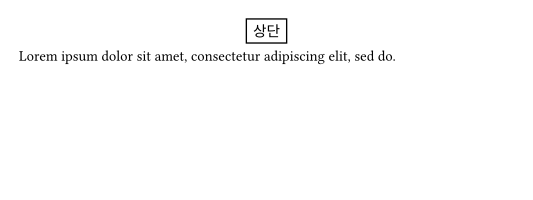
place를 사용한 기본적인 플로팅(floating)
#set page(height: 150pt)
#let note(where, body) = place(
  center + where,
  float: true,
  clearance: 6pt,
  rect(body),
)

#lorem(10)
#note(bottom)[하단 1]
#note(bottom)[하단 2]
#lorem(40)
#note(top)[상단]
#lorem(10)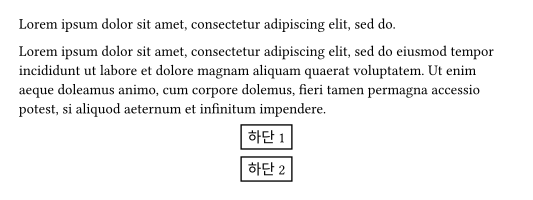
dx, dy
원래 위치를 기준으로 (dx, dy)만큼 수동으로 위치를 변경합니다.
#set page(height: 100pt)
#for i in range(16) {
  let amount = i * 4pt
  place(center, dx: amount - 32pt, dy: amount)[A]
}
이동 (Move)
참조 링크
#rect(inset: 0pt, move(
  dx: 6pt, dy: 6pt,
  rect(
    inset: 8pt,
    fill: white,
    stroke: black,
    [아브라카다브라]
  )
))
크기 조절 (Scale)
레이아웃에 영향을 주지 않고 콘텐츠의 _크기를 조절_합니다.
참조 링크
#scale(x: -100%)[좌우가 반전되었습니다.]
A#box(scale(75%)[A])A \
B#box(scale(75%, origin: bottom + left)[B])B
숨기기 (Hide)
콘텐츠를 보여주지는 않지만, 그 자리에 빈 공간을 남겨둡니다.
참조 링크
안녕 철수 \
#hide[안녕] 영희